Baby Month Photo Editor Frame

Baby Month Photo Editor Frame
Baby monthly photo editor frame baby milestone moments
Screenshots


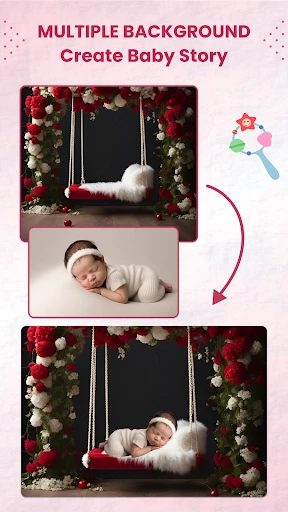
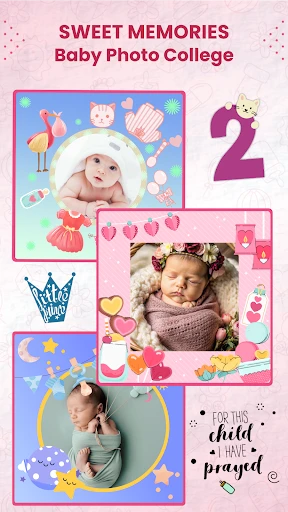

Baby Month Photo Editor Frame: Preserve Every Milestone with Creative Design
Baby Month Photo Editor Frame is a specialized mobile application designed to help parents and caregivers document their baby's growth from the first month onward. It offers an intuitive platform where users can combine their baby's monthly photos with themed frames, stickers, and text overlays. The app simplifies the process of creating a visual growth timeline, eliminating the need for complex photo editing software. By providing pre-designed templates for each month, it ensures consistency and creativity in recording developmental stages. The app is available on both Google Play and the Apple App Store, featuring a user-friendly interface optimized for quick edits and sharing.
Chapter 1: Function
The core functions of Baby Month Photo Editor Frame revolve around template-based editing and customization. Users start by selecting a monthly template, which includes a frame with the month number and decorative elements like stars, animals, or clouds. They can then import a photo from their gallery or take one directly within the app. The editing tools allow for resizing, rotating, and repositioning the image within the frame. Additional features include a library of stickers, text options for adding names or dates, and filters to enhance photo quality. The app also supports batch processing, enabling users to create multiple monthly edits at once. Finally, users can save the completed image to their device or share it directly to social media platforms.
Chapter 2: Value
The value proposition of Baby Month Photo Editor Frame lies in its ability to simplify and enhance the baby growth documentation process. For new parents, capturing monthly changes visually is a cherished activity, but traditional methods often result in inconsistent angles, backgrounds, or missing dates. This app solves that by standardizing the layout, ensuring each monthly photo looks cohesive and professional. Its key advantage is time efficiency: a user can produce a polished monthly card in under two minutes. The app also reduces the learning curve associated with general photo editors by focusing solely on baby milestones, with intuitive drag-and-drop controls. Another critical benefit is memory preservation. By organizing photos month by month within a single frame, parents create a chronological album that becomes a sentimental keepsake. The built-in sharing features also encourage family engagement, allowing relatives to follow the baby's growth in real time. For users who lack design skills, the pre-loaded themes eliminate guesswork, while advanced users can customize colors and fonts for a personal touch. Overall, the app transforms a routine task into a rewarding experience, making it a valuable tool for any parent documenting their child's early years.
Chapter 3: Scenarios
The primary target user groups for Baby Month Photo Editor Frame are new parents, grandparents, and childcare providers. Parents, especially first-time mothers and fathers, use it to create monthly photo cards for their baby's first year, which they often share on social media or print for baby books. Grandparents find it useful for compiling remote updates, as they can receive and compile photos from their children into coordinated frames. Childcare providers, such as nannies or daycare centers, employ the app to create personalized growth records for the families they serve. Everyday use cases include the monthly ritual of taking a photo on the baby's monthly birthday, such as month 1, month 2, and so on, up to month 12. Users typically place the baby in a consistent location, such as a designated chair or blanket, then use the app to add the correct frame. The app is also used for milestone events like a baby's first solid food or first steps, where users can select a specific themed frame to mark the occasion. Additionally, the app supports year-end recap projects, where parents compile all monthly frames into a single collage or video for celebrations.
Advantages
- monthly milestone stickers update automatically
- one-tap sticker placement aligns with baby pose
- supports both front and rear camera editing
- custom text font matches nursery decor
- cloud backup prevents lost milestone edits
Disadvantages
- requires photo import
- no live camera viewfinder
- full access demands monthly subscription
- no multi-baby tracking in single frame
- sticker library updates only quarterly
- edits saved at fixed 4:3 aspect ratio
Frequently Asked Questions
Q: What features does Baby Month Photo Editor Frame offer?
A: Baby Month Photo Editor Frame is a photo editing app designed to document baby growth milestones. It offers monthly-themed frames, stickers, and text overlays to mark months from newborn to 12 months. Core functions include photo cropping, color filters, and background removal tailored for baby photos. No additional editing tools for complex retouching are included.
Q: Is the app free to use with no hidden costs?
A: The app is free to download and provides basic frames and stickers at no cost. Some premium frames, stickers, and ad-free usage require in-app purchases. No subscription is mandatory, and all essential milestone features are accessible without payment. Payment is processed through the app store.
Q: What devices and systems are compatible with the app?
A: The app is compatible with iOS 12.0 or later and Android 5.0 or later. It supports both smartphones and tablets. No additional equipment like external camera or printer is required. Optimal performance is achieved on devices with at least 2GB RAM and a rear camera for capturing photos.
Q: Can I add custom text or stickers to the frames?
A: Yes, users can add custom text with adjustable fonts, colors, and sizes to each frame. Stickers include pre-designed monthly numbers and themed icons like toys or animals. Custom stickers from your device photo library are not supported. All edits are saved as a new image without affecting the original photo.
Q: How do I recover lost edits or save completed photos?
A: The app auto-saves edits in progress only within a session; closing the app may lose unsaved changes. Completed photos are saved directly to your device gallery after export. There is no cloud backup or editing history feature. For data loss, re-edit from the original photo as the app does not store project files.
Technical Information
Recommended for You

MuseScore: sheet music

Offline Maps - Route Planner

Google Classroom

Ovibox - Spirit Box & ITC Tool

Fandango at Home

MANGA Plus by SHUEISHA

بلد - مسیریاب، نقشه - Balad

Buenovela - Webnovel & Stories

MeteoSwiss

GPS Photo: With Location & Map

Smart Data Transfer-File Share

Vacasa - Vacation Rentals

Messages - SMS, Chat Messaging

Azteca Deportes: EN VIVO

All Document Hub

SkyCenter Control

Local Single: Chat & Friends

Good Inside: Parenting

TCL Android TV Remote

ReSound Smart 3D

SmartThings
Live Nation At The Concert

Deep Think - AI Seek Chatbot