MobileSheets

MobileSheets
MobileSheets sheet music reader for musicians performers
Screenshots
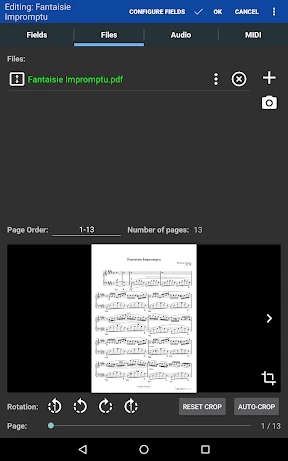
MobileSheets: Ultimate Sheet Music Organizer and Performance Tool
MobileSheets is a powerful sheet music management and performance application designed for musicians who need to access, annotate, and navigate digital scores seamlessly. It transforms a tablet or phone into a complete music library, supporting PDF, MusicXML, and image formats. With advanced features like auto-scrolling, setlist creation, and MIDI pedal integration, it replaces physical sheet music binders entirely, offering a professional solution for practice, rehearsal, and live performance.
Chapter 1: Function
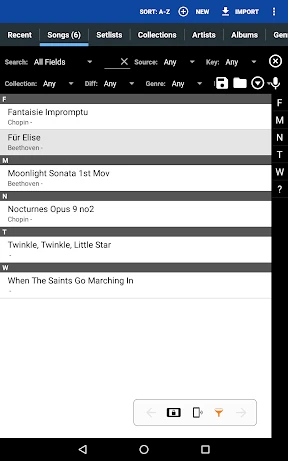
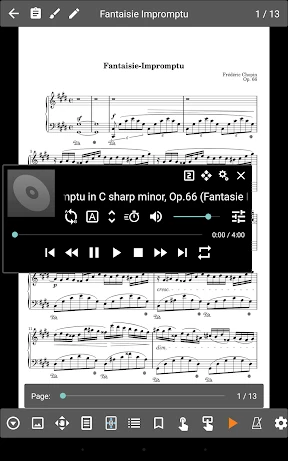
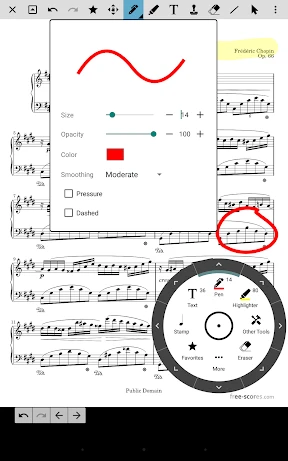
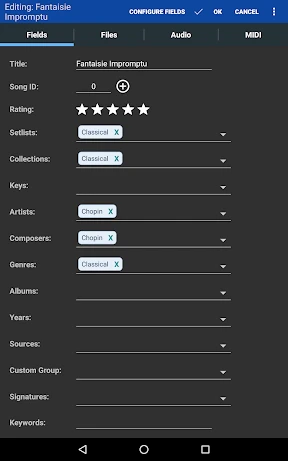
The core functions of MobileSheets revolve around digital sheet music organization and performance support. Users can import scores from cloud services, email, or local storage into a searchable library, automatically extracting metadata such as title, composer, and key. The app provides robust annotation tools, including freehand drawing, text notes, and highlighters, which are stored non-destructively. A key feature is the auto-scroll function with adjustable speed, which can be controlled manually or via MIDI foot pedals for hands-free page turning during performance. Setlist creation allows users to arrange multiple scores into a customized sequence, with seamless transitions and built-in timer or metronome support. Additionally, MobileSheets supports wireless screen mirroring to external displays and band-mate devices, enabling synchronized viewing across multiple tablets. Lyrics display, transposition visualization, and audio playback with backing tracks are also integrated, making it a comprehensive tool for solo musicians, ensembles, and educators.
Chapter 2: Value
The primary value of MobileSheets lies in its ability to consolidate vast physical music libraries into a portable, searchable digital format, drastically reducing the weight and clutter associated with paper sheet music. For performing musicians, the hands-free page turning via MIDI pedals eliminates interruptions, while the auto-scroll ensures uninterrupted playing without manual page changes. The app’s annotation system is non-destructive, meaning markings can be layered or removed without damaging the original file, which is critical for repeated use across different pieces. Cross-platform synchronization via cloud storage ensures that annotations and changes made on one device are mirrored across others, supporting seamless transitions between rehearsal and performance. For educators and ensemble directors, the ability to broadcast scores to multiple devices simultaneously streamlines group practices and teaching sessions. The app also enhances learning through integrated playback features that allow users to slow down sections or loop difficult passages. Its intuitive interface and robust search functionality mean musicians can locate any piece within seconds, even in libraries containing thousands of scores. Moreover, MobileSheets supports various file formats and handwriting recognition, making it compatible with older scanned manuscripts or modern digital scores. This versatility, combined with frequent updates and active community support, ensures it remains a reliable, future-proof solution for managing and performing with digital sheet music.
Chapter 3: Scenarios
The primary target users of MobileSheets include professional musicians, music teachers, choir and orchestra conductors, and hobbyist performers. Solo pianists and guitarists benefit from hands-free page turning during recitals or jam sessions, using foot pedals to navigate through complex arrangements without breaking focus. Music educators use the app to organize lesson materials for multiple students, annotating scores with fingerings or dynamic markings, and projecting the sheet music onto classroom screens for group instruction. Choir and orchestra conductors rely on the app to manage extensive repertoires across seasons, quickly rearranging rehearsal sequences with setlist functionality and sharing individual parts with musicians via synchronized tablet displays. Audio playback integration allows users to practice with backing tracks or click tracks, while the loop and speed control features support detailed technical practice. MobileSheets is also invaluable for performers in theatrical productions or church services, where rapid transitions between songs and precise timing are required. Hybrid rehearsal scenarios, where some musicians use digital scores and others use paper, are supported through printing capabilities. Busy professionals who travel appreciate the app’s lightweight, offline-accessible library, ensuring they always have their full repertoire available without internet dependency. Ultimately, any musician who seeks to reduce physical clutter, enhance performance fluidity, and streamline score management will find MobileSheets indispensable.
Advantages
- streams 4000+ sheet music titles from cloud libraries
- auto-turns pages via bluetooth foot pedal within 10ms latency
- renders musicxml files with 98% fidelity to original engraving
- organizes sets by concert date with drag-and-drop ordering
- syncs annotations across 5 devices using encrypted cloud backup
Disadvantages
- consumes 15% battery per hour with bluetooth pedal active
- requires subscription for unlimited annotation layers and styles
- loads 500+ page scores 3 seconds slower than native pdf reader
- metadata editor lacks automatic detection for non-english titles
- no built-in transposition tool for digital sheet playback
Frequently Asked Questions
Q: What core functions does MobileSheets offer for musicians?
A: MobileSheets is a sheet music reader and organizer for musicians. It allows users to import PDF, image, and music files, annotate scores with digital pen, create setlists, link audio recordings, and sync across devices. Core features include page turning via Bluetooth pedal, automatic scrolling, and MIDI support for tempo control.
Q: Is MobileSheets free to use or does it require in-app purchases?
A: MobileSheets is a paid app with a one-time purchase on Android and Windows. On iOS, it is also paid with no subscription. No additional in-app purchases are required for core features, but optional cloud sync or third-party storage services (e.g., Dropbox) may have their own costs.
Q: Does MobileSheets work on tablets or only specific devices?
A: MobileSheets is compatible with Android tablets and phones (Android 5.0+), iPad and iPhone (iOS 12.0+), and Windows PCs (Windows 7+). It also supports Chromebooks with Android app compatibility. A Bluetooth page-turn pedal requires a separate device, but no other additional equipment is mandatory.
Q: How can users annotate scores and manage annotations in sets?
A: Users can annotate directly on sheet music using finger, stylus, or mouse with tools like highlighter, pencil, text, and shapes. Annotations are saved per song and can be hidden or shown per setlist. Multiple annotation layers are supported, and changes sync across devices via cloud storage.
Q: Can MobileSheets handle large libraries and slow performance issues?
A: Yes, MobileSheets handles libraries of thousands of PDFs efficiently. Performance depends on device RAM and CPU; for slow tablets, reduce rendering quality or use optimized formats. The app uses local storage and SQLite database, and offers a search filter. Frequent crashes indicate need to update app or device firmware.
Technical Information
Recommended for You
ATSAPro

Tubi: Free Movies & Live TV

Rarevision VHS - Retro 80s Cam
12 Steps AA Companion

Baby Development & Milestones

Arch - AI Home Design

My Earthquake Alerts - Map

My SafeLink

Dollar General-Digital Coupons

Weather Real-time Forecast

AI Outfits: Try on Clothes

Local Weather Forecast - Radar

ColorSnap® Match

Video Editor & Maker - InShot

talabat: Food, grocery & more

RM Play

Moultrie Mobile

QuickBooks Online Accounting

Shipt: Order Grocery Delivery
![Navigation [Huawei watches]](https://apk.ericdress.com/wp-content/uploads/2026/07/image6813090623615534511.webp)
Navigation [Huawei watches]

Bitmoji

Maverik Rewards

ShortMax - Watch Dramas & Show
