Music Player & MP3 - MMusic

Music Player & MP3 - MMusic
Music player with high quality sound for all music lovers
Screenshots


Music Player & MP3 - MMusic: A Streamlined Audio Experience
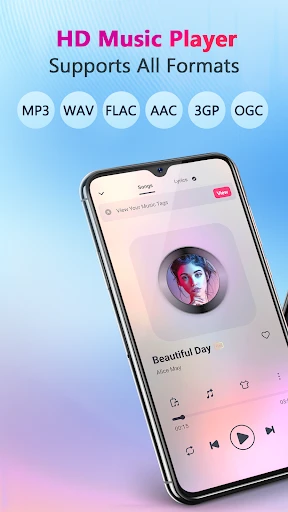
MMusic is a dedicated music player application designed for Android devices, focusing on providing a clean, efficient, and locally-focused playback experience. It primarily manages and plays audio files stored directly on the user's device. The app distinguishes itself from streaming services by offering a lightweight, ad-free interface and comprehensive control over one's personal music library, from MP3s to FLAC and other common formats. MMusic prioritizes offline listening and organizational flexibility.
Chapter 1: Function
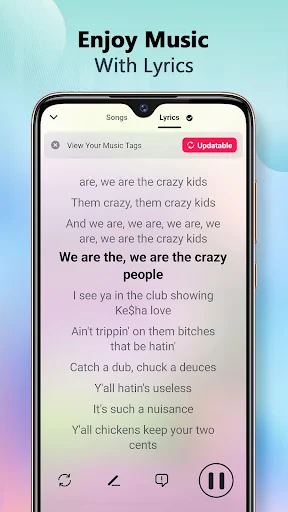
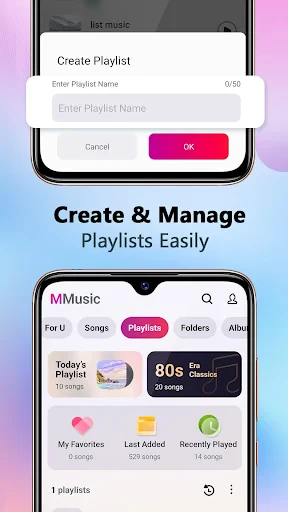
MMusic’s core function is the playback of local audio files. It automatically scans the device’s storage to build a searchable library organized by songs, albums, artists, and folders. The player supports key features including gapless playback, a 10-band equalizer with presets, sleep timer, and lyrics display. It also offers advanced playlist management, allowing users to create, edit, and sort playlists easily. Additional functions include tag editing for correcting file metadata, theme customization with multiple color options, and support for various audio formats like MP3, AAC, FLAC, OGG, WAV, and more. The interface prioritizes intuitive one-handed control with a minimalistic design.
Chapter 2: Value
MMusic’s primary value proposition is its uncompromising focus on local audio playback without the distractions of online streaming or advertisements. For users who own a large collection of downloaded music or high-quality lossless files, MMusic provides a superior listening experience compared to general-purpose file managers or bloated streaming apps. Key advantages include its exceptional efficiency: the app uses minimal system resources and battery, and does not require an internet connection for its primary function. The built-in equalizer allows for precise audio tuning, catering to audiophiles using high-quality headphones. Furthermore, the app offers complete privacy, as it does not collect playback data or require user accounts. Its theme engine and tag editor provide a high degree of personalization and library management, giving users full ownership and control over their music collection without recurring subscription fees or data tracking.
Chapter 3: Scenarios
MMusic is designed for users who prioritize offline, local music playback. The primary target user groups include commuters and travelers who download music to avoid mobile data charges and enjoy reliable playback in areas with poor network coverage. It is also ideal for audiophiles who maintain a collection of high-bitrate files, such as FLAC albums, and require precise equalizer controls. Another key user group is individuals with large, curated music libraries who need efficient organizational tools like folder browsing and playlist sorting. Everyday use cases include listening during a morning jog using the sleep timer, organizing a vacation road trip playlist without an internet connection, or an audiophile analyzing soundstage by switching between equalizer presets while listening to a FLAC file on public transport.
Advantages
- supports local playback without internet connection
- lightweight app size under 10MB for quick install
- includes advanced tag editor for custom metadata
- flac and lossless hi-res audio file support
- gapless playback for continuous album listening
Disadvantages
- no built-in streaming or online music catalog
- lacks cloud sync across multiple devices
- limited equalizer presets compared to competitors
- no smart playlist generation based on listening habits
- outdated ui design with no material you theming
Frequently Asked Questions
Q: What is the core function of MMusic?
A: MMusic is a local music player app designed for playing MP3 and other audio files stored on your device. It offers a clean interface with playlist management, equalizer presets, and gesture controls. No streaming or cloud storage is included; it plays files directly from your phone or tablet memory.
Q: Is MMusic free to use or does it require in-app purchases?
A: The app is free to download and use with basic playback features. Some advanced functions like customizable themes, additional equalizer presets, and ad removal are available via one-time in-app purchases. No subscription is required, and there are no hidden fees for core playback.
Q: Does MMusic work on all Android devices and system versions?
A: MMusic supports Android devices running OS version 5.0 (Lollipop) or higher. It is optimized for both phones and tablets. Compatibility with iOS or other platforms is not available. Users on older Android versions may experience limited functionality or installation issues.
Q: How can I add songs to a playlist in MMusic?
A: Open the app and navigate to the 'Songs' tab to browse your local audio files. Tap and hold a song title, then select 'Add to Playlist' from the menu. You can create a new playlist or choose an existing one. Repeat this process to build custom playlists. No automatic syncing is supported.
Q: Can I use MMusic without granting storage permissions?
A: No. MMusic requires access to your device storage to scan and play audio files. Without storage permissions, the app cannot detect any songs. You must grant this permission during the initial setup. The app does not collect or upload your personal data; all operations remain local.
Technical Information
Recommended for You

Tasker

СL Theme Line

WolframAlpha Classic

Church's Texas Chicken®

Calls Blacklist PRO - Blocker

@Voice Premium License

Zillow: Homes For Sale & Rent

StyleSeat: Book Hair & Beauty

Box Tops for Education™

Shake Shack

Christmas Spirit - Animated

Wave VPN

GEICO Mobile - Car Insurance

Tattoo Simulator Tattoo Maker

Simple Calendar

Xbox

Wallpaper Engine

Cashzine - Earn money reward

Podcast Player - Castbox

World of Hyatt

CVS Specialty

ComiQuest - Comic Reader

리디 - 웹툰, 만화, 웹소설, 전자책 모두 여기에!