Tasker
Tasker
Tasker automates tasks for power users with endless triggers and actions.
Screenshots

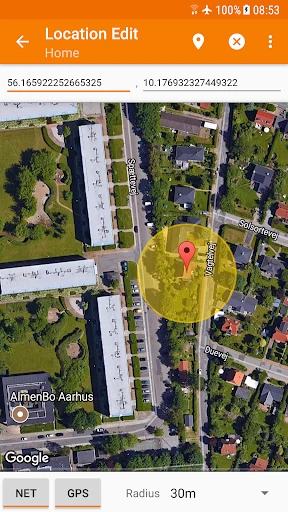
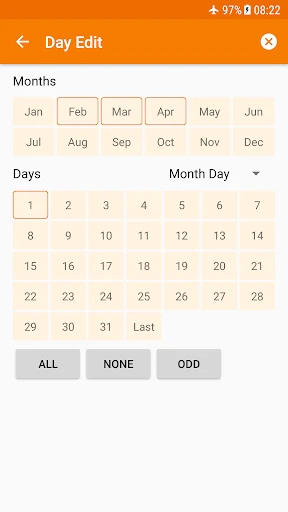
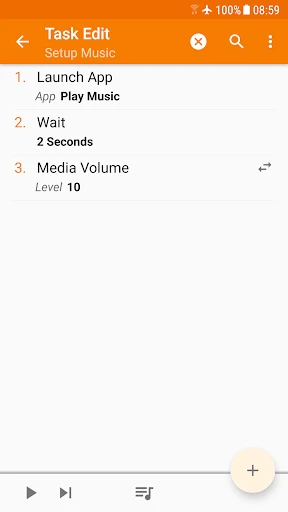
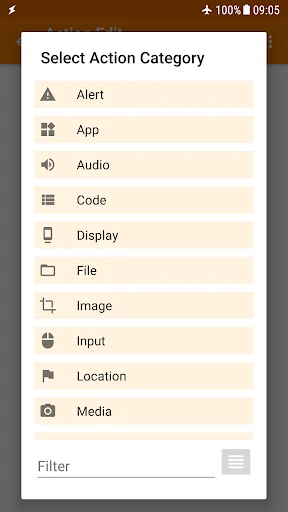
Tasker: Total Automation for Your Android Device
Tasker is a powerful automation app for Android that allows users to create custom tasks and profiles to control nearly every aspect of their device. By setting triggers based on time, location, app activity, or sensor input, Tasker can automatically perform actions like adjusting volume, sending messages, launching apps, and toggling settings. It operates on a simple if-this-then-that logic but offers an immense depth of customization through variables, scenes, and plugins. This makes it less of a simple app and more of a personal scripting engine for your phone, enabling users to streamline repetitive actions and create unique device behaviors.
Chapter 1: Function
The core function of Tasker is to automate tasks on an Android device based on user-defined contexts or triggers. Users create Profiles that specify conditions, such as time of day, location via GPS or Wi-Fi networks, system events like battery level, or even app openings. Each Profile links to a Task, which is a sequence of one or more Actions. These Actions are the app’s core functional units, encompassing hundreds of possibilities: from basic settings changes like Wi-Fi and Bluetooth toggling, to advanced capabilities like sending automated SMS, taking photos, performing web requests via HTTP, creating custom notification popups, and manipulating text variables. Tasker also includes a Scene Editor for building custom user interfaces. Unlike simple IFTTT style apps, Tasker offers granular control with configurable variables, loops, and conditional logic within Tasks, allowing for complex, multi-step automations that adapt to data. This function effectively turns the user into the device manager, capable of scripting bespoke behaviors that no other single app can achieve.
Chapter 2: Value
The value proposition of Tasker lies in its ability to transform a smartphone into a truly personal and efficient tool, saving users significant time and cognitive load. Its primary advantage is unparalleled customization: while most apps dictate how they function, Tasker lets you define exactly how your device should behave in any given situation. For instance, it can automatically silence your phone when you enter a meeting room based on the calendar, or turn on reading mode and disable notifications when you open an e-book app. This reduces manual toggling, which can be tedious and disruptive. A key advantage is its predictive capability based on context: the phone responds intelligently to the user’s environment, not just their direct input. For power users, the ability to integrate with third-party apps via plugins or send HTTP requests opens up IFTTT-style web automations. Furthermore, Tasker can be used for productivity, such as automatically backing up files to a cloud service at a set time, or for assistive technology, like reading incoming notifications aloud while driving. Beyond convenience, it empowers users to solve specific problems that are not addressed by standard OS settings, effectively extending the device’s utility. The app’s learning curve is steep, but the investment pays off in a device that operates exactly as the user intends, hands-free and intelligently.
Chapter 3: Scenarios
Tasker’s primary target user groups are technology enthusiasts, productivity seekers, and individuals with specific accessibility needs. The typical user is someone who feels constrained by standard smartphone operation and has a clear vision for reducing manual steps in their daily routine. Everyday use cases are diverse and scenario-driven. A common scenario is location-based automation: a user sets a profile so that when they arrive at their office Wi-Fi network, Tasker automatically sets their phone to silent mode, turns on Wi-Fi, and opens their work email app. Conversely, when leaving home Wi-Fi, it turns on mobile data and Bluetooth for the car. Another frequent use case is time-based routines: a profile can trigger at a specific bedtime hour to enable Do Not Disturb, dim the screen brightness, and log sleep time to a spreadsheet. For travelers, a profile linked to calendar events containing flight numbers can automatically turn on airplane mode at boarding time. Tasker also excels in device management scenarios, such as creating a button on the home screen that, when tapped, automatically disables multiple power-draining services or sends an emergency text with GPS coordinates. Power users might employ it for data logging from sensors or to create a custom alarm that requires solving a math problem to dismiss. Essentially, any repetitive on-screen action can be modeled as a Tasker scenario, making it invaluable for anyone from students wanting to auto-backup lecture notes to professionals needing a hands-free work transition.
Advantages
- automates phone tasks via triggers like time or app
- creates complex multi-step profiles without coding
- accesses over 400 system actions including sensors
- runs scheduled backups or toggles wifi on location change
- uses variable support for dynamic task data
Disadvantages
- steep learning curve due to deep configuration menus
- no built-in cloud sync for profile backups
- requires accessibility service for some automation features
- battery drain from frequent sensor polling in certain profiles
- limited visual debugging tools for task errors
Frequently Asked Questions
Q: What core functions does Tasker offer for automation?
A: Tasker enables automation of device actions based on contexts like time, location, or app events. Core functions include creating tasks (e.g., sending texts, toggling Wi-Fi), triggers (e.g., NFC tags, sensor states), and profiles combining triggers with tasks. It supports over 400 actions and variables for scripting, requiring no root access for most features.
Q: Is Tasker free to use or does it require in-app purchases?
A: Tasker is a paid app with a one-time purchase fee on Google Play. There is a free 7-day trial available via the official website or Amazon Appstore. No in-app purchases or subscriptions exist for core features, though some third-party plugins (e.g., AutoApps) may have separate costs.
Q: Does Tasker work on iOS or only on Android devices?
A: Tasker is primarily designed for Android devices (version 4.1+). It is not available on iOS due to system restrictions. Compatible with phones, tablets, Android TV, and Wear OS. Some functionality may vary on non-standard Android forks like Fire OS.
Q: How can I fix common issues like profiles not triggering?
A: First check that Tasker has necessary permissions (e.g., Accessibility, Notification Access, Location). Ensure no conflicting apps disable it (e.g., battery optimization). For location-based profiles, verify GPS is enabled. Test triggers manually in the app. Restarting the app or device often resolves transient issues.
Q: Can Tasker automate actions without an internet connection?
A: Yes, Tasker runs entirely on-device and does not require continuous internet for most tasks. Offline actions include controlling device settings, launching apps, or reacting to sensors. Online features (e.g., web scrape, HTTP requests) need connectivity only when those specific actions execute.
Technical Information
Recommended for You

Image to PDF - PDF Maker

GIF Maker, Video to GIF Editor

Cash Cow

Handy Art Reference Tool

Pocket FM: Audio Series

Pregnancy and Due Date Tracker

Sweet Beauty Camera Fillter
Workforce Tools

Etsy: A Special Marketplace

Family360 - GPS Live Locator

Acima Leasing

Phone Ringtones

NPR

Time Clock: Easy Tracker

HolidayTraverse

Nordstrom

CL Theme C1

UDisc Disc Golf App

Photobooth mini FULL

Cardboard

Cox

HBO Max

StoryFont for Instagram Story