Scandit SDK Showcase
Scandit SDK Showcase
Scandit SDK Showcase barcode scanning for developers
Screenshots



Scandit SDK Showcase: Enterprise Barcode Scanning and Data Capture Solution
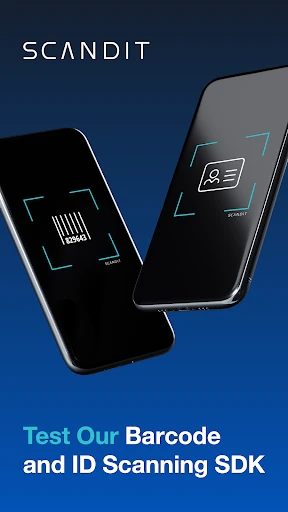
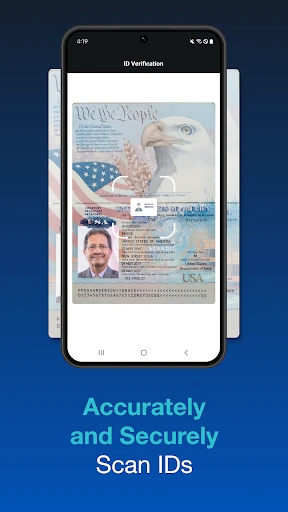
Scandit SDK Showcase is a demonstration application that highlights the advanced capabilities of the Scandit software development kit for intelligent barcode scanning and data capture. It provides users and developers with a practical interface to test and evaluate real-time scanning performance across various symbologies and challenging conditions. The app is designed to showcase the core functionalities of the Scandit SDK, including fast scanning, augmented reality overlays, and batch mode, without requiring a full application integration. It serves as a benchmark tool for businesses and developers to assess the accuracy and speed of the technology on their specific devices. The overview presented within the app allows users to quickly understand how the SDK can be deployed in enterprise environments to streamline operations, reduce errors, and improve workflow efficiency. The app itself is a sandbox for testing the Scandit engine, offering pre-configured settings and live feedback to demonstrate its industrial-grade robustness.
Chapter 1: Function
The Scandit SDK Showcase app functions primarily as a testing and demonstration environment for the underlying Scandit scanning engine. Its core function includes real-time barcode scanning for 1D and 2D symbologies, including standard retail codes, QR codes, Data Matrix, and PDF417. The app provides immediate visual feedback by displaying decoded data alongside a highlighted bounding box around the scanned barcode. It also supports advanced features such as augmented reality scanning guidance, where visual indicators or outlines appear on the screen to improve user accuracy in bulk scanning scenarios. Another critical function is batch scanning mode, which allows users to capture multiple barcodes in rapid succession without touching the screen, storing results in a local list for later export. Additionally, the app demonstrates the SDK’s ability to handle challenging conditions like damaged labels, reflective surfaces, or low-light environments by dynamically adjusting camera settings. Users can switch between different visualization options, including matrix scan, gesture-based scanning, and a simple point-and-shoot mode, to evaluate which interface best suits their operational needs. These functions collectively allow developers to validate the SDK’s performance before integrating it into custom enterprise solutions.
Chapter 2: Value
The Scandit SDK Showcase app delivers significant value by providing a risk-free, hands-on evaluation of a mission-critical enterprise scanning technology. Its primary advantage is enabling businesses to verify the SDK’s exceptional speed and accuracy under real-world conditions before committing to a full license or integration effort. This eliminates guesswork and reduces technical evaluation cycles, saving both time and development resources. The app’s key value proposition lies in its demonstration of performance in suboptimal environments, such as scanning wet, torn, or poorly printed barcodes, capabilities that are essential for logistics, healthcare, and manufacturing sectors. By leveraging the Scandit engine’s proprietary algorithms, the app proves it can achieve near-instantaneous decoding at distances up to several meters using standard smartphone cameras, eliminating the need for dedicated hardware scanners. Furthermore, the app showcases the SDK’s cross-platform compatibility, running with identical performance on iOS and Android devices, which reduces fragmentation for enterprises managing mixed-device fleets. It also highlights the augmented reality guidance feature, which reduces user training time by providing intuitive on-screen cues. From a business value standpoint, the app demonstrates how the SDK can increase operational throughput by enabling workers to scan items continuously without pausing to tap the screen, directly impacting productivity metrics. The transparent logging and export functionality in the app allow testers to compare accuracy rates across different lighting conditions and barcode types, providing concrete data for vendor evaluation. Ultimately, the app serves as a compelling proof of concept that the Scandit SDK can degrade error rates in asset tracking and inventory management, offering a swift return on investment through enhanced workflow efficiency.
Chapter 3: Scenarios
The Scandit SDK Showcase app is designed for three primary target user groups: enterprise development teams, operational managers in logistics and retail, and quality assurance engineers. For development teams, the app is used during the initial technical evaluation phase to test hardware compatibility, baseline scanning speeds, and integration complexity on target devices. Operational managers in warehouse or supply chain environments use the app to conduct real-world tests in picking, packing, and receiving areas, where they assess how quickly workers can scan high volumes of items without physical fatigue. In retail settings, store operations teams use the app to simulate checkout or inventory counting scenarios, evaluating whether the SDK handles product labels as quickly as traditional laser scanners. In healthcare, the app is used to test scanning of patient wristbands and medication labels under clinical lighting conditions. Quality assurance engineers deploy the app to generate performance metrics reports, comparing frame-by-frame decoding rates across different device models and Android versions. Everyday use cases include scanning mixed pallets in a distribution center, verifying shipment contents by batch scanning a line of boxes, and auditing shelf inventory in a grocery store aisle. The app’s batch mode is frequently tested during cycle counts where workers must log dozens of items per minute. Additionally, the app is used in training sessions to demonstrate the correct scanning technique and AR overlay usage before rolling out the full integrated solution. These scenarios confirm that the app effectively validates the SDK’s adaptability to fast-paced, error-sensitive environments found in modern enterprise operations.
Advantages
- scans barcodes in low light or damaged labels
- recognizes multiple barcodes simultaneously in one frame
- works offline with on-device AR overlay
- supports 1D
- 2D
- and OCR in one SDK
- real-time scanning from video stream
- not still images
Disadvantages
- requires camera permission for every session
- limited to static demo without API access
- no batch scanning history export within app
- high battery drain on older phone models
- fails on reflective or curved surfaces often
Frequently Asked Questions
Q: What core functions does Scandit SDK Showcase offer?
A: The Scandit SDK Showcase app demonstrates barcode scanning and augmented reality capabilities using the Scandit SDK. It allows users to test scanning on various barcode types, view real-time data capture, and explore AR overlays for item recognition. No purchase or subscription is required to use the demo features.
Q: Is the app free or does it require in-app purchases?
A: The Scandit SDK Showcase app is completely free to download and use. It does not contain any in-app purchases or hidden fees. All demonstration features, including barcode scanning and AR overlays, are accessible without payment.
Q: What devices and operating systems are supported?
A: The app supports iOS and Android devices with cameras. It requires iOS 12.0 or later for Apple devices and Android 6.0 (API 23) or higher for Android devices. No external hardware or additional permissions beyond camera access are required.
Q: How accurate is the barcode scanning in this demo?
A: The scanning accuracy depends on lighting conditions, barcode quality, and camera resolution. It supports 1D and 2D barcodes including QR codes, EAN, and UPC. The demo performs well in typical environments but may struggle with damaged codes or extreme glare.
Q: Can I use this app for commercial scanning in my business?
A: No, this app is strictly a demonstration tool for the Scandit SDK. It is not intended for commercial use. Businesses seeking production-level scanning must purchase a Scandit SDK license and integrate the SDK into their own applications.
Technical Information
Recommended for You

Brightspace Pulse

TV Cast Pro for LG webOS

EZVIZ
REI Co-op – Shop Outdoor Gear

UnitedHealthcare

Snap-tubè All Video Downloader

1.1.1.1 + WARP: Safer Internet

Jason's Deli

All Video Downloader Master

Sweet Beauty Camera Fillter

YouCam Makeup - Selfie Editor

Swiggy: Food Instamart Dineout

Google Play Services

1Password: Password Manager

Southwest Airlines: Travel App

Max: Stream HBO, TV, & Movies

DJ Mixer Studio - DJ Music Mix

Mirror - Makeup and Shaving

Safe Surfer: Block Porn & Apps

Pocket Workouts Champion V2

Darato Live NFL NBA NHL NCAA

VA Video Connect

Rover - Dog Boarding & Walking