1Password: Password Manager

1Password: Password Manager
Secure vault for passwords notes IDs and families
Screenshots


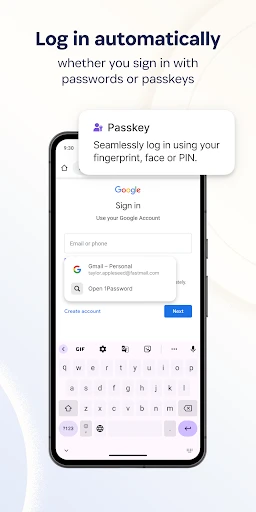
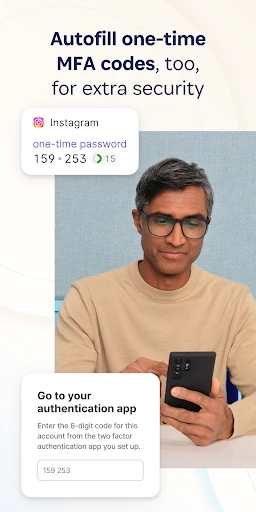

About 1Password: Password Manager – Secure Your Digital Life
1Password is a comprehensive password manager designed to simplify and secure your online experience. It stores and organizes all your passwords, credit card details, and sensitive documents in one encrypted vault, accessible across all your devices. With its intuitive interface and robust security features, 1Password eliminates the need to remember multiple passwords while providing advanced protection against data breaches and unauthorized access.
Chapter 1: Function
1Password core functions revolve around centralized password storage and intelligent automation. It generates strong, unique passwords for every account and saves them securely. Users can autofill login credentials, credit card information, and personal details across websites and apps with a single click. The app supports multi-factor authentication, secure sharing of vault items with family or team members, and includes a Watchtower feature that monitors for compromised passwords, weak credentials, and security breaches. Additionally, it offers Travel Mode to temporarily remove sensitive data from devices during border crossings, and a digital wallet for storing payment information.
Chapter 2: Value
The value proposition of 1Password lies in its seamless integration of security and convenience. Unlike basic password managers, 1Password uses end-to-end encryption with a Secret Key combined with your Master Password, ensuring even if the service provider is breached, your data remains unreadable. Its cross-platform support covers Windows, macOS, iOS, Android, and browser extensions, allowing effortless synchronization across devices. The Watchtower feature proactively alerts users to reused, weak, or compromised passwords, empowering them to take corrective action before an incident occurs. For families, 1Password includes shared vaults where members can securely exchange Wi-Fi passwords, streaming accounts, or emergency contact details. Business and team plans provide administrative controls, event logs, and integration with single sign-on services. The apps commitment to privacy is further evidenced by its zero-knowledge architecture, meaning only the user can decrypt their data. Regular independent audits and compliance with industry standards like SOC 2 Type II reinforce trust. Compared to free alternatives, 1Password offers a polished user experience with reliable autofill, offline access, and dedicated support, making it a premium tool for anyone serious about digital hygiene.
Chapter 3: Scenarios
1Password primarily serves individual users concerned about online security, families managing shared accounts, and businesses requiring centralized credential management. For daily use, an individual might employ 1Password to automatically log into social media, email, and banking platforms, generating new passwords during account creation without memorizing them. A family could use shared vaults to store Netflix login details, home Wi-Fi passwords, and important document scans like passports or insurance cards. In a professional setting, IT administrators can deploy 1Password across teams to securely share server credentials, API keys, and VPN access while tracking usage and revoking access instantly when employees leave. Travelers benefit from Travel Mode, stripping their device of sensitive vaults before crossing international borders, then restoring them with a single toggle. Parents might create separate vaults for children, granting access to school accounts without exposing financial data. The app also assists during emergencies; a user can set up a digital legacy contact to receive time-limited access to vital records.
Advantages
- unlocks vault via biometrics without typing master password
- generates strong passwords and auto-fills in browsers and apps
- stores credit cards
- IDs
- and secure notes in encrypted vaults
- syncs across devices via end-to-end encrypted cloud servers
- supports offline access to cached vaults when network is unavailable
Disadvantages
- requires subscription after free trial for full features
- master password recovery is impossible if forgotten
- browser extension can sometimes fail to detect login fields
- initial setup and import from other managers can be time-consuming
- no native support for non-Windows/non-macOS desktop Linux
Frequently Asked Questions
Q: What is 1Password and what does it do?
A: 1Password is a password manager app that securely stores your login credentials, credit cards, and private notes in an encrypted digital vault. It autofills passwords across websites and apps, generates strong passwords, and syncs data across devices using your master password. It supports two-factor authentication and includes a Travel Mode to remove sensitive vaults when crossing borders.
Q: Is 1Password free to use or does it require a subscription?
A: 1Password uses a subscription model. A free trial is available for 14 days, but after that, a paid plan is required. Individual plans start at $2.99 per month billed annually, and family plans cover up to five members for $4.99 per month. A business plan is also available for teams. No one-time purchase or fully free tier is offered.
Q: Does 1Password work on both Windows and mobile devices?
A: Yes, 1Password supports Windows, macOS, iOS, and Android. It also provides browser extensions for Chrome, Firefox, Safari, Edge, and Brave. There is no native Linux desktop app, but the browser extension can be used on Linux. It requires internet access for syncing via 1Password’s cloud servers, but offline access to cached vaults is available.
Q: How does 1Password handle data security and breaches?
A: 1Password uses end-to-end encryption with a 128-bit AES key derived from your master password and Secret Key. No one, including 1Password employees, can access your data. It supports biometric unlock on mobile and desktop. It includes Watchtower, a feature that alerts you to compromised passwords, weak passwords, and websites affected by data breaches.
Q: Can I share passwords with family members using 1Password?
A: Yes, 1Password Family and Teams plans allow sharing vaults and individual items with members. You can create shared vaults for specific groups, such as family or coworkers, and control read or edit permissions. Each person keeps their own private vault. Guest access for temporary sharing is available on business plans but not on the family plan.
Technical Information
Recommended for You

Video Downloader for Pinterest

ATOM Store, Myanmar

Karrot: Buy & sell locally

Amazon Business: B2B Shopping

Speedometer - Odometer App
iPhone Control Center iOS 16

Headunit Reloaded Emulator HUR

Google Voice

Yousician: Learn Guitar & Bass

Node Video - Pro Video Editor

Glitter Wallpaper: Theme, Icon

Ask AI - Chat with AI Chatbot

ESPN

Floor Plan Creator Home Design

theCut: Barbershop Booking

POCKET COMICS: Premium Webtoon

Live Weather: Weather Forecast

Screen Recorder - AX Recorder

7shifts: Employee Scheduling

Talk360: International Calling

PeakFinder

Wyndham Hotels & Resorts

Pink Cute Hippo Theme