Remote Control for Roku TV

Remote Control for Roku TV
Remote control for Roku TV users needing easy navigation
Screenshots
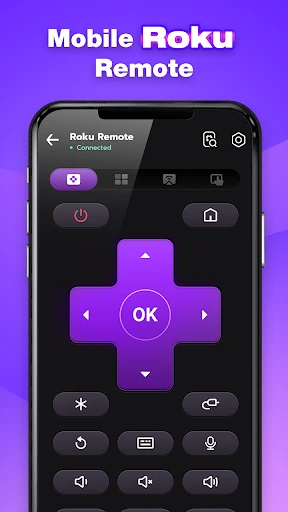
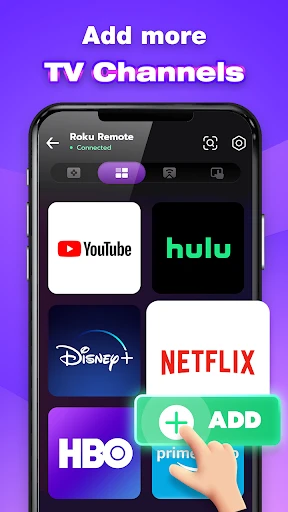
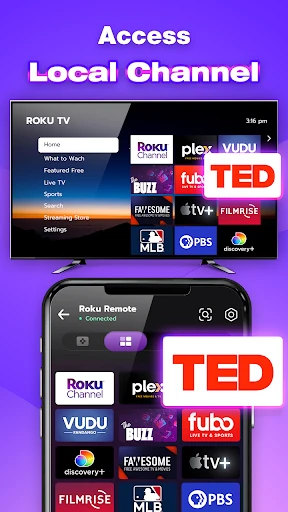

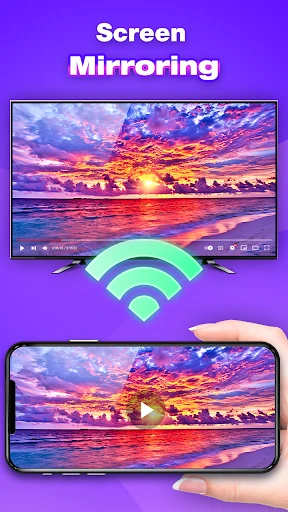
Remote Control for Roku TV: Full Control in Your Palm
Remote Control for Roku TV is a mobile application designed to replace the physical remote for Roku-powered televisions and streaming devices. It connects to your Roku device over the same Wi-Fi network, transforming your smartphone into a versatile remote control. The app eliminates the need for line-of-sight operation, offering a seamless way to navigate channels, adjust volume, launch apps, and type text using your phone's keyboard. It supports a wide range of Roku models, including Roku TV, Roku Stick, and Roku Ultra, providing an intuitive interface that mirrors the native Roku experience. With no additional hardware required, this app serves as a convenient backup or primary remote solution for users who frequently misplace their physical remote or prefer the familiarity of their smartphone interface.
Chapter 1: Function
The core function of Remote Control for Roku TV is to replicate and enhance the capabilities of a standard Roku remote through a digital interface. It allows users to navigate the Roku home screen, control playback such as pause, play, rewind, and fast forward, and adjust volume directly from their phone. A standout feature is the built-in keyboard, which enables quick text entry for search queries or login credentials, far surpassing the speed of on-screen D-pad typing. The app also includes a touchpad mode for swipe-based navigation and shortcut buttons for popular streaming services like Netflix, Hulu, and YouTube. Additionally, it supports voice search, letting users find content by speaking into their device microphone. The app automatically detects Roku devices on the same local network, eliminating manual setup. It also offers headphone listening through the phone, allowing private audio streaming when privacy is needed. Regular updates ensure compatibility with the latest Roku firmware and app additions, making it a robust and feature-rich remote alternative.
Chapter 2: Value
The value proposition of Remote Control for Roku TV lies in its convenience, accessibility, and enhanced user experience. Firstly, it resolves the common problem of lost or broken physical remotes, providing an instant replacement that is always available as long as the smartphone is charged. This is particularly valuable in households with multiple users or children, where remotes are easily misplaced. Secondly, the app improves efficiency with its keyboard and voice search capabilities, drastically reducing the time spent typing on cluttered on-screen keyboards. This is a significant advantage for users who frequently search for content or enter passwords for subscriptions. Thirdly, the private listening feature with headphone output adds value for late-night viewing or shared living spaces, allowing users to enjoy audio without disturbing others. The app also supports multiple device management, enabling control of Roku units in different rooms without needing separate physical remotes. From a cost perspective, it is free to download and use, saving users the expense of purchasing a replacement remote. Furthermore, its intuitive layout and responsive controls mirror the simplicity of the original Roku interface, ensuring a low learning curve. For tech-savvy users, the app provides additional settings access, such as screen mirroring initiation and Wi-Fi network management, which are not available on standard remotes. Overall, the app enhances the Roku viewing experience by adding smart features to an already user-friendly platform, making it an essential tool for Roku device owners.
Chapter 3: Scenarios
The primary target user group for Remote Control for Roku TV includes Roku device owners, especially those in households with high remote usage or frequent misplacement of physical remotes. It is ideal for parents who need to quickly silence the TV or adjust volume during children's bedtime, as the private listening mode allows them to continue watching without audio disturbance. Another key scenario is for users with mobility issues or physical limitations who find it easier to navigate via a touchscreen than a traditional remote. The app also serves tech enthusiasts who prefer consolidating their media controls into a single device like a smartphone. Everyday use cases include watching late-night shows in shared apartments, where the private listening feature is invaluable. Additionally, it is useful during parties or gatherings when multiple remotes are in use and control needs to be streamlined. For users who frequently switch between Roku devices in different rooms, the app’s multi-device support simplifies management. Lastly, travelers using Roku devices in vacation rentals or hotel rooms can rely on the app as a portable remote, avoiding the need for unfamiliar physical controls.
Advantages
- turns phone into a full touchpad for roku
- connects automatically when on same wifi network
- includes keyboard for faster text search input
- private listening mode through phone’s headphone jack
- works offline via infrared on select phone models
Disadvantages
- requires roku device and phone on same 2.4ghz network
- no voice control support for all roku models yet
- app drains battery faster than dedicated remote
- infrared function blocked by phone case or screen protector
- gesture navigation conflicts with roku’s native ui limits
Frequently Asked Questions
Q: What is Remote Control for Roku TV?
A: Remote Control for Roku TV is a mobile app that turns your smartphone into a virtual remote for Roku devices and Roku TVs. It connects via Wi-Fi, allowing you to navigate channels, adjust volume, and launch apps without needing the physical remote. No additional hardware is required.
Q: Is the app free to use or does it have in-app purchases?
A: The app is free to download and offers basic remote control functions without charge. However, some advanced features, such as ad-free experience or additional customization options, may require in-app purchases. No subscription is mandatory for core usage.
Q: Does Remote Control for Roku TV work on both iOS and Android?
A: Yes, the app supports both iOS (version 12.0 or later) and Android (version 6.0 or later) devices. It is compatible with most smartphones and tablets, provided they are connected to the same Wi-Fi network as your Roku device. No special permissions beyond network access are needed.
Q: How can I connect the app to my Roku TV if I don't have the physical remote?
A: Ensure your smartphone and Roku TV are on the same Wi-Fi network. Open the app, and it will automatically scan for nearby Roku devices. Select your TV from the list. If the TV is not discovered, try restarting the TV or checking network settings. No physical remote is required for initial setup.
Q: Can the app control multiple Roku devices in different rooms?
A: Yes, the app can control multiple Roku devices, but only one at a time. You can switch between devices from the app's settings menu, as long as all devices are on the same Wi-Fi network. There is no limit to the number of Roku devices you can add, but simultaneous control is not supported.
Technical Information
Recommended for You

Learn Languages - Lucida AI

NOAA Weather Unofficial (Pro)

LA Wallet

فیلتر شکن قوی پرسرعت Rooster

Zeus
GPS Earth Maps Live Navigation

HubbleClub By Hubble Connected

Claude by Anthropic

Valvoline Instant Oil Change
Roland-Garros Official

Klook: Travel, Hotels, Leisure

Super Storage Cleaner

투믹스

Inbox Homescreen

Recraft

Tor Browser

Key Attestation Demo

Tapas – Comics and Novels

Baby Development & Milestones

Bible: Advent Prayers & Verses

StarMaker: Sing Karaoke Songs

Uptodate Lexidrug

Stretch Fall - Watch face