Tor Browser

Tor Browser
Private anonymous browsing with no tracking for privacy seekers
Screenshots
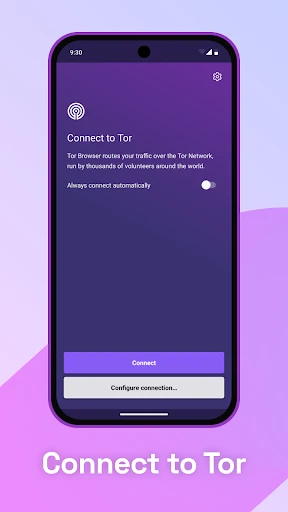
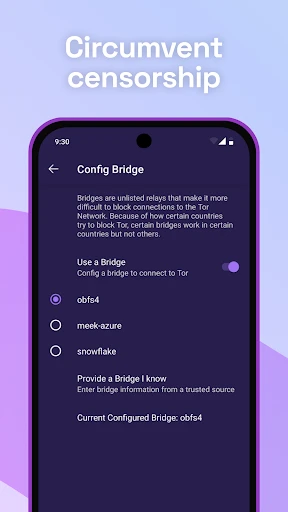
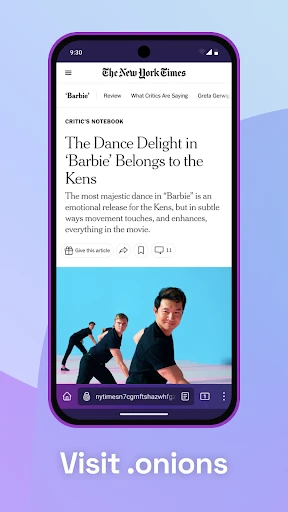
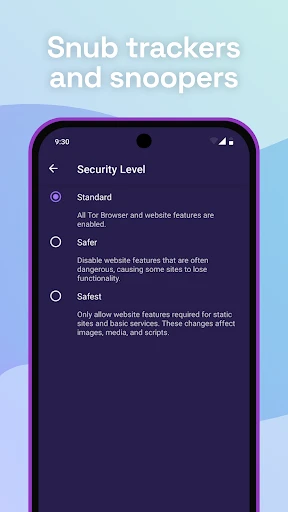
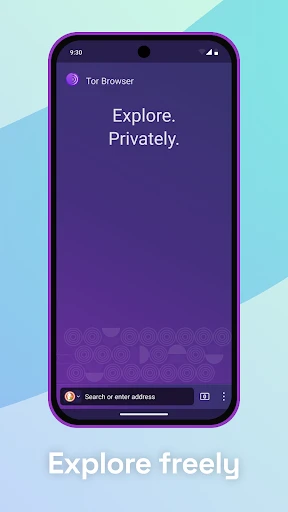
Tor Browser: Private and Anonymous Web Browsing for Enhanced Online Privacy
Tor Browser is a free and open-source web browser designed to protect user privacy and anonymity online. It directs internet traffic through the Tor network, a global overlay network of volunteer-operated relays, which conceals a user's location and usage from anyone conducting network surveillance or traffic analysis. Unlike standard browsers, Tor Browser prevents websites from tracking a user's physical location by hiding their IP address. It also blocks browser fingerprinting and automatically clears browsing history and cookies after each session. The browser is built on a modified version of Firefox, ensuring compatibility with modern web standards while prioritizing security. Its primary purpose is to give users control over their digital footprint, making it difficult for advertisers, websites, and even internet service providers to monitor online activities.
Chapter 1: Function
Tor Browser’s core functions revolve around anonymizing internet traffic and protecting user identity. When a user visits a website, Tor Browser encrypts the connection multiple times and routes it through at least three random relays in the Tor network, akin to layers of an onion. This process ensures that no single relay knows both the source and destination of the traffic. The browser’s built-in privacy features include automatic blocking of third-party trackers, scripts, and plugins that could compromise anonymity. It also employs a unique technique called circuit isolation, where each website connection uses a different network path to prevent cross-site linking. Additionally, Tor Browser offers customizable security levels ranging from Standard to Safest, allowing users to disable JavaScript, fonts, and other web features that pose privacy risks. These functions collectively create a secure compartment for browsing, leaving no trace on the device and thwarting attempts to associate browsing habits with a specific user.
Chapter 2: Value
The primary value of Tor Browser lies in its ability to restore fundamental online privacy in an era of pervasive digital surveillance. For users in repressive regimes, it provides a vital tool to bypass government censorship and access blocked news, social media, or human rights resources without fear of retribution. Journalists and whistleblowers rely on Tor to securely communicate with sources and publish sensitive information without endangering their identities. For average internet users, the browser shields browsing habits from commercial data brokers and large tech companies that profit from mining personal data. Tor Browser also offers peace of mind against targeted advertising and manipulation by preventing the creation of detailed user profiles. A key advantage is its low cost, being free to use, and its transparency as open-source software, allowing independent security experts to continuously audit its code for vulnerabilities. Its decentralized network structure also makes it incredibly resilient to single-point failures or censorship attempts, distinguishing it from centralized VPN services that may log activity or be forced to cooperate with authorities. By leveling the playing field, Tor Browser empowers individuals to exercise their right to free expression and information access globally.
Chapter 3: Scenarios
Tor Browser primarily serves privacy-conscious individuals, but its target user groups are diverse. Activists and human rights defenders operating in regions with heavy internet restrictions use it to organize protests and share uncensored information. Journalists, both local and international, utilize Tor to fact-check stories, contact sources anonymously, and publish articles without revealing their physical locations or the origin of their reports. Whistleblowers, such as those exposing corporate or government misconduct, rely on Tor to submit documents to secure drops or media outlets while protecting their identity. Everyday internet users concerned about data commodification employ Tor for routine activities like searching for health information or financial advice, preventing personalized ad tracking. Researchers and security professionals use Tor to investigate cyber threats or analyze malicious websites without exposing their true IP addresses. A typical use case involves a dissident in a country with strict censorship using Tor to check email or read independent news without alerting local authorities. Another scenario is a consumer comparing prices online, using Tor to prevent retailers from adjusting prices based on past shopping behavior.
Advantages
- onion routing hides IP from all sites
- isolates each website into separate session
- automatically clears cookies and history on exit
- no JavaScript
- plugins
- or fonts by default
- built-in bridge obfuscation for censorship bypass
Disadvantages
- slower page loads due to multi-node relays
- blocks WebRTC and geolocation APIs
- no bookmark sync across devices
- some streaming sites refuse onion traffic
- requires manual security slider adjustment for advanced features
Frequently Asked Questions
Q: What is Tor Browser and what does it do?
A: Tor Browser is a privacy-focused web browser that routes traffic through the Tor network to anonymize your online activity. It blocks trackers, cookies, and fingerprinting by default, and provides access to .onion sites. It is designed for users seeking private browsing and bypassing censorship.
Q: Is Tor Browser free to use, and are there in-app purchases?
A: Tor Browser is completely free to download and use with no in-app purchases or subscription fees. It is funded by donations and grants. No additional equipment is required beyond a device and internet connection, though using it may require adjusting firewall or proxy settings in restricted networks.
Q: What devices and systems are supported by Tor Browser?
A: Tor Browser is available for Windows, macOS, Linux, and Android. It does not have an official iOS version, though third-party Tor-based apps exist on the App Store. It requires at least 200 MB of storage and supports most modern hardware. There is no official support for Chromebook or tablet touch interfaces.
Q: Does Tor Browser protect my privacy on all websites?
A: Yes, Tor Browser encrypts and anonymizes traffic across all websites by routing it through three relays. However, it cannot protect against website-level data collection, such as login forms or JavaScript exploits, if you disable its built-in security settings. It also does not anonymize other apps on your device.
Q: How can I troubleshoot slow speeds or connection issues in Tor Browser?
A: Slow speeds are inherent to Tor’s multi-hop routing. For basic issues, ensure your system clock is accurate, try selecting a different Tor circuit via the browser's toolbar, or disable hardware acceleration if experiencing crashes. No dedicated customer support exists; visit the Tor Project forum or documentation for solutions.
Technical Information
Recommended for You

Microsoft SharePoint

Avatar Maker - Avatar Creator

Blink Beauty Cam: Photo Makeup

Genius Scan - PDF Scanner

Schoox Classic

ملودیفای | مرجع تخصصی آهنگ

KY3 Weather

Alibaba.com - B2B marketplace

LingoDeer - Learn Languages

Spectrum News: Local Stories

GEM VPN

IPTV

BET+

Mark - AI Logo Generator

Alight Motion

Daily News: Local & Alerts

MSNBC: Watch Live & Analysis

Find my Phone - Clap, Whistle

e.l.f. Cosmetics and Skincare

AI Video Editor - VivaCut

Barron's: Investing Insights

Hubble Connected for Motorola

Classic Netspend
