SMS Auto Reply - Autoresponder

SMS Auto Reply - Autoresponder
Auto SMS reply app for busy users
Screenshots
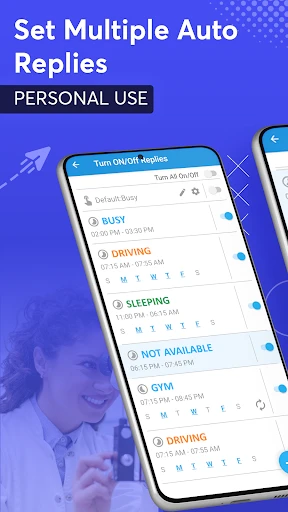
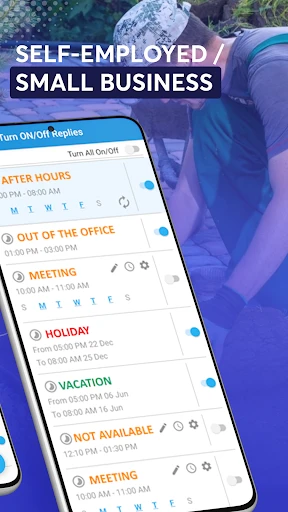

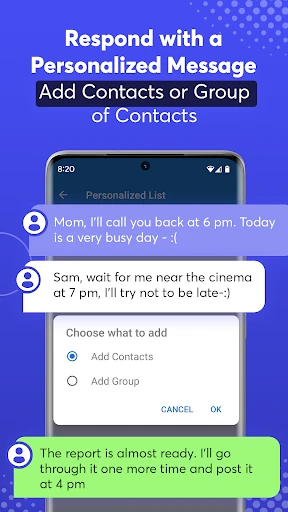
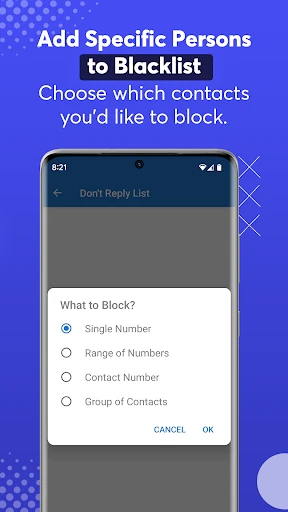
SMS Auto Reply - Autoresponder: Intelligent Messaging Automation Tool
SMS Auto Reply - Autoresponder is a mobile application designed to automate the process of sending predefined text message responses when a user is unable to manually reply. It acts as a digital assistant for managing inbound SMS, ensuring that contacts receive timely acknowledgments even when the user is driving, in a meeting, sleeping, or otherwise occupied. The app leverages phone state detection, such as call status or Bluetooth connection, to trigger automatic replies. It supports customizable response templates, scheduling options, and contact/group-based rules, making it a versatile tool for personal and professional communication management. The application aims to reduce missed communication opportunities and enhance responsiveness without requiring constant manual intervention.
Chapter 1: Function
The core function of SMS Auto Reply - Autoresponder is to automatically send a custom or pre-written text message in response to incoming SMS under specified conditions. Users can set up triggers based on various states: when the phone is connected to a specific Bluetooth device, such as a car kit or headset; during certain time periods, like nighttime or work hours; when the device is in Do Not Disturb mode; or when the user rejects an incoming call. The app allows the creation of multiple auto-reply rules, each with its own set of conditions and response text. It also features an option to filter replies by contact groups or individual numbers, enabling personalized responses. Additional functionality includes a log to track all sent auto-replies, the ability to set a limited number of replies to prevent spam, and support for saving frequently used message templates for quick reuse. This automation ensures that every SMS received during a predefined scenario receives an appropriate and immediate acknowledgment.
Chapter 2: Value
The primary value of SMS Auto Reply - Autoresponder lies in its ability to maintain communication continuity and reduce the anxiety of delayed responses. For professionals, it ensures that clients or colleagues receive an instant reply even during meetings, focused work sessions, or off-hours, thereby preserving professional courtesy and preventing misunderstandings. For drivers, it promotes safety by eliminating the distraction of texting while driving, as the app automatically informs senders that the user is currently on the road and will reply later. For individuals with busy lifestyles, it serves as a reliable second brain, handling routine acknowledgments so the user can focus on more critical tasks. Key advantages include its high level of customization, which allows users to tailor responses for different contacts or situations, and its reliance on device-native triggers that do not require internet connectivity, making it reliable in areas with poor data coverage. Furthermore, the app's scheduling feature enables users to prepare for specific events, such as vacations or overnight sleep, ensuring that inbound messages are always addressed. The logging feature provides transparency and accountability, allowing users to review all automated interactions. By automating tedious and time-sensitive responses, the app reduces cognitive load and empowers users to manage their availability proactively, ultimately enhancing both personal productivity and social responsiveness.
Chapter 3: Scenarios
The primary target user groups for SMS Auto Reply - Autoresponder include busy professionals, frequent drivers, customer service representatives, and individuals with high communication volumes. Busy professionals, such as managers, consultants, or freelancers, use it during meetings or deep work sessions to automatically inform callers that they are unavailable and will respond later. Frequent drivers, including rideshare drivers and long-distance commuters, rely on the app to send safety-focused messages like I am driving now, will reply later to incoming messages, thus reducing temptation to text. Customer service agents or field technicians use the app to set up after-hours auto-replies, ensuring customers receive an acknowledgment and expected response time even when the office is closed. Everyday use cases also include setting a bedtime auto-reply to avoid late-night disruptions, creating a vacation response that provides alternative contact information, or establishing a specific message for family members when the user is in a noisy environment. The app is also valuable for individuals managing multiple phone lines or SIM cards, as it can be configured to handle each line separately. Ultimately, it serves anyone who needs to maintain a professional or personal communication standard without being tethered to their phone at all times.
Advantages
- auto-replies without unlocking phone
- customizable rules by contact or keyword
- triggers responses based on SMS
- calls
- or calendar
- works offline with no internet dependency
- low battery drain during background monitoring
Disadvantages
- requires persistent accessibility service permission
- limited to Android due to SMS permissions restrictions
- no iMessage or RCS support
- only legacy SMS
- may delay reply on low-end devices under heavy load
- setup of advanced rules requires multiple steps
Frequently Asked Questions
Q: What does SMS Auto Reply - Autoresponder do?
A: SMS Auto Reply - Autoresponder automatically sends pre-set text replies to incoming SMS messages based on user-defined rules. It supports triggers like specific contacts, keywords, or time periods. No internet connection is required for basic functionality, as it operates locally on your device. The app is designed for hands-free communication during driving, meetings, or sleep, but does not support MMS or group messaging auto-replies.
Q: Is the app free to use or are there in-app purchases?
A: The app is free to download with basic functionality included. Advanced features such as unlimited custom rules, scheduled replies, and ad-free experience require a one-time in-app purchase. There are no subscription fees. You do not need additional hardware or external permissions beyond SMS access and notification listening.
Q: Does SMS Auto Reply work on both Android and iOS devices?
A: SMS Auto Reply is currently available only for Android devices running version 5.0 (Lollipop) and above. It does not support iOS due to system-level SMS access restrictions. The app requires permissions to read and send SMS messages and to access notifications. It is compatible with most Android smartphones and tablets, but not with feature phones.
Q: Can I set different auto-reply rules for different contacts?
A: Yes, you can create custom rules for individual contacts or groups. Rules can be based on keywords in incoming messages, specific phone numbers, or time schedules. The free version limits you to 3 active rules, while the paid version allows unlimited rules. However, the app cannot auto-reply to messages from unknown or blocked numbers automatically.
Q: How can I stop the auto-reply feature temporarily?
A: You can pause the auto-reply functionality from the app’s main dashboard using a toggle switch. Alternatively, you can set a do-not-disturb schedule within the app to automatically enable or disable replies during specific hours. If you uninstall the app, all rules and scheduled replies are permanently deleted. There is no cloud backup for your settings.
Technical Information
Recommended for You

eBay Motors: Parts, Cars, more

MangaToon: Comic & Manga

Smart Remote For Vizio TV

AdBlock for Samsung Internet

AgeCam: Face Age Changer App

Simple Calendar

AirDroid Parental Control

Paramount+

Car Launcher Pro

OBDeleven VAG car diagnostics

CBS News - Live Breaking News

Travelocity Hotels & Flights

Mushroom Identification

PeacHub - Online Video Chat

PalmistryPro

Little Caesars

theCut: Barbershop Booking

Floor Plan Creator Home Design

Nintendo Switch Parental Cont…

Fandango - Buy Movie Tickets

Chartr - Tickets, Bus & Metro

Real Messenger

Microsoft Bing Search