ReadEra – book reader pdf epub

ReadEra – book reader pdf epub
ReadEra free book reader for pdf epub with no ads
Screenshots
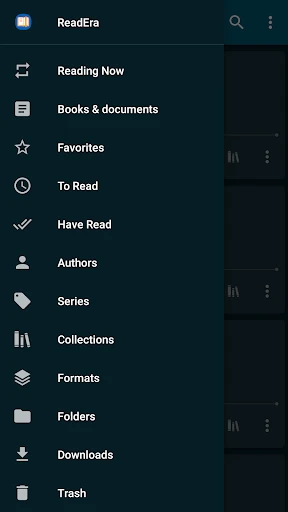
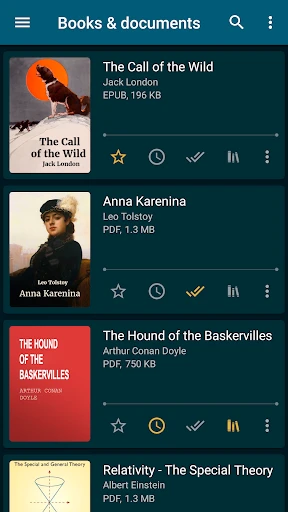


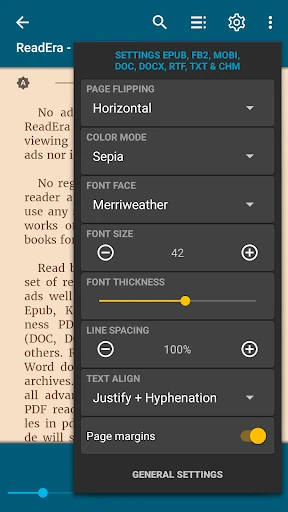
ReadEra – book reader pdf epub: A Universal Reading Companion
ReadEra is a versatile and powerful book reader application designed to handle a wide range of document formats, including PDF, EPUB, MOBI, FB2, and many others. Unlike many dedicated e-book readers, ReadEra operates without intrusive ads, unnecessary permissions, or built-in online stores. It functions as a comprehensive library manager and a smooth, customizable reading interface. The app prioritizes user privacy and offline access, allowing readers to organize, open, and enjoy their personal document collections without requiring an account or an internet connection for basic functionality. Its core philosophy is to provide a clean, efficient, and distraction-free reading experience for users who value their own content library over a curated bookstore.
Chapter 1: Function
ReadEra's core functionality revolves around seamless file management and reading. The app automatically scans the device's storage to find all supported e-book and document files, categorizing them into a unified library. It supports a broad spectrum of formats, from common ones like PDF and EPUB to less common ones like DJVU, CBR (comics), and RTF. For reading, it offers essential customization tools such as adjustable font size, typeface, line spacing, and margins. It features a night mode with multiple color themes, a powerful text-to-speech engine for listening, and the ability to add bookmarks, highlights, and notes. A standout feature is its automatic bookmarking system, which saves the reader's exact position upon closing a file, even if the file is moved to another folder. The app also includes a built-in file manager for renaming, deleting, or moving documents, and it allows for the creation of custom collections and reading lists. It handles both single-page and two-page layouts for PDFs, and offers smooth zoom and pan for image-heavy files.
Chapter 2: Value
The primary value proposition of ReadEra lies in its exceptional combination of privacy, versatility, and a zero-cost, ad-free experience. Unlike many popular readers that come with built-in stores, aggressive recommendations, or data tracking, ReadEra operates entirely offline for library management and reading. Users can manage thousands of personal documents without creating an account or sharing any data. This is a critical advantage for privacy-conscious individuals. Furthermore, its format support is among the most comprehensive in the market, eliminating the need for multiple apps for different file types. The app's performance is also a key benefit; it opens large PDFs and complex EPUBs with remarkable speed and stability, even on older or lower-end devices. Another significant advantage is its consistent cross-platform design. While primarily on Android, it offers a similar experience on iOS, ensuring a unified workflow. The absence of advertisements is not just a minor perk; it ensures that the reading process is never interrupted by pop-ups or banners, maintaining the immersive quality that avid readers demand. Finally, the automatic and reliable progress saving across formats and folders gives users peace of mind, knowing their place is always remembered, regardless of how they organize their digital library.
Chapter 3: Scenarios
ReadEra is ideally suited for a diverse range of users and daily life situations. Its primary target audience includes students and academics who need to manage a large collection of textbooks, research papers in PDF format, and academic journals. They can annotate, highlight, and create notes without the bloat of a full office suite. For avid novel readers who own a personal library of EPUB and MOBI files downloaded from various sources, ReadEra provides a clean, bookstore-free environment for uninterrupted reading. The app is also invaluable for professionals who regularly review documents, contracts, and reports on their mobile devices during commutes or business trips; the text-to-speech feature allows them to listen to documents while driving or exercising. Another key user group is comic book and manga fans, as ReadEra handles CBR and CBZ files effectively, offering a smooth page-turning experience. In everyday use, a user on a crowded subway can rely on ReadEra’s night mode for comfortable reading, while a student in a library can use the app to quickly search across multiple PDF chapters. The app serves equally well for someone reading a single novel during a holiday or a researcher cross-referencing dozens of articles.
Advantages
- opens pdf
- epub
- djvu
- mobi
- cbr without conversion
- zero ads and no in-app purchases for core reading
- remembers exact reading position across multiple books
- reads books directly from zip archives and cloud folders
- uses hardware acceleration for fast page rendering on low-end devices
Disadvantages
- no built-in store or library management for purchased books
- annotations cannot be exported as standard notes file
- lacks integration with dictionary apps or online translation APIs
- does not support streaming of audio books or read-aloud tts
- no dark mode toggle in system settings on android 5-7
Frequently Asked Questions
Q: What core file formats does ReadEra support?
A: ReadEra supports reading PDF, EPUB, DJVU, MOBI, FB2, CHM, CBR, CBZ, and other common book and document formats without requiring conversion or internet access. It handles both standard and reflowable layouts, making it a versatile offline reader for various e-book and comic files.
Q: Does ReadEra have any in-app purchases or ads?
A: ReadEra is completely free with no ads, no in-app purchases, and no subscriptions. All core reading features, including format support, bookmarks, and reading progress syncing via Google Drive, are available without any payments. It does not collect user data or require account registration to use.
Q: Can ReadEra read books from cloud storage or SD cards?
A: Yes, ReadEra can access books stored on the device’s internal storage, SD cards, and external USB drives. It also supports direct opening of files from cloud services like Google Drive and Dropbox, as well as from file manager apps. It does not have its own cloud storage.
Q: How does automatic reading progress sync work in ReadEra?
A: ReadEra syncs reading progress, bookmarks, and notes across multiple Android devices via a Google Drive account. The sync is automatic and does not require manual backup. It uses the same Google Drive folder for all books, ensuring seamless switching between phone and tablet. No data is stored on ReadEra servers.
Q: Can I customize text and background appearance when reading EPUBs?
A: Yes, ReadEra offers extensive customization for EPUB and other reflowable e-book formats. You can adjust font type, size, line spacing, margins, and background color (including dark mode). For PDFs, it provides zoom and page cropping but not text reflow. All settings are per-book adjustable.
Technical Information
Recommended for You

Bandsintown Concerts

Citi Bike

Star Tracker - Mobile Sky Map

Kodi

Good Morning Wishes

PerfectPic-Photo Edit・Collage
AI Drawing : Trace & Sketch

YoWindow Weather
Tarnished Checklist Premium

Picture Mushroom - Mushroom ID

Instacart: Earn money to shop

Authenticator App - SafeAuth

Universal Studios Hollywood

Learn Piano - Real Keyboard

AdventHealth

Face Massage, Skincare: forYou

Victoria's Secret—Bras & More

Instant Boost : Addon

Baby Monitor Saby - 3G Babycam

Crunchyroll

Piano - music & songs games

Picrew PFP & OC Maker

Gallery - Photo Gallery, Album