Remodel AI - Home Renovation

Remodel AI - Home Renovation
Remodel AI Home Renovation AI design for homeowners
Screenshots


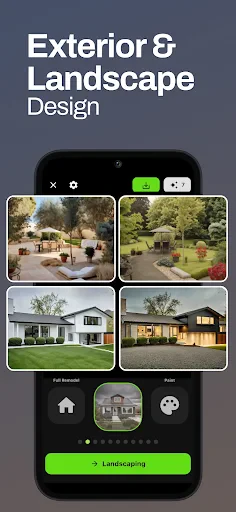
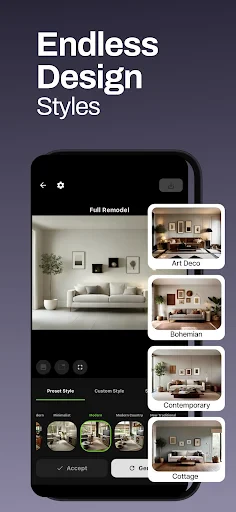

Remodel AI - Home Renovation: AI-Powered Interior and Exterior Design Tool
Remodel AI is a mobile application that leverages artificial intelligence to enable users to visualize home renovation and remodeling projects. By allowing users to upload a photo of their existing space, the app generates multiple realistic design variations in different styles, including modern, traditional, minimalist, and industrial. It serves as a practical tool for homeowners, renters, and real estate professionals to explore aesthetic changes without physical alterations or upfront costs.
Chapter 1: Function
Remodel AI’s core function is AI-driven photorealistic transformation of interior and exterior spaces. Users begin by taking or selecting a photograph of a room, facade, or garden. The app then offers a library of preset design styles—such as rustic, contemporary, or farmhouse—and auto-generates a transformed image that applies new colors, materials, flooring, cabinetry, lighting, and furniture suggestions. It also includes a virtual staging feature for empty rooms, allowing users to add virtual furniture and decor. Additionally, the app provides a side-by-side comparison of original and remodeled images for clear before-and-after visualization. Its interface is streamlined for one-tap generation, requiring no design expertise.
Chapter 2: Value
The primary value proposition of Remodel AI lies in its ability to drastically reduce the time, cost, and uncertainty associated with traditional home remodeling. For homeowners, it eliminates the need for expensive interior designers or physical mock-ups during the planning phase. Users can instantly experiment with dozens of design combinations—from flooring materials to wall paint colors—without any financial commitment or labor. This empowers informed decision-making by providing a realistic preview of the final result before hiring contractors or purchasing materials. The app also serves as a powerful communication tool between homeowners and professionals; users can present specific visual references to architects or builders, minimizing misinterpretation and redesign costs. For real estate agents, Remodel AI offers a competitive advantage by enabling virtual staging of vacant properties in high-quality interior styles, potentially accelerating sales and increasing property appeal. The application supports emotional decision-making, as seeing a potential future home layout fosters greater buyer confidence. Furthermore, the app’s efficiency saves weeks of research and guesswork, providing instant visual feedback that speeds up renovation planning cycles. Its AI technology continues to improve with user input, offering increasingly accurate and personalized design suggestions.
Chapter 3: Scenarios
Remodel AI is designed for a broad demographic, primarily targeting homeowners planning renovations, interior design enthusiasts, and real estate professionals. Typical use cases include a homeowner wanting to visualize a kitchen remodel before committing to cabinet replacements; a renter exploring temporary cosmetic changes in a rental unit to improve livability; and a realtor staging a vacant living room to appeal to potential buyers. The app is also useful for contractors who need to present multiple design options to clients quickly, and for DIY decorators seeking inspiration for small-scale projects such as bathroom tile upgrades or accent wall colors. In daily use, individuals can photograph any room in their home, select a style like a beach house or Scandinavian, and receive an instant AI-rendered image that guides their renovation decisions. The mobile format allows on-the-spot experimentation while shopping for materials or comparing paint samples.
Advantages
- turns room photos into multiple realistic renovation styles in seconds
- supports material swap like flooring
- paint
- and backsplash in one tap
- uses AI photorealistic rendering for accurate lighting and texture
- works offline after initial style model download
- offers side-by-side original vs remodel comparison view
Disadvantages
- limited to predefined style packs
- no custom design input
- high-resolution renders require paid subscription
- struggles with complex angles or non-square room layouts
- occasional lighting mismatch between new materials and original photo
- no AR preview for real-time furniture placement in room
Frequently Asked Questions
Q: What does Remodel AI do for home renovation?
A: Remodel AI allows users to visualize and plan home renovations by uploading photos of their space. It uses AI to generate realistic remodeled designs, offering style options like modern or rustic. No technical skills are needed—just select a room and apply changes.
Q: Is Remodel AI free to use or does it require purchases?
A: Remodel AI offers a free tier with basic features and limited design generations. Full access requires a subscription, which unlocks unlimited designs, high-resolution outputs, and advanced styles. No additional equipment is needed beyond a smartphone or computer.
Q: Does Remodel AI work on both iOS and Android devices?
A: Yes, Remodel AI is available for iOS and Android devices via their respective app stores. It requires iOS 13.0 or later and Android 8.0 or higher. The app also functions on tablets with compatible systems, but not on desktop computers.
Q: Can Remodel AI produce realistic before-and-after images?
A: Remodel AI does not support real-time AR preview or 3D walkthroughs. It generates static 2D images from uploaded photos, and lighting or structural changes are simulated. Complex renovations like plumbing or electrical layouts are beyond its scope—visualization only.
Q: What if I encounter errors or need help with the app?
A: Remodel AI offers in-app customer support via email and a help center with FAQs. Common issues like design loading failures are addressed in troubleshooting guides. No phone support or live chat is available; response times vary but typically within 48 hours.
Technical Information
Recommended for You

DJI Store - Try Virtual Flight

Sad ringtones phone 2024

Expedia: Hotels, Flights, Cars

Allē

Smart Life - Smart Living

Chase Mobile

Local Weather & News - Radar

Passport Parking

Simply Piano: Learn Piano Fast

Inkitt: Books, Novels, Stories

فیلتر شکن قوی پرسرعت Raad VPN

Connected Wifi Info

PDF Note Reader

Tile: Making Things Findable

Holy Bible, KJV Bible + Audio

12 Steps AA Companion

Xumo Play: Stream TV & Movies

Screen Mirroring Pro for Roku

Revolut: Spend, Save, Trade

Ting Sensor

My H-E-B

Zedge™ Wallpapers & Ringtones

DraftKings Pick6: Fantasy Game
