Passport Parking

Passport Parking
Passport Parking pay parking easy drive
Screenshots

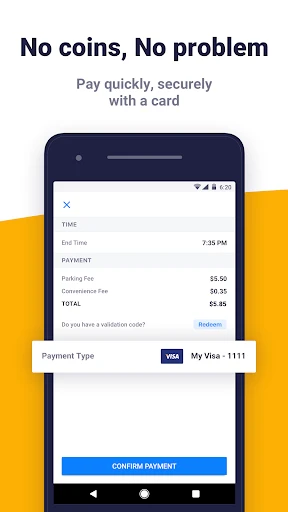


Passport Parking: Streamlined Digital Payment for Parking
Passport Parking is a mobile application designed to simplify the process of paying for parking across numerous cities and lots. It eliminates the need for physical coins, cards, or paper tickets by allowing users to manage parking sessions entirely from their smartphone. The app connects to a network of partnered parking zones, enabling drivers to start, extend, or end their parking remotely. It serves as a digital alternative to traditional parking meters, offering convenience and flexibility. The core value of Passport Parking lies in its ability to save time and reduce the hassle associated with parking payments, making it a practical tool for daily commuters, travelers, and urban residents.
Chapter 1: Function
Passport Parking provides a suite of core functions centered on digital parking management. Upon launching the app, a user creates an account and adds a payment method, such as a credit card or digital wallet. The primary function is to initiate a parking session by entering a zone number, which is displayed on signs in the parking area. The user sets the desired duration, and the app processes the payment in real time. A key function is the ability to extend the parking session remotely from anywhere, avoiding the risk of a ticket if the user is delayed. The app also sends notifications when the session is about to expire. Additional functions include viewing parking history, managing multiple vehicles, and receiving receipts for expense tracking. The app operates across a wide network of municipalities and private lots, making it a unified tool for various parking needs. The interface is designed for simplicity, requiring minimal taps to complete a transaction.
Chapter 2: Value
Passport Parking delivers significant value by addressing common pain points associated with traditional parking payment methods. Its primary advantage is convenience; users avoid the need to carry exact change or interact with malfunctioning meters. The remote extension feature directly reduces the likelihood of receiving parking tickets, which are often costly. The app also provides financial transparency by tracking all parking expenses in a single history log, which is useful for personal budgeting or business expense reports. For frequent parkers, the time saved by not queuing at payment kiosks or searching for change translates into increased daily efficiency. The app supports multiple vehicle profiles, which is beneficial for households with more than one car or for fleet management. From a broader perspective, Passport Parking integrates with city infrastructure to reduce congestion at meter points and supports cashless transactions, which are often faster and safer. The app also offers a seamless user experience with reliable customer support channels. Its compatibility with a diverse range of cities and private operators strengthens its value proposition, as users can rely on a single application for parking in different locations without downloading multiple apps. The combination of ticket prevention, expense tracking, and time savings makes it a cost-effective solution for anyone who parks in urban environments regularly.
Chapter 3: Scenarios
Passport Parking serves a diverse range of target user groups including daily commuters, business travelers, and urban residents. A primary scenario is the office worker who parks in a downtown garage each weekday. Using the app, they can extend their parking session during a long meeting without leaving their desk. Another scenario involves a sales representative who visits multiple client sites across different cities. The app allows them to pay for parking at each location without needing local change or different meter systems. Students and faculty on college campuses also benefit, as many university parking lots accept Passport Parking, enabling them to pay for hourly parking near lecture halls. Tourists visiting a new city can use the app to quickly park near attractions without understanding local payment kiosks. Additionally, ride-share drivers and delivery personnel use the app to manage short-term parking while making pickups or drop-offs, avoiding tickets during brief stops. The app is also used by event attendees at stadiums or concert venues that have partnered lots, allowing them to pre-pay for parking or extend their session during an event. These scenarios highlight the app’s utility in dynamic, time-sensitive environments where flexibility and speed are critical.
Advantages
- supports parking sessions across 1
- 500+ cities
- extend time remotely without returning to meter
- license plate lookup for quick session start
- push notifications 15 minutes before meter expires
- real-time parking zone map within app
Disadvantages
- requires stable cellular data to pay or extend
- no offline mode for areas with poor coverage
- session history not synced across multiple devices
- city-specific parking zone codes needed for first use
- in-app balance refunds can take several business days
Frequently Asked Questions
Q: What does Passport Parking do?
A: Passport Parking is a mobile payment app for parking meters and lots. It allows users to pay for parking sessions remotely, extend time without returning to the meter, and view payment history. The app uses GPS to locate available parking zones and processes payments via credit card or digital wallet.
Q: Is Passport Parking free to download and use?
A: The app is free to download. However, users must create an account and add a payment method. Parking transactions include the parking fee plus a small convenience fee per session, which varies by location. No subscription or additional equipment is required beyond a smartphone.
Q: Does Passport Parking work in all cities?
A: No. Passport Parking operates only in partnered cities and parking facilities across North America. Coverage is not universal. Users can check the app’s map or search by city to confirm availability. The app requires an internet connection to start or extend a session.
Q: How do I extend parking time using Passport Parking?
A: Open the app, go to your active session, and select that you can extend or add time. The app will process the additional fee if the zone permits extensions. Extensions are subject to local parking time limits and may not be possible if the max limit is reached.
Q: Can I get a refund for unused parking time?
A: Refund policies vary by parking authority. Passport Parking does not issue refunds directly; users must contact the local parking enforcement or city office listed in the app. The app records all transactions but has no standard refund process. Review local rules before purchasing.
Technical Information
Recommended for You

Firehouse Subs

AI Outfits: Try on Clothes

Beauty Camera: Selfie Editor

ArcStory - AI Comic generator

MetaTrader 5 — Forex, Stocks

LINE: Calls & Messages

Breastfeeding tracker Pump log

Talk & Translate - Translator

Speedometer: GPS Speedometer

Car Launcher

ZoZo Player - URL Video Player

Travelocity Hotels & Flights

Chat Cloner Secretly View Chat

Clubhouse

Smart Remote - Easy TV Control

Samsung SmartTag

Metrolink

QR Code Reader: QR Code Maker

Floor Plan Creator
ATSAPro

Maps All in One, Speedometer

ShiftLock

Symbolab: AI Math Solver