AR Draw Sketch & Paint
AR Draw Sketch & Paint
AR Drawing Tool for Realistic Sketch Art
Screenshots

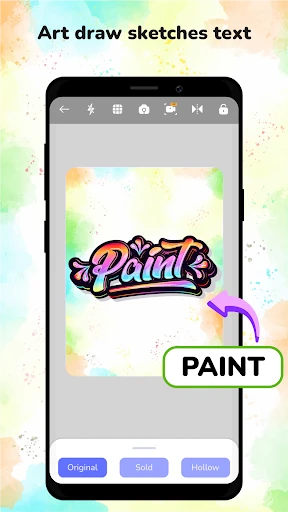
AR Draw Sketch & Paint: Augmented Reality Drawing Tool Overview
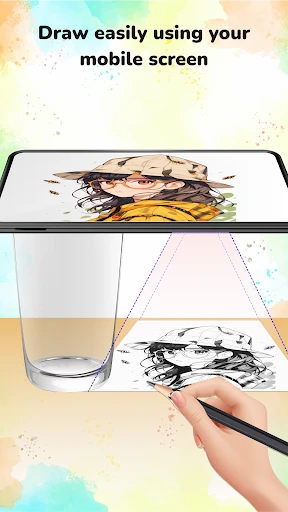
AR Draw Sketch & Paint is a mobile application that leverages augmented reality technology to assist users in creating drawings and sketches. The app uses the device's camera to overlay a reference image onto the real-world surface, allowing the user to trace the outlines and details directly onto paper or a canvas. It serves as a digital aid for traditional drawing, combining the convenience of a smartphone with the tactile experience of physical art. The application is designed for both beginners seeking to improve their skills and experienced artists looking for a quick proportion and perspective reference.
Chapter 1: Function
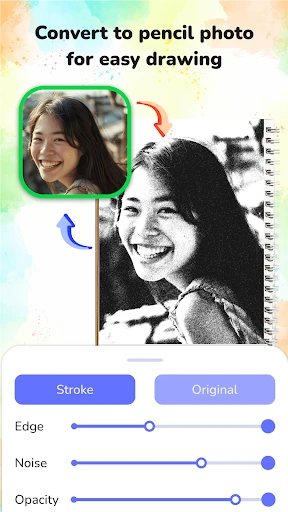
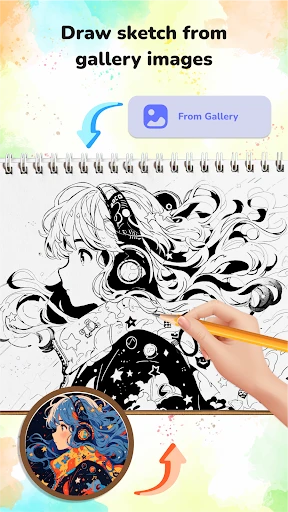
The core functions of AR Draw Sketch & Paint revolve around transforming any image into a traceable projection. Users can select an image from their gallery or use the in-app camera to capture a subject. The app then processes this image and displays it as a semi-transparent overlay on the live camera feed. The user can lock the image in place on a flat surface, such as a table or sketchbook. Key features include adjustable image opacity, brightness, and zoom controls for fine details. The app also offers a grid overlay option to help with proportions and composition. Additional functions include the ability to freeze the camera frame for a steady reference and a library of pre-loaded sample images for practice. The application operates without requiring an internet connection for core tracing functions, ensuring offline usability.
Chapter 2: Value
The value proposition of AR Draw Sketch & Paint lies in its ability to lower the barrier to entry for drawing while accelerating skill development. It eliminates the common frustration of getting proportions and perspective wrong by providing a real-time, adjustable guide directly aligned with the drawing surface. For beginners, the app reduces the intimidation factor of starting from a blank page, offering a structured method to practice hand-eye coordination and line confidence. For more advanced artists, it saves time on initial layout and blocking, allowing them to focus on shading, texture, and creative interpretation. The app also offers significant practical advantages: it is more convenient than traditional projectors, requiring no setup or special equipment beyond a phone and a surface. The ability to trace from any photograph means artists can replicate scenes, portraits, or complex objects with high accuracy. The app also serves as a learning tool, as users can gradually reduce the reliance on the overlay to develop freehand skills. Furthermore, the application is cost-effective, replacing expensive light boxes and projectors with a single download. Its value is also evident in mobile creativity; artists can draw anywhere, from a cafe to a park, without needing a stationary setup. The app is particularly useful for architectural sketching, fashion design, and character concept art where precision and speed are important.
Chapter 3: Scenarios
The primary target user groups for AR Draw Sketch & Paint include art students, hobbyist sketchers, digital artists practicing traditional techniques, and professionals needing quick visual references. Art students use the app to practice anatomy, still life, and landscape drawing by tracing photographs of models or scenes, helping them understand form and proportion without the pressure of perfection. Hobbyists who wish to create personalized gifts, such as portraits of family members or pets, find the app accessible for achieving a recognizable likeness without advanced drawing skills. The app is also used by educators in classroom settings to demonstrate drawing techniques, providing a clear visual aid that students can follow individually. Everyday use cases include sketching travel memories by tracing a photo taken on a trip, creating DIY art for home decor by copying illustrations, and designing custom patterns or calligraphy. The app also serves as a tool for collaborative art projects where multiple users trace different parts of a larger composition. Another common scenario is character design for game and comic artists who need to quickly generate consistent poses and features from reference sheets. The application supports creative exploration by allowing users to combine multiple traces or experiment with different styles based on a single reference image.
Advantages
- traces real-world images for precise outlines
- adjusts brush size and opacity mid-sketch
- works offline without internet requirement
- exports layered sketches for external editing
- supports front and rear camera reference capture
Disadvantages
- limited to 2D tracing with no 3D object mapping
- camera alignment drifts on fast hand movements
- no cloud sync for projects across devices
- basic filter effects replace full image editing
- overlays blurry on low-light camera input
Frequently Asked Questions
Q: What does AR Draw Sketch & Paint do?
A: AR Draw Sketch & Paint is a mobile app that uses augmented reality to project reference images onto a surface, allowing users to trace and draw by following outlines on their device screen. It supports real-time image overlay, adjustable transparency, and a built-in drawing toolset for sketching, painting, and coloring, requiring no additional hardware beyond a smartphone camera.
Q: Is the app free to use with in-app purchases?
A: The app offers a free version with basic features like image tracing and limited brush options. Full access to advanced tools, ad-free experience, additional filter packs, and high-resolution export requires a one-time in-app purchase or subscription. No external equipment or extra permissions beyond camera access are needed.
Q: Which devices and systems are compatible?
A: The app is compatible with iOS 12.0 or later and Android 8.0 or higher, supporting both phones and tablets with a rear camera. It works best on devices with gyroscope sensors for stable AR tracking. Older or low-end models may experience lag during real-time projection, especially with high-resolution images.
Q: Can I use my own photos for tracing?
A: Yes, users can import images from their device gallery or take a photo directly within the app for tracing. The app also provides a built-in library of preloaded templates. Image size is limited to 4096x4096 pixels to maintain performance, and traced output can be saved as PNG or JPEG files.
Q: How to fix a misaligned AR projection?
A: If the AR projection appears misaligned, ensure the surface is flat, non-reflective, and well-lit. Recalibrate by tapping the reset button in the AR settings, which reinitializes the camera and gyroscope. Move the device slowly from left to right until the anchor point locks. If persistent, restart the app or check for system updates.
Technical Information
Recommended for You

AI Face Swap Video App-Swapme

iRobot Home (Classic)

Gocrypto: Crypto Trading

Remote for Roku: TV Remote

Survey Junkie

Resume Builder - CV Engineer
GPS Maps Voice Navigation App

Hairstyles for short hair
180Score Football Predictions

FamilyAlbum - Photo Sharing

Knott's Berry Farm

Crafto
Erie Weather

Haystack News: Local TV News

Burner: Second Phone Number

Room Planner AI: Home Interior

MyHeritage: Family Tree & DNA

DRIVE Electric for Tesla
S25 Launcher One Ui

Shipt: Shopper and Driver

Zara
REI Co-op – Shop Outdoor Gear

LiveATC for Android