Kling AI: AI Image&Video Maker

Kling AI: AI Image&Video Maker
Kling AI makes image and video for creators
Screenshots
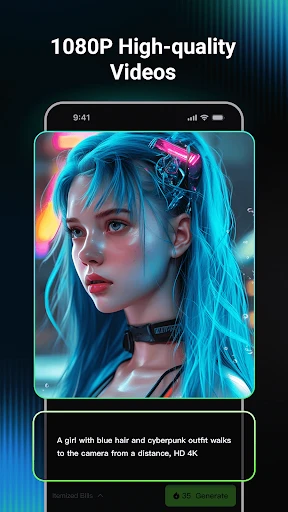
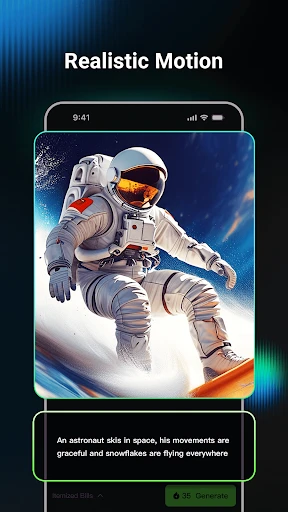
Kling AI: AI Image&Video Maker
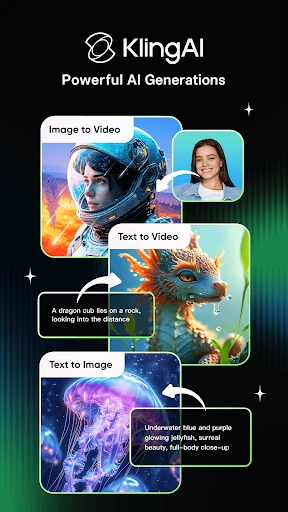
Kling AI is a powerful mobile application that leverages advanced artificial intelligence to generate high-quality images and videos from simple text prompts or uploaded reference images. Designed for both creators and professionals, it streamlines the process of visual content creation by translating ideas into polished multimedia assets in seconds. The app intelligently handles complex compositions, lighting, and motion, making sophisticated media production accessible to users without technical design skills. Its core engine focuses on realism and semantic understanding, ensuring generated outputs closely match user intent while offering a range of stylistic controls.
Chapter 1: Function
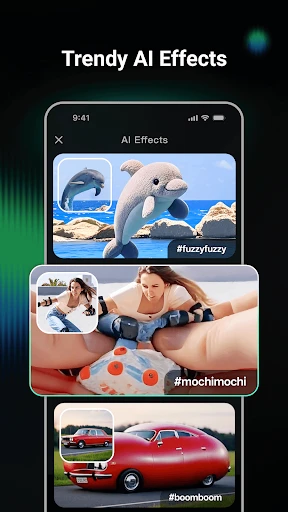
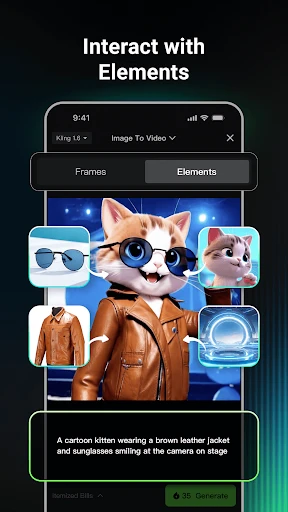
Kling AI's core functions center on AI-driven generation and editing. It accepts text descriptions to create images and short videos, supporting diverse styles including realism, anime, and digital art. Users can upload reference images for style transfer or as a base for further generation. The app offers a text-to-video feature that interprets narrative descriptions to produce coherent video clips with natural motion and scene transitions. It also includes an image-to-video capability, allowing static pictures to be animated with specified movements or effects. Additional tools allow for background removal, aspect ratio adjustment, and resolution enhancement. The interface provides simple sliders for controlling generation parameters like creativity level and motion intensity, enabling users to fine-tune results without complex technical knowledge.
Chapter 2: Value
Kling AI delivers significant value by democratizing professional-grade visual creation. Its primary advantage is speed: a task that would traditionally require hours of manual design or video editing is completed in under a minute, dramatically accelerating content production cycles. This efficiency reduces dependency on expensive software licenses and specialized personnel, cutting operational costs for individuals and small businesses. The app's ability to understand nuanced language and generate contextually accurate visuals ensures that even users with no artistic training can produce high-quality, publishable media. Key advantages include its realistic motion synthesis, which avoids common AI artifacts like distorted limbs or unnatural physics, and its consistent branding capability for businesses that need unified visual output across multiple assets. The app also offers a library of pre-set prompts and templates, lowering the barrier to entry for beginners. By handling tedious rendering tasks, Kling AI frees creators to focus on strategy and storytelling, enhancing overall productivity and creative output. The offline processing option for certain modes also ensures data privacy and usability without constant internet access.
Chapter 3: Scenarios
The primary target user groups for Kling AI include social media content creators, marketing professionals, and small business owners. Everyday use cases are diverse. A social media manager might use the app to quickly generate eye-catching video thumbnails or short animated clips for Instagram Reels and TikTok, selecting from pre-made templates to match brand aesthetics. A freelance graphic designer could employ it to produce concept art or product visualization mock-ups for client presentations, using the text-to-image function to iterate through multiple style variations rapidly. E-commerce sellers frequently utilize the image-to-video feature to animate product photos, creating dynamic listings that show a dress flowing or a gadget rotating, which increases customer engagement. Educators and presenters use the app to convert complex ideas into illustrative video segments for e-learning modules. Additionally, hobbyists and enthusiasts leverage Kling AI for personal creative projects, such as generating unique artwork for wallpapers or crafting short narrative videos for family events. The app is also valuable for rapid prototyping in game development and film pre-visualization, allowing teams to visualize scenes and characters before full production investment.
Advantages
- generates 6-second video clips from text prompts in under a minute
- supports motion brush for directing specific object movements in scenes
- offers 4K upscale option for both images and generated videos
- allows real-time preview of video results before final rendering
- includes camera movement controls like zoom and pan for dynamic shots
Disadvantages
- exported videos have a visible watermark unless paid subscription active
- free tier limits video length to 5 seconds with 1080p resolution cap
- motion brush accuracy drops on complex backgrounds with multiple subjects
- character consistency cannot be maintained across different video generations
- no offline mode available; requires stable internet connection throughout use
Frequently Asked Questions
Q: What core functions does Kling AI provide?
A: Kling AI is an AI-powered tool for generating images and videos from text prompts. It specializes in transforming descriptions into visual content, supporting both static image creation and short video generation. The app uses advanced machine learning models to interpret user inputs and produce corresponding visuals, with no need for manual editing skills from users.
Q: Is Kling AI free to use or does it require payment?
A: Kling AI operates on a freemium model. Basic image and video generation features are available for free, but with limited daily credits or resolution options. For higher-quality outputs, longer videos, or faster processing, users must purchase in-app subscriptions or credit packs. No additional external equipment is required beyond a smartphone.
Q: Which devices and systems are compatible with Kling AI?
A: Kling AI is compatible with iOS and Android devices running iOS 12.0+ or Android 8.0+. It is optimized for smartphones and tablets, requiring a stable internet connection for AI processing. The app does not support desktop or web versions as a standalone product, and no specific accessories or VR headsets are needed.
Q: Can Kling AI generate videos longer than a few seconds?
A: Free users are limited to generating videos up to 5 seconds in length. Longer durations, such as 10 or 15 seconds, require a paid subscription or additional credits. The generated video resolution also varies by plan; free tiers typically cap at 720p, while paid tiers unlock 1080p or higher. No offline generation is available.
Q: How does Kling AI handle copyright for generated content?
A: Users retain full ownership of content created via Kling AI. The app does not claim rights to generated images or videos. However, users are responsible for ensuring their prompts do not infringe on third-party copyrights or contain prohibited content. The app reserves the right to moderate outputs for policy violations under its terms of service.
Technical Information
Recommended for You

Stardew Valley Tracker

Backbone — Next-Level Play

WebComics - Webtoon & Manga

Diamond Painting by Number

Whoscall - Caller ID & Block

Apps 4 Chromecast & Android TV

17TRACK Package Tracker
Transparent clock weather Pro

Samsung Smart Switch Mobile

Emoji Maker: DIY Emoji Merge

Baby Sleep Sounds

CloudEdge

AI Photo Editor: Face Beauty
Coin Value - Coin Identifier

Cricket LineX: Fast Live score

Xfinity

Nova Launcher

Back Market - Buy & Sell tech

Chilis

Services Update Info

Total Wine & More

JB4 Mobile

Guidebook