Canva: AI Photo & Video Editor

Canva: AI Photo & Video Editor
Design your world with AI photo video editing for creators
Screenshots


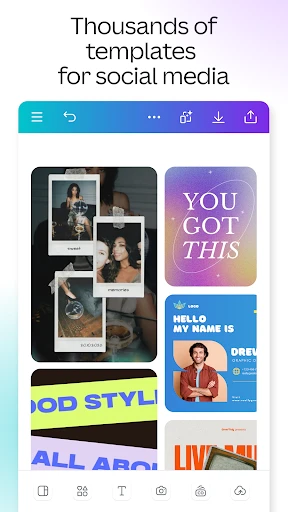
Canva: AI Photo & Video Editor – A Comprehensive Creative Platform Overview
Canva is a versatile and user-friendly graphic design application that integrates advanced artificial intelligence to simplify photo editing, video creation, and design tasks. It provides a vast library of templates, stock images, fonts, and elements, enabling users to produce professional-quality visual content without extensive design expertise. The app supports both mobile and desktop platforms, offering seamless cross-device synchronization. Its AI-powered tools, such as background removal, magic resize, and text-to-image generation, streamline workflows for individuals, creators, and businesses. Canva positions itself as an all-in-one solution for visual communication, bridging the gap between amateur creators and professional designers.
Chapter 1: Function
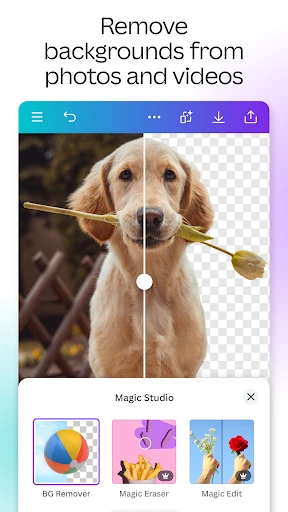
Canva’s core functions revolve around intuitive design creation and AI-enhanced editing. Users can start from thousands of customizable templates for social media posts, presentations, posters, videos, and more. The drag-and-drop interface allows easy integration of text, images, icons, and shapes. Key AI features include Magic Eraser for removing unwanted objects, Magic Edit for altering specific areas, and AI-powered background removal for photos and videos. The video editor supports trimming, transitions, filters, and text overlays, with tools like Magic Animate to add motion graphics. Additionally, the Brand Kit function enables businesses to store logos, colors, and fonts for consistent branding. The app also offers collaborative features, allowing teams to edit and comment in real time. Overall, Canva democratizes design by making complex editing accessible to everyone.
Chapter 2: Value
Canva’s value proposition lies in its ability to drastically reduce the time, cost, and skill barrier associated with visual content creation. For individual users, it eliminates the need for expensive software like Adobe Creative Suite while delivering comparable results through AI automation. Professionals and small business owners can produce consistent, branded graphics for marketing, social media, and presentations without hiring designers. The app’s AI features enhance productivity: Magic Resize instantly adapts designs to multiple platform dimensions, and Background Removal saves hours of manual clipping. Its free tier offers substantial functionality, while the Pro subscription unlocks advanced tools like 100GB cloud storage, transparent backgrounds, and access to 100 million premium stock assets. Canva also serves as a learning platform, offering tutorials and design tips integrated into the workflow. The key advantage is its adaptability: from a quick social media post to an animated video explainer, Canva handles diverse needs within a single ecosystem, fostering creativity and efficiency across personal, educational, and professional scenarios.
Chapter 3: Scenarios
Canva caters to a wide range of target user groups. The primary audience includes social media managers, small business owners, marketers, educators, students, and content creators who need rapid, visually appealing outputs without deep design skills. Everyday use cases include creating Instagram stories, YouTube thumbnails, LinkedIn banners, event invitations, resumes, and lesson plans. For businesses, Canva facilitates the production of sales presentations, product catalogs, and email headers. Educators use it to design worksheets, infographics, and classroom posters. Freelancers and entrepreneurs leverage the platform to build lead magnets, digital planners, and promotional flyers. The collaborative features make it ideal for remote teams working on shared projects, such as designing a campaign across time zones. Additionally, hobbyists use Canva for photo collages, travel albums, and personal blogs. Its mobile app ensures that users can edit on-the-go, making it a practical tool for life pattern where inspiration strikes at any moment. Ultimately, Canva addresses the growing demand for self-service design, empowering users to transform ideas into polished visual communications quickly.
Advantages
- drag-and-drop design with 250k+ templates
- real-time team collaboration on the same canvas
- AI background removal works on complex images
- magic resize adapts designs for multiple platforms
- browser-based editing requires no software install
Disadvantages
- free export limited to PNG with watermark
- AI image generation lags on low-end devices
- template undo history resets on page refresh
- video timeline lacks frame-by-frame precision
- font search ignores non-English character sets
Frequently Asked Questions
Q: What core features does Canva offer for editing?
A: Canva is a graphic design platform offering AI-powered photo and video editing, templates for social media, presentations, posters, and more. Core features include drag-and-drop design tools, background remover, Magic Eraser, text-to-image, and video trimming. It integrates with stock photo libraries and allows team collaboration. No additional equipment is required beyond a device and internet connection. Basic usage is free with limited premium assets.
Q: Is Canva free to use or does it require in-app purchases?
A: Canva operates on a freemium model. The basic version is free with access to thousands of templates, images, and design tools. In-app purchases unlock Canva Pro features like unlimited premium assets, background remover, brand kits, and advanced AI tools. There is no mandatory subscription for core editing functions. No additional equipment is needed.
Q: Does Canva work on both iOS and Android devices?
A: Canva is compatible with iOS (iPhone and iPad) and Android devices, as well as web browsers on desktop and laptops. The app requires iOS 13.0 or later and Android 6.0 or higher. It is optimized for mobile editing with touch gestures. No specific hardware or external permissions beyond standard camera/gallery access are required.
Q: How does Canva handle export quality and file size limits?
A: Canva allows exports in multiple formats including PNG, JPG, PDF, MP4, and GIF. Free users can export up to 50 files per month with standard resolution. File size limits apply: images up to 25 MB and videos up to 1 GB for free accounts. Pro users get higher resolution (up to 4K video) and unlimited exports. Large files may require stable internet.
Q: Can Canva edit videos with audio or add text overlays?
A: Yes, Canva supports basic video editing including trimming, splitting, merging clips, adding audio tracks or voiceovers, and inserting text overlays, stickers, and animations. It includes a library of royalty-free music and sound effects. Advanced features like speed control or keyframe animation are limited to Pro. No external software is needed for audio integration.
Technical Information
Recommended for You

Calculator - photo vault

ZBD: Earn Bitcoin Rewards

Denny's

Empower: Advance & Credit

what3words: Navigation & Maps

Ancestry: Family History & DNA

Ecosia - Safe Internet Browser

EMT Review Plus

جاباما | اجاره ویلا و اقامتگاه

Cubasis 3 - DAW & Music Studio

Momo - AI Photo Generator

Video Compressor & Converter

Miles - Video chat online

Car play/Android Auto Sync

GPS Coordinates Locator Map
Tattoo Maker - Tattoo Design

GameChanger

PassWarrior - Montana

Messenger - Texting App

Cloned Voices

NBC LA: News, Weather

Living Worlds – Mark Ferrari
ATSAPro