Alphablocks, How to Write

Alphablocks, How to Write
Alphablocks Write teaches kids letters through fun tracing play
Screenshots
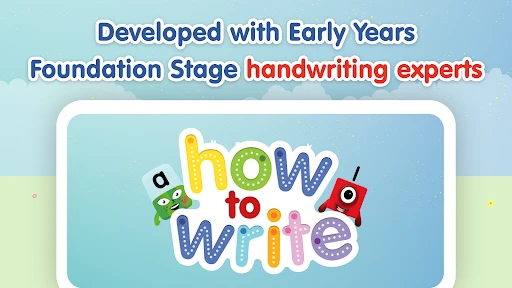
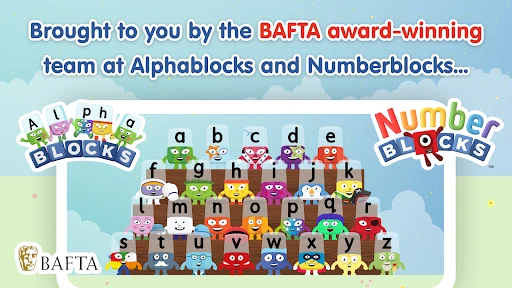
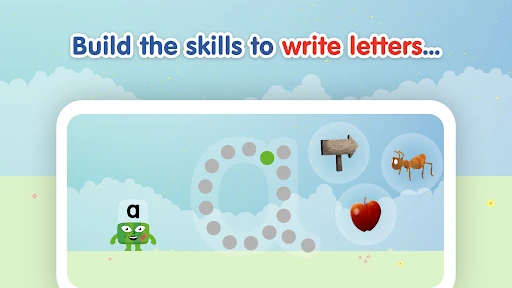
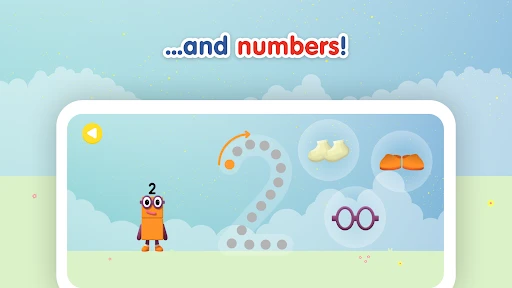
Alphablocks How to Write: A Fun Phonics-Based Handwriting App for Early Learners
Alphablocks How to Write is an educational mobile application designed to teach young children the fundamentals of handwriting and letter formation. Based on the popular BBC CBeebies Alphablocks series, the app uses a systematic phonics approach combined with engaging animations and interactive tracing mechanics. It guides children through each letter of the alphabet, focusing on both uppercase and lowercase forms, while simultaneously reinforcing the phonetic sounds associated with each letter. The application is specifically tailored for preschool and kindergarten-aged children, offering a safe, ad-free environment that encourages independent learning. Its core design philosophy centers on making the often tedious practice of handwriting enjoyable through rewards, clear visual cues, and the familiar voice of the Alphablocks characters. By integrating phonics instruction directly into the writing process, the app aims to build a strong foundation for early literacy, bridging the gap between recognizing letters and being able to write them legibly. The interface is simple and intuitive, requiring minimal adult supervision, making it a practical tool for both home and classroom settings.
Chapter 1: Function
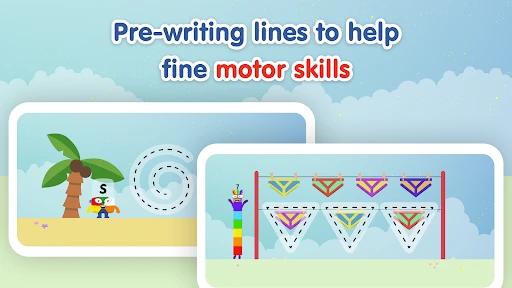
The core function of Alphablocks How to Write is to provide a structured, interactive handwriting curriculum for young children. The app focuses on teaching correct letter formation through guided tracing activities. Each letter is presented in a dedicated lesson where a friendly Alphablock character demonstrates the proper stroke order using animated arrows and audio instructions. Children then practice by tracing the letter with their finger on the screen, receiving real-time feedback. The app employs a 'four-step' method for each letter: introduction to the letter and its sound, watching the formation demonstration, tracing the letter with visual guides, and finally attempting to write it independently. Beyond basic tracing, the app includes phonics integration; when a child successfully writes a letter, it sounds out its phonetic pronunciation. It also features a word-building component, allowing children to hear and form simple three-letter words using the letters they have mastered. The application includes a reward system where correct tracing unlocks stickers and new Alphablock characters, maintaining motivation. It systematically progresses from easier letters like 'a' and 't' to more complex ones, and differentiates between lowercase and uppercase writing exercises.
Chapter 2: Value
The primary value of Alphablocks How to Write lies in its unique synthesis of phonics education and handwriting instruction, a combination that addresses a critical developmental milestone in early childhood. Unlike many writing apps that treat letter formation as a purely motor skill, this app concurrently teaches the alphabetic principle, reinforcing that each written symbol corresponds to a specific sound. This dual focus accelerates literacy development by building both phonemic awareness and fine motor control simultaneously. The app’s key advantage is its reliance on the established educational credibility of the Alphablocks brand, which is already trusted by parents and teachers worldwide for its proven phonics methodology. Children are motivated to engage because they are interacting with beloved characters in a game-like environment, transforming a potentially frustrating activity into a delightful play session. Furthermore, the app offers significant practical value for parents and educators. Its self-correcting and looped feedback mechanism allows children to practice independently without constant adult intervention, freeing up caregivers to attend to other tasks while ensuring the child is learning correct techniques. The visual and audible guidance for stroke order prevents the formation of bad habits, such as writing from the bottom up, which are difficult to correct later. The ability to track a child’s progress, seeing which letters they have mastered and which require more practice, provides valuable insight for targeted learning support. In an educational landscape increasingly focused on digital literacy, this app offers a balanced solution that uses technology to enhance, rather than replace, the foundational skill of handwriting.
Chapter 3: Scenarios
The primary target user group for Alphablocks How to Write is children aged 3 to 6 years old who are in the pre-reading and early writing stages. It is particularly beneficial for children who have already been introduced to the Alphablocks TV series or the phonics program, as it provides a hands-on extension to their learning. A key everyday use case is in the home environment, where a parent or caregiver can set aside 10 to 15 minutes for the child to practice independently on a tablet, serving as a structured 'homework' or learning activity that does not require direct adult supervision. The app is also ideal for use in preschool and kindergarten classroom settings. Teachers can incorporate it into literacy station rotations, allowing small groups of children to practice letter formation while the teacher works with others. The app’s progressive difficulty makes it suitable for differentiated instruction. For children with fine motor delays or those who struggle with traditional pen-and-paper handwriting, the app offers a low-pressure, forgiving alternative to build confidence and muscle memory before transitioning to physical writing tools. Additionally, the app serves as a valuable tool for children learning English as a second language, providing clear, repetitive audio of letter sounds and names alongside visual tracing cues. It is also commonly used during travel or waiting times, as it provides a quiet, educational activity that keeps a child engaged without requiring physical supplies like pencils and paper.
Advantages
- letter tracing with phonics sounds for each stroke
- adaptive difficulty increases as child’s accuracy improves
- offline play available after initial download
- replayable mini-games reinforce letter formation memory
- voice feedback corrects grip and direction in real-time
Disadvantages
- no multi-user profiles for siblings sharing device
- limited uppercase letter practice compared to lowercase
- requires precise touch input on smaller screens
- can’t skip intro animations for faster session start
- stroke order detection fails on some cursive attempts
Frequently Asked Questions
Q: What is Alphablocks How to Write's main function?
A: Alphablocks How to Write is an educational app that teaches children to write letters and words through interactive tracing exercises. It uses phonics-based guidance from the Alphablocks characters to help preschool and early primary school kids develop handwriting skills. The app focuses on letter formation, stroke order, and basic word writing without requiring an internet connection for core lessons.
Q: Is the app free to use or does it require purchases?
A: The app offers a free trial with limited content. Full access to all letter sets and writing activities requires a one-time in-app purchase or a subscription. No additional physical equipment is needed beyond a touchscreen device. All permissions are limited to storage for saving progress and optional microphone for voice feedback features.
Q: Does it work on both iOS and Android devices?
A: Alphablocks How to Write is compatible with iOS devices running iOS 13.0 or later and Android devices running Android 6.0 or later. It supports both smartphones and tablets but performs optimally on screens 7 inches or larger. The app is designed for children aged 3-6 and includes accessibility features like adjustable font size and color contrast.
Q: How does the app teach letter writing without an internet connection?
A: The app downloads all writing lessons and character animations locally during initial setup. Core tracing exercises, letter sounds, and progress tracking work fully offline. Only optional features like sharing achievements or downloading additional content packs require an internet connection. This ensures uninterrupted learning even without Wi-Fi or cellular data.
Q: Can multiple children share one account with separate progress?
A: Yes, the app supports up to four individual profiles per device. Each child's progress in letter mastery, completed words, and writing accuracy is saved separately under a named profile. Parents can reset individual profiles without affecting others. Profile settings can be locked with a simple math puzzle to prevent accidental changes by children.
Technical Information
Recommended for You

Obby Parkour: Runner Game

FINAL FANTASY VIII Remastered

ONE PIECE TREASURE CRUISE-RPG

Tower Craft:Skyscraper Builder

Pepi Super Stores: Fun & Games

City Truck Transport Games 3d

Kids Games: For Toddlers 3-5

Rope Gangster Crime City

Peace Word Search

Wizario: Idle Magic RPG

World War Heroes — WW2 PvP FPS

Fluid Art:Color By Number

Dune: Imperium Digital

GODDESS OF VICTORY: NIKKE

Who Wants to Be a Millionaire?

World of Artillery: Cannon War

Project Entropy

Cytus II

Tilescapes - Onnect Match Game

Anima Color - Paint by Number

Human Fall Flat
Melon Sandbox

Merge Archers: Bow and Arrow