Zen Color - Color By Number

Zen Color - Color By Number
Zen Color calming paint by numbers for stress relief
Screenshots

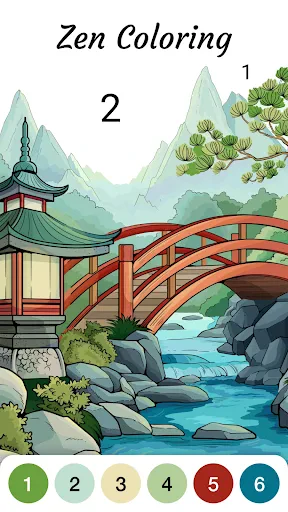
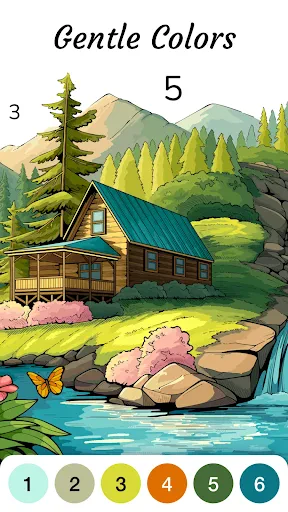
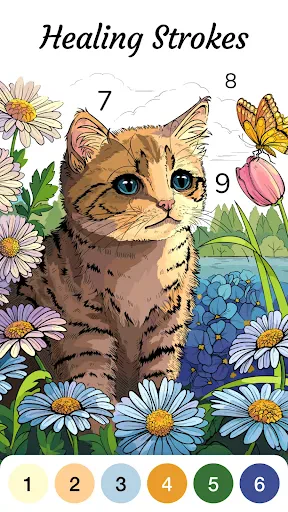
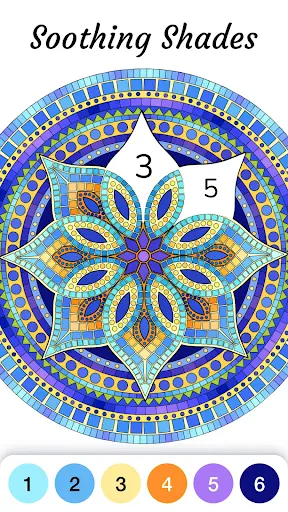
Zen Color - Color By Number: A Calming Digital Art Experience
Zen Color is a mobile application that transforms the traditional paint-by-numbers concept into a relaxing digital activity. It offers a vast library of intricate illustrations and patterns, each segmented into numbered sections. Users simply select the color corresponding to each number to fill in the image, gradually creating a vibrant and complete piece of art. The app is designed to be a portable creative outlet for stress relief and mindfulness, allowing users to focus on the simple, repetitive action of coloring without needing any physical art supplies or cleanup.
Chapter 1: Function
The core function of Zen Color is to provide a guided and effortless coloring experience. Users begin by choosing from a wide selection of digital artworks, including landscapes, animals, mandalas, and fantasy themes. Each image is pre-labeled with numbered areas. The app provides a comprehensive palette of digital pigments that correspond to these numbers. By tapping or long-pressing on a numbered segment, the user fills it with the correct color. Advanced features include pinch-to-zoom for detailed sections, a hint system to locate difficult numbers, and a preview function to see the final colored image. The app also tracks progress and allows users to save and share their finished works, creating a satisfying sense of accomplishment without the need for artistic skill.
Chapter 2: Value
The primary value proposition of Zen Color lies in its ability to promote mental well-being and structured creativity. In a fast-paced, high-stress world, the app offers an accessible, low-effort method for achieving a state of flow. The mechanical task of filling in numbered spaces requires just enough concentration to quiet a racing mind, acting as a form of active meditation. This focus on the present moment helps reduce anxiety and provides a digital detox from more demanding or social media-based apps. Furthermore, it democratizes art creation; users who feel they have no artistic talent can produce beautiful, complex images. This boosts self-esteem and provides a tangible sense of achievement. Unlike physical coloring books, there are no costs for new books, no need for markers that dry out, and no risk of going outside the lines. The endless variety of free and premium images ensures long-term engagement, while the soothing color palettes and lack of timers or competitive elements reinforce a purely personal and non-judgmental creative journey. For those seeking a portable, clean, and effective way to unwind, Zen Color provides immediate therapeutic value.
Chapter 3: Scenarios
The primary target user groups for Zen Color are adults and older teenagers seeking stress relief, mindfulness, and a creative hobby without high barriers to entry. Ideal everyday use cases include unwinding after a long workday during a commute or before sleep, as the app does not require Wi-Fi after downloading an image. It is also perfectly suited for periods of waiting, such as in doctor's offices or during travel. Busy parents or professionals with limited time can engage in a quick 5-to-10-minute coloring session to reset their focus without a major time commitment. Additionally, the app serves individuals with anxiety or concentration issues, providing a calming focal point to manage symptoms. For elderly users, it offers a gentle cognitive exercise that maintains fine motor skills and works as a source of quiet entertainment. The app is also valuable in educational settings for teaching color recognition and patience or as a shared relaxing activity for friends or family members who live apart, where they can finish the same image and compare results.
Advantages
- turn any photo into color-by-number pages instantly
- offline mode works without internet for on-the-go coloring
- precise number-to-color mapping reduces decision fatigue
- wide palette of 24+ hues for detailed shading
- auto-save progress prevents losing half-finished artworks
Disadvantages
- in-app purchase required to unlock most premium palettes
- complex photos get too many tiny numbered cells
- no direct social sharing feature to export creations
- ads interrupt flow every few completed sections
- manually zooming on small cells can be cumbersome
Frequently Asked Questions
Q: What is Zen Color's core function?
A: Zen Color is a color-by-number app that lets users tap numbered sections to fill intricate artworks. It offers a relaxing, meditative experience with a library of hundreds of free images, including mandalas, animals, and landscapes. No drawing skills are required, making it accessible for all ages.
Q: Is the app free to use or does it require purchases?
A: Zen Color is free to download and play. It includes a vast collection of free pictures unlocked daily. Optional in-app purchases are available for premium images, ad removal, or extra color palettes. No additional equipment or subscriptions are required to enjoy the core experience.
Q: What devices and systems are supported?
A: Zen Color is compatible with iOS and Android devices, including smartphones and tablets. It requires iOS 11.0 or later for Apple devices and Android 5.0 (Lollipop) or higher for Android. The app is optimized for touch screens and supports offline play after downloading images.
Q: How does the color-by-number system work?
A: Each image is divided into numbered areas. Users select a color from the palette matching the number, then tap the corresponding section to fill it. The app automatically stays within the lines. A magnifying glass feature helps with tiny sections, preventing errors. No Wi-Fi is needed once the image is downloaded.
Q: Can I share my finished artwork on social media?
A: Yes, Zen Color includes a built-in sharing feature. After completing an image, users can save it to their device gallery or directly share it on platforms like Instagram, Facebook, and Twitter. The app also offers a time-lapse replay of the coloring process for sharing creative progress videos.
Technical Information
Recommended for You

CarX Street

Beat Music Racing: Motor&Racer

Hollywood Story®: Fashion Star

Hex: Anxiety Relief Relax Game

Flip Beat: Ragdoll Shooter

Pokémon UNITE

Cookingdom

DOP: Draw One Part

Classic Words With Friends

Parking Jam: Car Parking Games

Drawing Games: Paint And Color

Zero to Hero: Pixel Saga

Brainy Prankster

Yazy the yatzy dice game

Road Jam : Gridlock Escape

Sinner Mix - Kiss Music Box

Sky: Children of the Light

Vehicle Masters:Car Driver 3D

Snake Run Race・3D Running Game
Bubble Shooter
Math Kids: Math Games For Kids

Paper Delivery Boy

Pokémon Masters EX