Race Craft - Kids Car Games

Race Craft - Kids Car Games
Racing fun builds skills for preschool boys
Screenshots

Race Craft - Kids Car Games: Building Skills Through Racing Play
Race Craft - Kids Car Games is a mobile application designed specifically for young children, offering a safe and engaging introduction to the world of cars, racing, and basic vehicle mechanics. The app combines simple driving simulations with creative building and maintenance activities, all presented in a colorful, child-friendly interface. It aims to entertain while subtly developing fine motor skills, hand-eye coordination, and early problem-solving abilities. Without the use of complex controls or violent themes, Race Craft provides a digital playground where children can experiment with car assembly, customization, and driving on various tracks. The app’s core philosophy centers on learning through doing, allowing kids to understand cause and effect as they fix engines, change tires, and steer their vehicles. Parents can trust the environment as it contains no ads, no external links, and focuses purely on constructive, screen-based play. With multiple modes and unlockable content, the app encourages repeated play without becoming repetitive, making it a reliable tool for quiet-time engagement or travel entertainment.
Chapter 1: Function
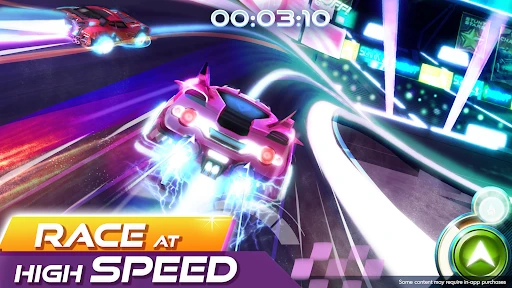
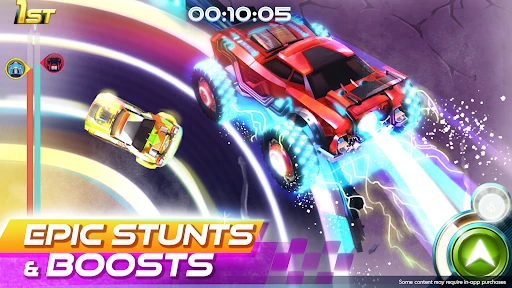
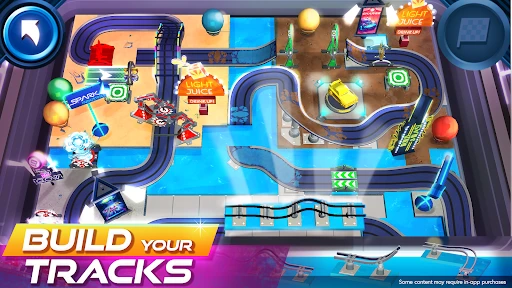
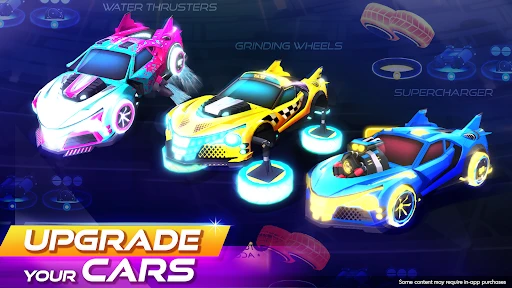
The app’s core functions revolve around three interconnected activities: car assembly, customization, and driving. In the assembly mode, children drag and drop parts such as wheels, chassis, and engines to build a complete car from scratch, learning basic mechanical relationships in the process. The customization mode allows players to paint their cars, apply stickers, and choose accessories like spoilers or headlights, fostering creativity and personal expression. The driving mode presents simple, obstacle-free tracks where kids control their created vehicles using intuitive tilt or tap controls, moving forward and steering to collect stars and complete laps. Each successful drive rewards the player with in-game currency, which can be used to unlock new parts and paint options, creating a positive feedback loop that encourages goal-setting and persistence. Additional functions include a garage for storing multiple custom builds and a repair station where children must match shapes or colors to fix fictional damage, reinforcing pattern recognition. The interface uses large buttons, minimal text, and voice prompts to ensure non-readers can navigate independently, and all animations are immediate and responsive to maintain engagement without frustration.
Chapter 2: Value
Race Craft - Kids Car Games delivers significant educational and developmental value by transforming screen time into a hands-on learning experience. Its primary advantage lies in the integration of creative construction with motor skill practice. Unlike many passive video alternatives, this app requires active participation: children must think critically about which parts fit together, plan their car’s appearance, and coordinate their movements to drive effectively. This process naturally cultivates spatial awareness as they visualize how different components affect the car’s stability and speed. The trial-and-error element, such as choosing wrong parts and seeing the car fail to move, teaches resilience and logical reasoning in a low-stakes environment. For parents, the app offers peace of mind through its adherence to child safety standards: no advertisements, no in-app purchases that bypass parental gates, and no data collection. This turns a potential source of distraction into a reliable, educational tool. The progressive difficulty system ensures children remain challenged but not overwhelmed, adapting to their growing skills. Furthermore, the app promotes delayed gratification, as children must earn currency through driving to unlock desired items, building patience and motivation. It also serves as a bridge between digital and physical play, often inspiring kids to recreate car-building scenarios with real blocks or toy vehicles. In a media landscape filled with passive content, Race Craft stands out as a constructive alternative that builds confidence, fine muscle control, and basic engineering concepts in a format young children find irresistible.
Chapter 3: Scenarios
The primary target user group for Race Craft - Kids Car Games is children aged three to seven years old, particularly those who show an early interest in vehicles, building toys, or cause-and-effect games. It is especially suitable for preschoolers who are developing their fine motor skills and need controlled, non-frustrating digital activities. Everyday use cases include quiet time at home, where parents seek a screen-based activity that promotes thinking rather than simple watching. It is also ideal for travel, such as long car rides or plane trips, as the offline functionality ensures play without internet dependency. In waiting rooms or restaurants, the app provides a calm, self-contained diversion that does not require constant parental intervention. Educators of early childhood programs can use it as a supplemental tool during free-play stations, allowing children to practice following multi-step instructions and sharing completed designs with peers. Sibling groups benefit as well, since the app encourages turn-taking, with one child building a car while another drives, fostering cooperative play. Additionally, it serves children with varied attention spans; the short, rewarding driving loops accommodate those who need quick accomplishments, while the detailed customization appeals to more detail-oriented players. Parents looking for a starter app for their child’s first tablet experiences will find Race Craft’s simple navigation and failure-tolerant design ideal for building digital literacy without fear of mistakes.
Advantages
- teaches real traffic rules through driving missions
- offers 50+ vehicle customization options for creativity
- voice-guided instructions help non-reading kids play
- physics-based car handling varies by vehicle type
- offline play supported without wifi requirement
Disadvantages
- limited map variety with only 3 themed environments
- reward system relies heavily on repetitive lap tasks
- no multiplayer mode for competitive racing with friends
- camera angle fixed behind car
- no perspective switch
- some car parts locked behind daily login streaks
Frequently Asked Questions
Q: What is the main purpose of Race Craft?
A: Race Craft is a children's car game app designed for toddlers and preschoolers. Its core function is to provide safe, simple racing and vehicle-building activities that teach basic cause-and-effect, color recognition, and motor skills. It offers a construction mode where kids can assemble cars from parts, plus a free-driving mode with no time limits or scores. The app uses cartoon graphics and touch controls, with no text-heavy instructions, making it accessible for non-readers.
Q: Is Race Craft free to play or does it have in-app purchases?
A: Race Craft is a free-to-download app with limited free content. It offers one free car assembly set and two free driving tracks. Additional vehicle parts, themed tracks, and paint customization options are locked behind a single in-app purchase of $2.99, which unlocks all current and future content permanently. There are no recurring subscriptions, ads, or consumable purchases.
Q: What devices and systems are supported for Race Craft?
A: Race Craft supports iOS devices running version 12.0 or later, including iPhone, iPad, and iPod Touch. On Android, it requires version 7.0 or newer. The app is optimized for tablets with a minimum 7-inch screen. It does not currently support Amazon Fire tablets, Windows devices, or Chromebooks. No additional equipment like a gamepad or physical controller is required.
Q: Can multiple children use Race Craft on the same device?
A: The app does not feature a multi-profile or multi-user account system. Each child will share the same saved progress and unlocked items on the same device. However, parents can delete the app's local data via device settings to reset all progress for a fresh start. There is no cloud save function, so progress cannot be transferred between devices.
Q: How do I remove ads or get support for technical issues?
A: Race Craft contains no third-party ads or pop-ups in its design, so no ad-removal purchase is needed. For technical support, such as crashes on startup or missing content after an update, users should email the developer directly through the 'Contact Us' button in the app's settings menu. The developer typically responds within 48 hours but does not offer phone or chat support.
Technical Information
Recommended for You

Match Factory!

DOP Delete Stories: Erase Game

My Little Universe

456 Prison: Monster survival

MONOPOLY GO!

Real Piano

Car Jam Solver: Traffic Jam
Wordscapes Solitaire

Solitaire - 2025

Mini Antistress Relaxing Games

Music Ball Tunes: Falling Ball

DRAGON QUEST V
Connection: Logic Games

Bingo Classic - Bingo Games

Project Makeover

Solitaire - Card Game 2025

Grand Mobile:RP Life Simulator

The Game of Life 2

Word Trip - Word Puzzle Game

DOP: Draw One Part

Perfect Tidy

Word Search Trip

Zombie Waves
