Incredibox

Incredibox
Incredibox music maker for all ages to mix beats and create
Screenshots


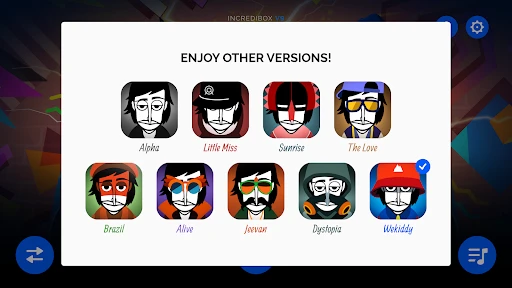
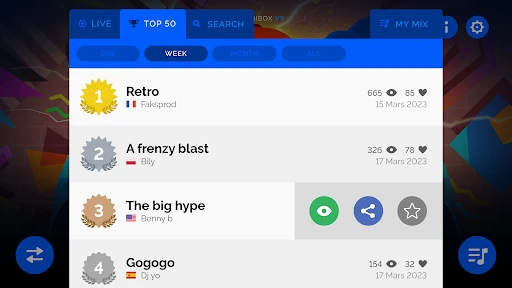
Incredibox: Music Creation Made Simple and Fun
Incredibox is an interactive music-making app that transforms users into beatboxers and composers without any musical training. Designed for casual creativity and professional curiosity alike, the app simplifies the complex process of mixing beats, melodies, effects, and vocals by dragging and dropping icons onto animated characters. Each character represents a distinct sound loop, and users can layer up to seven tracks to create unique compositions. The result is a playful, visually engaging experience that encourages experimentation and musical expression. Available on both Google Play and the Apple App Store, Incredibox combines intuitive design with high-quality audio samples, making it accessible to children, hobbyists, and music enthusiasts seeking a fast, rewarding creative outlet.
Chapter 1: Function
Incredibox offers a streamlined interface where users create music by selecting from preset sound categories: beats, effects, melodies, and voices. Each category contains several animated characters, each dragging a specific loop or sound effect onto the stage. Users can start by dropping a beat character to set the rhythm, then layer melodies, add vocal harmonies, and sprinkle effects for texture. The app provides up to seven slots simultaneously, allowing sophisticated arrangements. A key function is the automatic synchronization of all loops, ensuring harmonic and rhythmic coherence regardless of the user’s choices. Additionally, users can record their mixes as videos or audio files, share them within the app’s community, or unlock bonus content by discovering special sound combinations. The interface is entirely gesture-based, with no menus or settings to navigate, keeping the focus on immediate, tactile creation.
Chapter 2: Value
Incredibox delivers exceptional value by democratizing music production. Its primary advantage is removing the technical barriers—no knowledge of music theory, beat matching, or mixing software is required. The app’s drag-and-drop system makes composition as simple as playing a game, yet the results can sound polished and professional. For educators, it serves as a tool to introduce rhythm, layering, and arrangement concepts in an engaging, non-intimidating way. For casual users, it provides a stress-free creative escape, enabling anyone to produce a satisfying track in under a minute. The app also fosters a sense of community: users can share their mixes publicly, vote on others’ creations, and discover new combinations. This social aspect encourages repeated use and exploration. Furthermore, the recurring introduction of new themed versions (e.g., “Mr. Hop,” “Hip Hop,” “Brazil”) keeps the experience fresh and expands the sonic palette. Unlike many creative apps, Incredibox requires no in-app purchases to access core features—initial versions are free, with optional upgrades for additional sounds. Its universal appeal lies in how it transforms passive listening into active participation, giving users a genuine sense of authorship without the steep learning curve of traditional music software.
Chapter 3: Scenarios
Incredibox appeals to a broad demographic, including children aged 6 and up, educators, and music lovers of all ages. In a classroom setting, teachers use the app to demonstrate the building blocks of music, like tempo, harmony, and call-and-response, while students experiment with sound in a low-pressure environment. Parents often introduce it to young children as a digital toy that encourages pattern recognition and creativity without exposing them to ad-filled or violent content. During commutes or short breaks, adults use Incredibox for spontaneous creative relief, quickly crafting a mood-based mix to unwind. It also appears in social gatherings: friends pass the device around, each adding a layer to a collaborative track, sparking laughter and discussion. Additionally, aspiring musicians treat it as a sketchpad for melodic ideas, exporting mixes to reference later. The app’s portability means it fits seamlessly into waiting rooms, road trips, or quiet evenings at home, where users can lose themselves in rhythmic play. Its zero-reading design also makes it accessible to pre-literate children and speakers of any language, broadening its real-world utility.
Advantages
- drag-and-drop beats loop creation in browser
- voice-driven character animations sync to sounds
- visual beatboxing with distinct sound tribes
- no account needed for instant mixing
- export recordings as video or audio directly
Disadvantages
- limited to pre-recorded sample libraries only
- no live mic input or custom sample upload
- linear composition structure restricts advanced arrangement
- character icons lack diversity in visual feedback
- cloud save requires internet for session recovery
Frequently Asked Questions
Q: What is Incredibox's core function?
A: Incredibox is a music rhythm app that lets users create beats by dragging sound icons onto animated characters. Core features include a beatboxing interface, seven themed versions, and automatic mixing. No musical skill is required; users simply drag and drop to compose layered tracks. It serves as both a creative tool and a casual music game.
Q: Is Incredibox free to use or does it require purchases?
A: Incredibox offers a free demo version with limited sounds per theme. Full access to all seven versions and additional sound packs requires a one-time in-app purchase per theme. No subscriptions or recurring fees exist. The free version suffices for basic exploration, but unlocking all features costs between $3.99 and $4.99 per theme.
Q: Which devices and systems does Incredibox support?
A: Incredibox works on iOS (iPhone/iPad with iOS 11.0+), Android (version 5.0+), and web browsers via the official site. The app is optimized for touchscreens but also supports mouse input on desktop. No additional equipment like MIDI controllers or headphones is required, though speakers or headphones enhance the experience.
Q: Can I save or share my Incredibox creations?
A: Yes, users can save their mixes locally within the app and share them via social media, email, or direct link on the Incredibox community page. However, exported audio files are limited to 30-second clips in the free version. Full-length saving and sharing require unlocking the theme. No cloud sync across devices is available.
Q: Does Incredibox have any age restrictions or special permissions?
A: Incredibox is rated for ages 4+ on app stores with no violent or inappropriate content. It requires no special permissions like microphone or camera access. Only internet access is needed for sharing mixes or purchasing themes. The app collects no personal data, making it suitable for children and classroom use.
Technical Information
Recommended for You

Catan Classic

Moto Rider, Bike Racing Game

Wizario: Idle Magic RPG

WWII Defense: RTS Army TD game

Monster Draft : Merge Runner

Stealth Master: Assassin Ninja

Solitaire Classic Card
Real Electro Drum Pad: Hip Hop

Guess the Songs, Quiz

Brainroot Merge Battle

RFS - Real Flight Simulator

Baby Panda's House Games

Hello Kitty Nail Salon

Infinity Nikki

Mahjong Triple - Match 3 Tile

Cup Heroes

Geometry Dash World

A Dance of Fire and Ice

We Are Warriors!
Sudoku - Classic Sudoku Puzzle

60 Seconds! Reatomized

Tackle Battle:Send Them Flying

DIY Paper Doll