AirReceiver AirPlay Cast DLNA

AirReceiver AirPlay Cast DLNA
AirPlay DLNA receiver mirroring for home audio video streaming
Screenshots

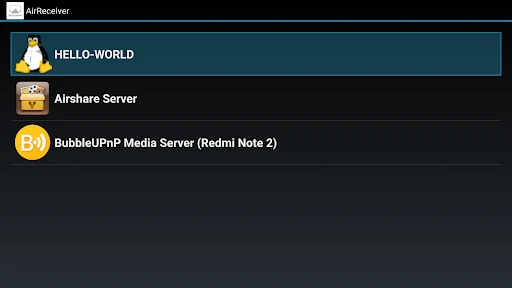

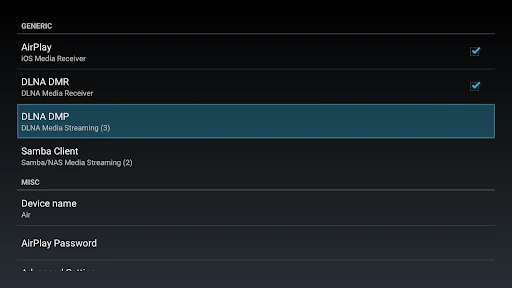
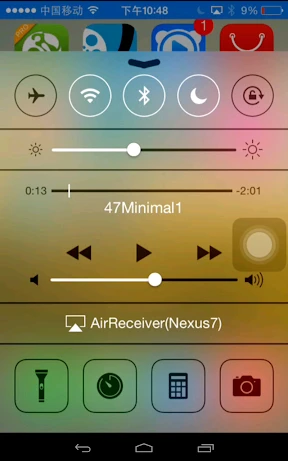
AirReceiver AirPlay Cast DLNA - Universal Media Receiver and Streaming Hub
AirReceiver AirPlay Cast DLNA is a versatile media receiver app that transforms your Android device into a multi-protocol streaming receiver. It supports Apple AirPlay, Google Cast, and DLNA standards, enabling seamless reception of audio, video, and screen mirroring content from a wide range of source devices such as iPhones, iPads, Macs, Android phones, and Windows PCs. The app acts as a bridge between different ecosystems, eliminating the need for dedicated hardware like Apple TV or Chromecast.
Chapter 1: Function
The core function of AirReceiver AirPlay Cast DLNA is to allow your device to receive and play media streams wirelessly. It listens for incoming streams via AirPlay for iOS and macOS devices, Google Cast for Android and Chrome-based sources, and DLNA/UPnP for Windows and compatible media servers. Once a stream is detected, the app automatically decodes and renders the content, supporting popular formats including MP4, MKV, AVI, MP3, FLAC, JPEG, and PNG. It also handles screen mirroring for real-time display of a source device's screen. The app integrates with your device's native audio and video players or uses its own built-in decoder for smooth playback, adjusting resolution and bitrate based on network conditions.
Chapter 2: Value
The primary value proposition of AirReceiver AirPlay Cast DLNA is its cross-platform compatibility and cost-effectiveness. It eliminates the need to purchase separate streaming devices for different ecosystems, saving both money and physical space. Users can stream from any AirPlay-enabled Apple device to an Android tablet or phone, or cast from a Windows PC via DLNA to an Android TV box. This flexibility is crucial for mixed-device households or workplaces. The app also provides low-latency streaming, making it suitable for presentations, gaming, and video watching without noticeable delay. Additionally, it supports background playback, allowing users to multitask while streaming music or podcasts. Its intuitive interface offers simple one-tap connection management, and the app respects user privacy by not requiring unnecessary permissions or uploading personal data. Regular updates ensure compatibility with the latest OS versions and streaming protocols. Compared to hardware receivers, the app offers portability—any Android device can become a streaming hub, which is especially valuable for travel or temporary setups. The app also supports multiple simultaneous connections, enabling shared use in social gatherings or classroom settings.
Chapter 3: Scenarios
The primary target user groups include Android device owners who use Apple products (iPhone, iPad, Mac) and want to mirror or stream content without buying an Apple TV. It is also ideal for Windows PC users who need to send media to an Android TV or tablet via DLNA. Common everyday use cases include: streaming a movie from an iPad to a large Android tablet while traveling, mirroring a MacBook screen to an Android phone for quick presentations in a meeting room, playing music from an iPhone through an Android device connected to a sound system, and casting photos from a Windows laptop to an Android TV for family slideshows. The app is also useful for educators who need to share mobile device screens on a classroom projector using an Android receiver, and for gamers who want to stream from a PC to a portable device without dedicated hardware. In smart home setups, it allows any Android-based smart display to act as a multi-protocol hub, bridging content from various family members' devices.
Advantages
- mirrors iOS screen to TV via AirPlay without Apple TV
- supports DLNA casting for Android media to smart TVs
- works as a standalone receiver
- no extra hub required
- low latency for presentations and video streaming
- compatible with both Windows and macOS via browser option
Disadvantages
- iOS screen mirroring requires same Wi-Fi network only
- DLNA playback limited to local media files
- no streaming apps
- no built-in codec support for HEVC on older devices
- setup fails on enterprise networks with strict port blocking
- free version adds watermark and limits session duration
Frequently Asked Questions
Q: What is AirReceiver AirPlay Cast DLNA used for?
A: AirReceiver is a media streaming receiver app that allows you to cast or mirror content from iOS, Android, or Windows devices to your TV or display via AirPlay, DLNA, or Miracast protocols. It requires no extra hardware and works over Wi-Fi.
Q: Is the app free to use with all features?
A: The app offers a free trial with limited features like short casting sessions and ads. Full, unlimited use requires a one-time in-app purchase. No additional equipment is needed beyond a Wi-Fi network and compatible device.
Q: Does it work on all smart TVs and streaming devices?
A: AirReceiver runs on Android TVs, Fire TV, and Android-based streaming sticks. It is compatible with Android 5.0+ and iOS 12+ sender devices. Roku and Apple TV are not supported as receivers, but AirPlay sender devices work with the app.
Q: How to fix frequent disconnections during streaming?
A: Ensure both sender and receiver devices are on the same 5GHz Wi-Fi network for better stability. Close background apps, reduce distance to the router, and disable VPN. If issues persist, restart the app and router. Smooth playback depends on network speed.
Q: Can I stream copyrighted content or DRM-protected videos?
A: No. AirReceiver cannot stream DRM-protected content from services like Netflix or Disney+ due to protocol limitations. It supports local media, photos, music, and non-DRM web videos. For DRM content, use the native app on your smart TV or a certified streaming device.
Technical Information
Recommended for You

Houseparty

Protection 360™

Galaxy SmartTag

Piano - music & songs games

ZoomOn Home Security Camera

Audacy: Radio & Sports Talk

Baby Name Together
Carla Car Rental - Rent a Car
Face Beauty Makeup Camera-Self
Language Translator, Translate

Fred Meyer

Mark - AI Logo Generator

Kitchen Design: 3D Planner

Volume Booster - Equalizer

Busch Gardens

PGA TOUR

ElevenReader - Text to Speech

TeamReach - Your Team App

FreeStyle LibreLink - US

My Lightning Tracker & Alerts

MyMoney Pro - Expense & Budget

Flipp: Shop Grocery Deals

Addons for Minecraft
