Jellyfin

Jellyfin
Jellyfin free media server for personal movie music streaming
Screenshots
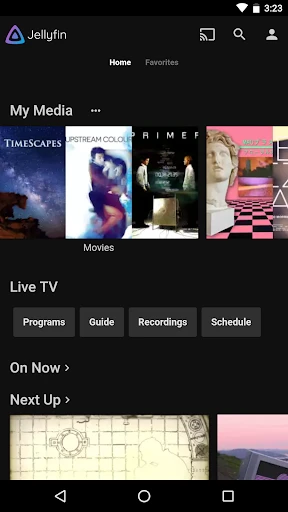
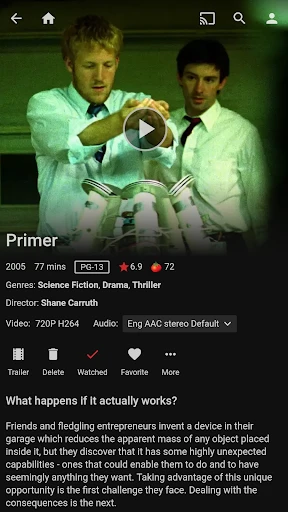
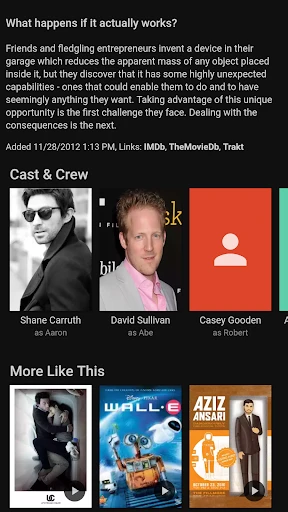
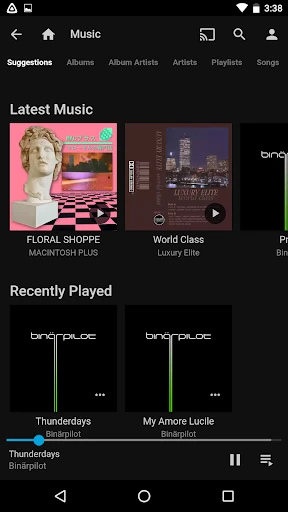
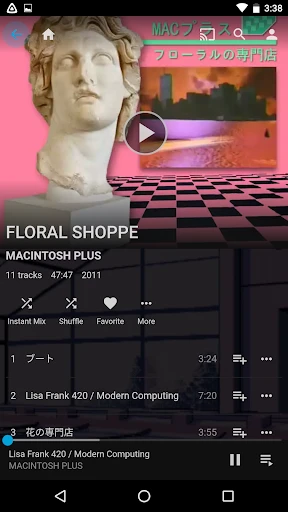
Jellyfin: Your Personal Media Server Solution
Jellyfin is a free and open-source media server software designed to give users complete control over their personal media collection. It allows you to organize, manage, and stream your movies, TV shows, music, photos, and live TV content from a central server to any device on your network or remotely. Built as a community-driven alternative to proprietary services like Plex or Emby, Jellyfin requires no licensing fees, subscriptions, or cloud dependencies, ensuring your data remains private and under your ownership. The software runs on a wide range of server platforms including Windows, macOS, Linux, and even Docker containers, with client apps available for smartphones, tablets, smart TVs, web browsers, and gaming consoles.
Chapter 1: Function
Jellyfin’s core functions revolve around media library management and multi-device streaming. It automatically scans designated folders for media files, pulls metadata such as cover art, descriptions, and actor information from online databases, and sorts content into intuitive libraries by type. The server supports real-time transcoding, converting media formats on the fly to ensure compatibility with any client device, whether it is an old smartphone or a high-end 4K TV. Users can resume playback across devices, create playlists, and set parental controls to restrict access to certain content. Additionally, Jellyfin includes live TV and DVR functionality if a compatible tuner is connected, enabling users to record and watch over-the-air broadcasts. The system also supports hardware acceleration for efficient transcoding, subtitles from multiple sources, and plugins that extend functionality like audiobook support or metadata fetching from third-party sources.
Chapter 2: Value
The primary value of Jellyfin lies in its combination of full user ownership, privacy, and zero-cost operation. Unlike commercial media servers, Jellyfin does not require a paid subscription or an account with an external company. All your media files, watch history, and personal settings remain stored on your own hardware, never being sent to third-party servers for processing or analysis. This eliminates concerns about data mining or service shutdowns. Furthermore, its open-source nature means the community continuously develops improvements, security patches, and new features, all without licensing fees. Jellyfin is highly customizable via a plugin system that adds capabilities such as intro detection for TV shows, integration with home automation systems like Home Assistant, and advanced user management for households with multiple members. Administrators can fine-tune streaming quality limits to manage bandwidth usage across different users, or enable network encryption for remote access. For advanced users, Jellyfin supports Direct Play for compatible formats, reducing server load, and offers a robust API for integration with third-party tools. It also supports multi-user environments with isolated profiles, each with their own watch progress and recommendations. Because it can run on low-power devices like a Raspberry Pi or a NAS, the barrier to entry is minimal, making digital media management accessible to anyone with a basic understanding of networking. The software also provides a consistent experience across clients, with polished interfaces on Android, iOS, Roku, Apple TV, and web browsers, ensuring family members can access content effortlessly.
Chapter 3: Scenarios
Jellyfin is ideal for individuals and families who maintain a substantial local media library and seek to stream it without relying on cloud subscriptions. A typical use case is a household where one member runs a home server on a dedicated computer or a network-attached storage (NAS) device. All family members can then watch movies on smart TVs in different rooms, listen to music on their phones during commutes via remote access, or view photos on tablets while traveling. It also serves users who have a collection of DVDs or Blu-rays they have ripped to digital files, wanting to access them across devices without re-inserting discs. For content enthusiasts who record live TV, Jellyfin acts as a digital DVR, scheduling recordings of sports games or news programs and making them available on demand. Another scenario involves audiobook collectors or podcast archivists who use plugins to organize and stream their audio files. Tech enthusiasts and communities, such as university groups or hobbyist clubs, deploy Jellyfin to share legally acquired media among members with controlled access. Additionally, users concerned with privacy after major streaming service price hikes or content removals often migrate to Jellyfin as a sustainable, offline-first alternative that maintains all functionality even without an internet connection besides the initial setup.
Advantages
- runs on raspberry pi and synology without subscription
- transcodes 4k hdr using hardware acceleration on intel/nvidia
- syncs watched status across tv
- phone
- and browser instantly
- serves live tv with channel guide via hdhomerun or m3u
- metadata downloads posters and subtitles in batch automatically
Disadvantages
- no native client for apple tv requires third-party player
- initial setup demands manual docker compose or linux knowledge
- 4k direct play stutters on wifi without bitrate tuning
- plugin ecosystem lacks polish compared to plex official
- remote access needs reverse proxy or vpn configuration
Frequently Asked Questions
Q: What is Jellyfin and what does it do?
A: Jellyfin is a free and open-source media server software that lets you organize, manage, and stream your personal collection of movies, TV shows, music, and photos across devices. It requires no subscription, no cloud dependency, and no user tracking. You install it on your own server or computer, then access your media through various client apps on phones, tablets, smart TVs, or web browsers. It supports live TV with DVR, hardware transcoding, and plugin extensions.
Q: Is Jellyfin free, or does it have in-app purchases?
A: Jellyfin is completely free with no in-app purchases, no subscriptions, and no hidden fees. The server software and all official client apps are open source under the GNU GPL license. There are no premium tiers or locked features. You only need to provide your own hardware (server or computer) and storage for your media files. Optional donations support development, but they grant no paid benefits.
Q: What devices and systems does Jellyfin support?
A: Jellyfin server runs on Windows, macOS, Linux, and Docker. Client apps are available for Android, iOS, Apple TV, Android TV, Roku, Amazon Fire TV, Chromecast, and web browsers. Smart TV models include LG webOS and Samsung Tizen via dedicated apps or third-party clients. There is no official support for game consoles like PlayStation or Xbox beyond web browser access. Minimum server requirements depend on your media library size and transcoding needs.
Q: How do I set up remote access to my Jellyfin server?
A: Remote access requires opening a port (default 8096) on your router and forwarding it to your Jellyfin server's local IP. You must configure HTTPS with a reverse proxy (e.g., Nginx or Caddy) using a valid SSL certificate for security. Alternatively, you can use a VPN for secure remote connections. Jellyfin does not offer a built-in free dynamic DNS or relay service. Without proper setup, remote streaming will fail or pose security risks.
Q: Can Jellyfin transcode media in real time?
A: Yes, Jellyfin supports real-time hardware and software transcoding. Hardware transcoding requires a compatible GPU (Intel Quick Sync, NVIDIA NVENC, or AMD AMF) and proper driver installation. Software transcoding uses CPU but is less efficient. Hardware acceleration setup varies by operating system and may need manual configuration. Transcoding is essential for formats your client device cannot natively play, or for bandwidth-limited remote streams. No additional license is needed.
Technical Information
Recommended for You

Headout: Travel Experiences

Ice Princess Makeup Salon

VistaCreate: Graphic Design

Timemark: Photo Proof

GPS Voice Navigation: Live Map

Alpha Manga: Read Isekai Manga
Microsoft OneDrive

Touch Lock Screen Touch Photo

Gocrypto: Crypto Trading

Collage Maker | Photo Editor

Status Saver - Video Saver

Phone Tracker & GPS Location

AirPin PRO - AirPlay & DLNA
Lezhin Comics -การ์ตูนและนิยาย

Tennis TV - Live Streaming

Trenitalia

Meds & Pill Reminder MyTherapy

MEATER® Smart Meat Thermometer

Future Face - See Your Future

BuildCalc

ONE@Work (formerly Even)

Pura

Skin Bliss: Skincare Routines