OruxMaps GP

OruxMaps GP
Outdoor GPS Mapping for Hikers and Explorers
Screenshots

OruxMaps GP: Offline GPS Navigation and Map Management for Outdoor Enthusiasts
OruxMaps GP is a powerful and versatile GPS navigation application designed primarily for outdoor activities such as hiking, mountain biking, geocaching, and off-road exploration. Unlike typical online mapping services, OruxMaps GP excels in offline functionality, allowing users to download high-resolution maps from various sources, including online tile servers and locally stored files. The app transforms a standard Android device into a professional-grade GPS tracker and navigator. It supports multiple map formats, waypoint management, route planning, and real-time tracking. Its ability to display customizable data fields, such as altitude, speed, and distance, makes it an indispensable tool for serious adventurers. The application is not a simple step-by-step turn-by-turn navigator but rather a comprehensive mapping and recording instrument that gives users full control over their geographic data. It is known for its steep learning curve but also for its unmatched flexibility, allowing advanced users to tailor every aspect of their navigation experience through granular settings and configuration files.
Chapter 1: Function
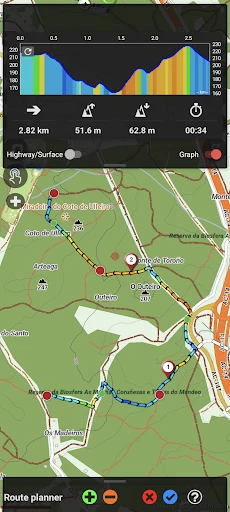
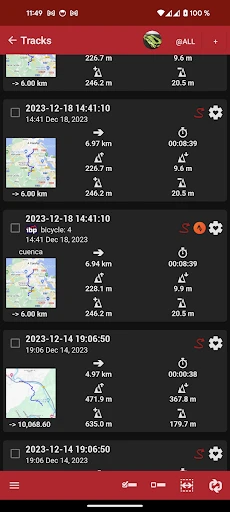
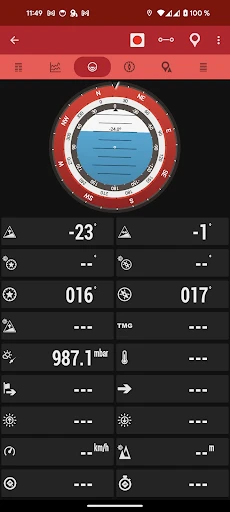
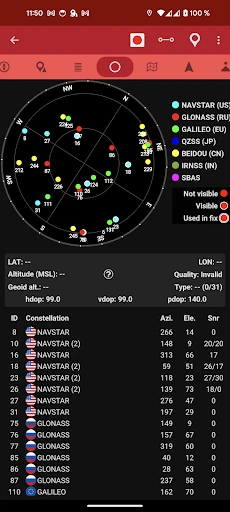
OruxMaps GP serves as a comprehensive offline GPS navigator and data recorder. Its core functionality rests on three pillars: map management, route navigation, and activity tracking. For map management, the app allows users to download maps from online sources like OpenStreetMap or Google Maps for offline use, eliminating the need for a mobile data connection in remote areas. It also supports custom maps by loading MBTiles, KMZ, or OziExplorer files, which can be created from scanned paper maps or satellite imagery. For route navigation, users can create and follow routes by importing GPX, KML, or TCX tracks. The app provides real-time navigation feedback, displaying position on the map with audio alarms for waypoints or off-route notifications. For activity tracking, OruxMaps GP records GPS tracks in the background, capturing speed, elevation, and timestamps. It displays customizable dashboard widgets that show current coordinates, moving time, total ascent, and other metrics. The application also includes a compass, a barometric altimeter (if supported by device hardware), and the ability to activate a clickable grid for coordinate sharing. These functions collectively enable precise navigation and data logging in challenging environments without reliance on cellular networks.
Chapter 2: Value
The primary value of OruxMaps GP lies in its offline reliability, data customization, and professional-grade feature set, which far exceed that of typical consumer fitness apps. Unlike Google Maps or Strava, which are designed for urban navigation or basic tracking, OruxMaps GP provides deep control over every mapping element. It supports over 20 different coordinate systems and map projections, making it ideal for professional surveyors or hikers using specialized paper maps. The app includes a highly customizable user interface where users can change units, colors, and transparency of tracks, as well as configure multiple data fields to display exactly the information needed. A key advantage is the ability to record stats with exceptional accuracy and export them in industry-standard formats for analysis in GIS software. The app also supports a radar function for finding nearby waypoints and a 3D terrain view on compatible devices. Furthermore, OruxMaps GP offers a robust backup system for all user data, and it includes a feature to synchronize with online cloud services like Dropbox for automatic track archiving. The app is free from advertisements and in-app purchases for core functionality, which stands in contrast to many paid navigation tools. This combination of offline availability, technical precision, and cost-effectiveness makes it an essential tool for anyone who needs reliable navigation beyond cellular coverage, offering peace of mind and detailed performance data that commercial alternatives frequently fail to deliver.
Chapter 3: Scenarios
OruxMaps GP is primarily targeted at outdoor enthusiasts, including hikers, backpackers, mountain bikers, trail runners, and off-road vehicle drivers. The primary user group consists of individuals who venture into remote areas with limited or no mobile network coverage. For example, a hiker planning a multi-day trek through a national park can download high-resolution topographic maps before leaving home. While on the trail, they use the app to follow a pre-loaded GPX route, check current altitude, and record the exact path taken for later sharing or analysis. Mountain bikers benefit from the app’s ability to track speed, distance, and cumulative elevation gain across multiple trails, allowing them to compare performance over different terrain. Search and rescue teams or geocachers use the app’s coordinate input function and radar view to pinpoint precise locations. Another use case is for photographers who need to log exact positions for landscape shots in remote wilderness. Aviation enthusiasts or paramotor pilots also use it as a secondary navigation tool. Because the app works entirely offline once maps are saved, it is equally useful in everyday scenarios where data signal is poor, such as underground parking garages or deep valleys. Overall, any scenario requiring precise tracking, route adherence, or terrain analysis without constant internet access makes OruxMaps GP the preferred choice for those who treat navigation as a technical skill rather than a simple utility.
Advantages
- offline vector maps with no internet needed
- supports multiple geodata formats like GPX
- KML
- and GeoPDF
- real-time GPS tracking with altitude and speed log
- customizable tile sources for satellite or topographic layers
- low battery consumption during long hikes
Disadvantages
- steep learning curve for first-time map navigation users
- UI lacks modern gesture support and looks dated
- no built-in routing engine requires external track files
- occasional sync issues when exporting to cloud services
- data import may fail on large or corrupted GPX files
Frequently Asked Questions
Q: What is OruxMaps GP and its primary function?
A: OruxMaps GP is a GPS navigation and mapping app designed for outdoor activities like hiking, biking, and off-road trips. Its core function is displaying offline topographical maps with real-time GPS tracking, supporting various map sources including online tiles and custom offline maps. It allows users to record tracks, waypoints, and routes without requiring constant internet access.
Q: Is the app free or does it require in-app purchases?
A: OruxMaps GP is free to download and use with basic GPS tracking and map viewing features. Some advanced functionalities, like online map cache management, additional map formats, or ad-free experience, may require in-app purchases or donations. No subscription is mandatory, and core offline navigation remains accessible without payment.
Q: What devices and systems does OruxMaps GP support?
A: OruxMaps GP is designed specifically for Android devices running Android 4.1 or higher. It does not support iOS or Windows platforms. It works on smartphones and tablets with GPS hardware, and external Bluetooth GPS receivers are compatible for improved accuracy. No additional equipment is required for basic use.
Q: How can I load custom offline maps into the app?
A: To load custom offline maps, first download map files (e.g., MBTiles or OruxMaps compatible formats) to your device. Then, place them in the designated folder 'oruxmaps/mapfiles' on internal storage or SD card. Open the app, go to Map view, tap the layers icon, and select 'Offline maps' to browse and activate your files. Ensure file names use only ASCII characters.
Q: Does the app track location accurately in remote areas without internet?
A: Yes, GPS tracking functions independently of internet connection. The app relies solely on device GPS hardware to record position, speed, and altitude. Accuracy depends on your device's GPS chip and satellite visibility. Offline maps provide full navigation context. However, real-time weather or traffic updates require internet access and are not available offline.
Technical Information
Recommended for You

Joketone-Air Horn Fart Sounds

Spark Driver

Church's Texas Chicken®
Snowflake rose gold watch face

sendit

Gemini: Bitcoin Credit Card

Cozycozy: All accommodations

Photo Editor - Face Makeup
Indoor thermometer

PA Toll Pay

Sheetz Food Delivery & Rewards

MP3 Converter - Video to MP3

Oh She Glows - Healthy Recipes

Timestamp Camera

AI Mirror: Hugs Video & Photo

Upgrade

Soda Reels - Drama & show

Policia de Niños Llamada Falsa

Pro Emulator for Game Consoles

AI Chatbot - Nova

AR Drawing Paint Sketch Trace

Smule: Karaoke, Sing & Record

Smart Life - Smart Living