Go Fly Drone Remote Controller
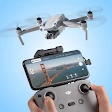
Go Fly Drone Remote Controller
Go Fly Drone Pilot Connect Control Fly
Screenshots
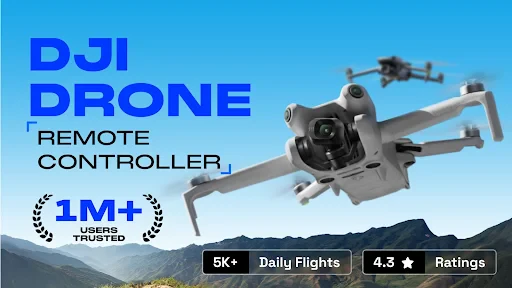
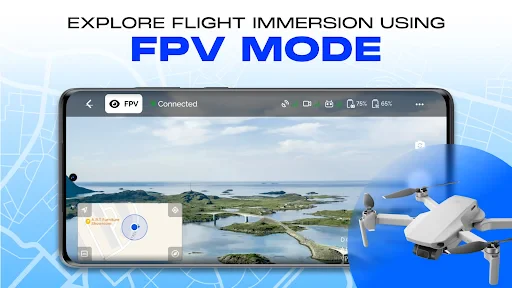
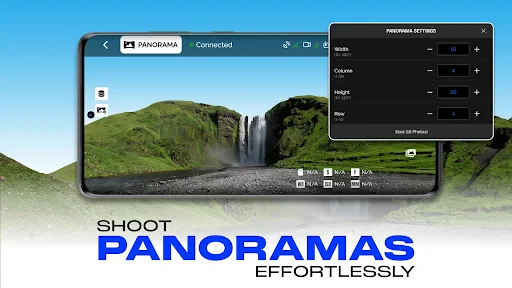
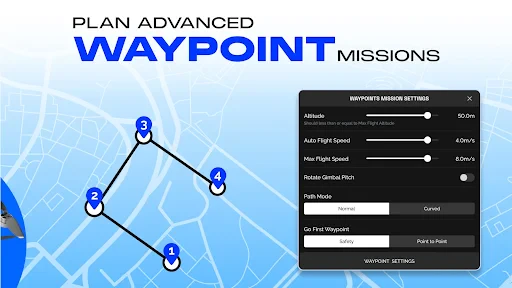
Go Fly Drone Remote Controller Overview and Features
Go Fly Drone Remote Controller is a specialized mobile application designed to serve as a comprehensive remote control interface for compatible drone models. The app transforms a smartphone into a powerful command center, providing real-time telemetry data, camera feed monitoring, and precise flight controls. It eliminates the need for bulky physical remotes in many casual scenarios, offering a streamlined and portable solution for drone pilots. The app supports both novice and experienced users through customizable control sensitivity settings and automated flight modes. Its core architecture prioritizes low-latency communication between the mobile device and the drone, ensuring responsive handling during flight. The interface presents essential flight metrics including altitude, speed, battery level, GPS signal strength, and distance from the pilot. Go Fly also integrates with the drone's onboard camera system, allowing users to capture photos and videos directly from the app interface. The application includes safety features such as geo-fencing alerts, return-to-home functionality, and emergency stop commands. Regular updates ensure compatibility with evolving drone firmware and mobile operating systems.
Chapter 1: Function
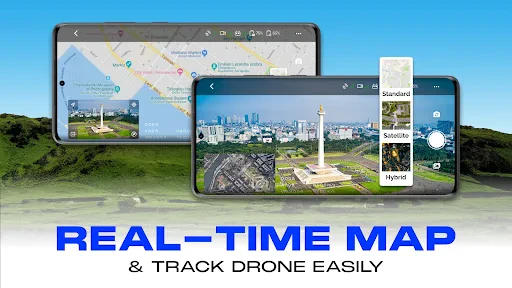
Go Fly Drone Remote Controller provides a suite of core functions that facilitate complete drone operation through a mobile device. The primary function is real-time flight control, where touchscreen joysticks simulate traditional remote stick inputs for throttle, yaw, pitch, and roll. The app offers customizable sensitivity curves to match pilot skill levels, from beginner-friendly stabilization modes to advanced manual acrobatics. A live first-person view feed streams directly from the drone camera at minimal latency, with options to toggle resolution between 720p and 1080p based on connection stability. Telemetry data overlays display critical flight information such as current altitude, horizontal speed, distance from home point, remaining battery percentage, and estimated flight time remaining. The photo and video capture function enables single-shot photos, burst mode, and 4K video recording with resolution and frame rate adjustments. Intelligent flight modes include waypoint navigation, where users can draw a flight path on a map for the drone to follow autonomously, and orbit mode for circling a designated point. The app also manages drone settings, including calibration of the compass, IMU, and gimbal, as well as firmware update notifications. A built-in flight log records each session's data for review and analysis.
Chapter 2: Value
The primary value proposition of Go Fly Drone Remote Controller lies in its ability to democratize drone flight by removing hardware barriers and reducing entry costs. For hobbyists, the app eliminates the need to purchase an expensive dedicated radio controller, instead leveraging the smartphone they already own. This cost efficiency makes drone flying more accessible to students, casual users, and budget-conscious enthusiasts. The app's intuitive touch interface reduces the learning curve associated with traditional RC controllers, allowing beginners to grasp flight basics without intimidation. For professionals such as real estate photographers and videographers, the app provides precise camera control and real-time framing through the live FPV feed, enabling accurate composition without guesswork. The automated flight modes, particularly waypoint navigation and orbit, save time and improve repeatability for mapping or inspection tasks. Safety is a key advantage; the return-to-home function triggers automatically if signal is lost or battery is critically low, protecting expensive drone hardware. The geo-fencing feature prevents flights in restricted airspace, reducing the risk of regulatory violations. Portability is a significant benefit for travelers or field workers, as no additional controller equipment is needed beyond the drone, smartphone, and a small charging cable. The app's regular updates ensure compatibility with new drone models and emerging operating systems, extending the product's lifecycle. Additionally, the flight log feature aids in performance analysis and troubleshooting, offering data-driven insights for improving piloting skills. Overall, Go Fly enhances the drone experience by combining convenience, cost savings, and advanced functionality in a single mobile application.
Chapter 3: Scenarios
Go Fly Drone Remote Controller targets a diverse audience, primarily including hobbyist drone pilots, aerial photography enthusiasts, and light commercial operators. The primary target users are individuals who own compatible recreational drones and seek a portable, cost-effective control solution without investing in separate hardware. These users typically fly for fun, capturing scenic landscapes or family events from an aerial perspective. The app is especially useful for travelers who want to pack light and drone pilots who frequently switch between different flying locations, as no physical controller needs to be carried or charged separately. Another significant user group comprises prosumers and small business operators, such as real estate agents requiring property overview shots, farmers monitoring crop health, or event photographers documenting weddings from above. These users depend on the app's precision camera controls and autonomous flight modes for professional-grade results without logistical complexity. Educational institutions also benefit, using the app as a teaching tool for students learning drone piloting basics before progressing to more advanced hardware. Everyday use cases include casual backyard flights for family aerial selfies, park explorations for nature videography, and neighborhood mapping for DIY landscaping projects. For commercial scenarios, typical applications involve rapid property survey inspections, farm perimeter checks, and sports event coverage. The app also supports urban pilots needing discreet, quiet flights for personal projects, as the touchscreen interface is less conspicuous than traditional controllers. Overall, Go Fly serves individuals seeking simplicity, affordability, and portability in their drone piloting experience, from casual recreation to light professional work.
Advantages
- connects to DJI drones via USB-C for low-latency control
- supports both joystick and touchscreen flight inputs
- works offline with pre-loaded flight maps and routes
- battery lasts 6 hours on a single charge
- detachable controller fits most tablet mounts
Disadvantages
- only compatible with DJI drones
- excludes other brands
- requires firmware update via app before first flight
- touchscreen less responsive in direct sunlight
- no built-in screen
- must pair with external device
- SD card slot omitted for map storage expansion
Frequently Asked Questions
Q: What is Go Fly Drone Remote Controller used for?
A: Go Fly Drone Remote Controller is a mobile app that transforms your smartphone into a virtual remote control for compatible DJI drones. It provides real-time flight telemetry, camera viewfinder, and joystick controls via Wi-Fi or Bluetooth connection. No additional hardware remote is required for basic flight operations, though some advanced features may depend on drone model support. The app handles takeoff, landing, altitude adjustments, and photo/video capture, but does not include autonomous flight modes or waypoint navigation by default.
Q: Is the app free or does it require in-app purchases?
A: The app is free to download and use for basic drone control functions. However, certain advanced features such as high-resolution video streaming, extended flight range assistance, or removal of on-screen ads require optional in-app purchases. No subscription is mandatory for standard flight. All purchases are one-time and linked to your app store account. There is no trial period for paid features, and refunds follow store policies.
Q: Which devices and drone models are compatible with this app?
A: Go Fly Drone Remote Controller works on iOS 12.0+ and Android 8.0+ smartphones with Wi-Fi or Bluetooth 4.0+. It supports DJI models including Mavic Mini, Mavic Air 2, and Phantom 4 series. It does not support older models like Phantom 3 or Spark. GPS and camera permissions are required for full functionality. Some tablets with larger screens may experience UI scaling issues. No external controller or joystick accessory is needed, but third-party stabilizers are not supported.
Q: How does the app handle connection drops during flight?
A: If the Wi-Fi or Bluetooth connection drops, the app immediately displays a red warning on screen and triggers an automatic return-to-home (RTH) command if the drone is within 50 meters of the takeoff point. Manual control can be regained within 10 seconds by reconnecting. The app logs all disconnection events locally. No automatic reconnection to previously paired Wi-Fi networks is provided; you must manually select the drone’s network again. For safety, do not fly over water or crowds.
Q: Can I use this app for commercial drone operations?
A: No, Go Fly Drone Remote Controller is designed exclusively for recreational and hobbyist use. It does not include features required for commercial operations such as geofencing override, flight log export for regulatory compliance, or multi-drone fleet management. The app’s terms of service explicitly prohibit use in paid aerial services. For professional work, consider the manufacturer’s dedicated remote controller or enterprise-grade software. No warranty or support is provided for commercial usage.
Technical Information
Recommended for You

VSD Viewer for Visio Drawings
TP-Link Tapo

Lift: Reels & Stories Maker

Wireless charge Phone to Phone

WhisperFM - Romance Novels

USHUD Foreclosure Home Search
AI PDF Reader-All File Readers
Reverse Charging Wireless

WFAA - News from North Texas
Password Safe and Manager
Waveful - Become a Creator

TuneIn Radio: Music & Sports
Stack the States®
AfterShip Package Tracker - Tr
Ringtone Maker: Music Cutter
Tasker by Taskrabbit

Hibbett - Sneakers & Clothing

USAA DriveSafe

Huckleberry: Baby & Child

Solocator - GPS Field Camera

Spranbox: Mix beats

Housecall Pro

Avigilon Alta Open