AI Photo Enhancer - PixLift

AI Photo Enhancer - PixLift
AI Photo Enhancer PixLift restores blurry images for everyone
Screenshots
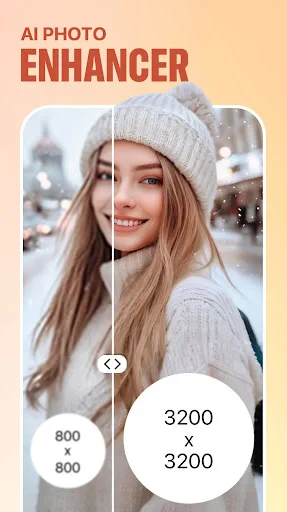
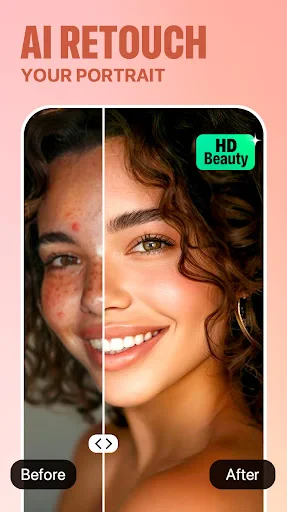

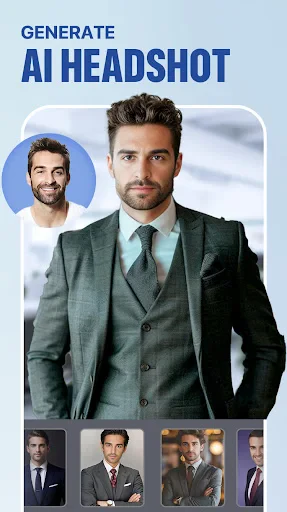
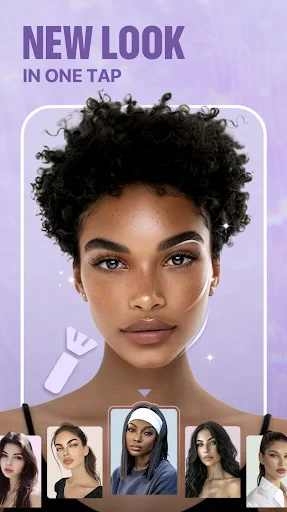
AI Photo Enhancer - PixLift: Intelligent Image Restoration and Enhancement Tool
AI Photo Enhancer - PixLift is a mobile application designed to improve the quality of digital images through artificial intelligence. It focuses on increasing image resolution, reducing noise, and restoring clarity in photos that may be blurry, old, or low-light. The app provides users with a simple interface to upload images and receive enhanced versions, aiming to make professional-grade photo editing accessible to anyone without technical expertise.
Chapter 1: Function
The core functions of AI Photo Enhancer - PixLift include automatic resolution upscaling, where the AI model predicts and adds missing pixel details to enlarge images without visible quality loss. It also features noise reduction technology that cleans grainy textures from photos taken in dark environments. Additionally, the app offers face enhancement capabilities that refine facial features in portraits, sharpening eyes and smoothing skin texture. A color correction tool adjusts white balance and saturation to restore faded or discolored images. The app processes images locally on the device for privacy and speed, with batch processing support for multiple files at once. Users can preview results side by side with originals before saving final outputs in high-resolution formats.
Chapter 2: Value
The value proposition of AI Photo Enhancer - PixLift lies in its ability to democratize high-end photo restoration typically requiring expensive software and skilled operators. For individuals managing personal photo archives, the app rescues memories captured in low resolution by old cameras or smartphones, making them suitable for printing or sharing on large screens. For small business owners, such as real estate agents or e-commerce sellers, PixLift enhances product images to appear more professional, potentially increasing customer trust and conversion rates. Key advantages include a one-tap enhancement process that eliminates the learning curve of manual editing tools like Photoshop. The AI model is specifically trained on diverse datasets to handle common issues like motion blur, compression artifacts, and lighting imbalances. Compared to online alternatives, PixLift offers offline processing, ensuring user data never leaves the device, which addresses privacy concerns. The application also saves time by completing complex edits in seconds rather than hours, and it does not require an internet connection after initial download, making it reliable for travelers or users in areas with poor connectivity.
Chapter 3: Scenarios
Primary target user groups for AI Photo Enhancer - PixLift include amateur photographers, social media influencers, and individuals digitizing family photo albums. Everyday use cases involve enhancing selfies or casual portraits before uploading to social platforms to achieve a polished appearance. Another scenario is restoring old scanned photographs from the pre-digital era, where the app can fix scratches, low contrast, and overall unsharpness to preserve family history. In professional contexts, real estate agents use the app to sharpen property photos taken from listings, making interiors appear brighter and more detailed. E-commerce sellers apply it to improve the clarity of product shots, especially for small items like jewelry or electronics, where detail matters for online buyers. Travel enthusiasts often use PixLift to salvage blurry photos captured in dimly lit museums or at night, turning them into shareable memories. The app also serves students and researchers who need to enhance diagrams or text in images for presentations. By addressing these diverse scenarios, the application fills a gap for users who need quick, reliable enhancement without specialized skills.
Advantages
- upscales 2x to 4x resolution in seconds locally
- removes noise and artifacts from old low-light photos
- batch processes multiple images with one tap
- works offline without uploading to cloud servers
- supports JPEG
- PNG
- and HEIC input formats
Disadvantages
- slight color shift after heavy denoising on portraits
- free version limits daily upscales to 5 images
- large 4x output files take up significant storage
- cannot restore motion blur from shake or movement
- no manual control over denoising strength per channel
Frequently Asked Questions
Q: What is the core function of PixLift?
A: PixLift uses AI algorithms to enhance low-resolution, blurry, or old photos by upscaling resolution, reducing noise, and sharpening details. It supports batch processing and can restore facial features in portraits. No additional equipment is required beyond a smartphone camera roll access.
Q: Is PixLift free to use or does it require payment?
A: PixLift offers a free tier with basic enhancement and limited daily uses. Full-resolution export, batch processing, and advanced AI models require a subscription or one-time purchase. No in-app ads interrupt usage, but watermark-free saving is locked behind payment.
Q: Does PixLift work on both iOS and Android devices?
A: PixLift is available for iOS 13+ and Android 8+ devices. It requires at least 2GB RAM for smooth AI processing. The app does not support desktop or web versions currently. Some older devices may experience slower processing due to hardware limitations.
Q: How accurate is the AI enhancement for very old or damaged photos?
A: The AI can improve resolution up to 4x with reasonable accuracy on minor scratches and moderate blur. Heavily damaged, missing parts, or extremely low-resolution faces may produce unnatural results. The app provides a preview before saving so users can adjust or decline edits.
Q: Can I cancel my subscription and still keep enhanced photos?
A: Yes, any photos you export during an active subscription remain saved to your device after cancellation. The subscription only unlocks features; it does not store photos on servers. For refunds, contact the platform's customer support (Apple/Google) within the standard refund window.
Technical Information
Recommended for You

Transit • Subway & Bus Times

Google Podcasts

Phone Number Tracker 2024

Total Connect Comfort

Fifth Third: 53 Mobile Banking

Trust: Crypto & Bitcoin Wallet

Slice: Pizza Delivery/Pick Up

NavRadio+

Pinkfong Shapes & Colors

MTS Urent

Citymapper

Medium
BET+

Weather Real-time Forecast

ThinkDiag+

House Chores Cleaning Schedule

FlashGet Kids:parental control

Pocket Broker - trading

Family Location Tracker
Decibel Meter: Sound Meter App

The Athletic: Sports News

Webfic - Fantastic Reading

Car Engine Sounds - Gas Pedal
