Meitu

Meitu
Meitu beauty camera makeup editor for selfie lovers
Screenshots
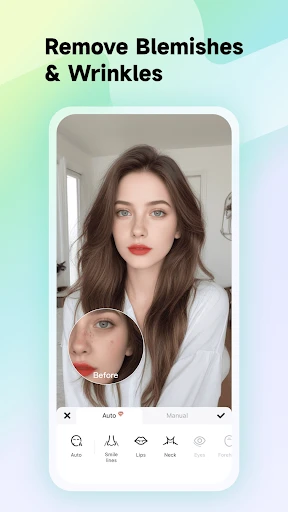
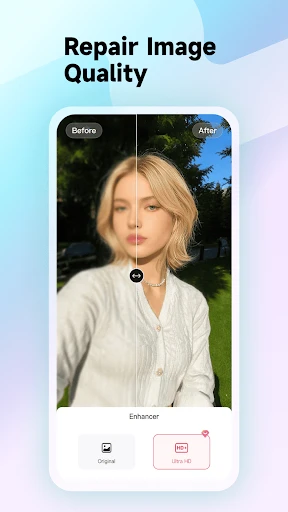
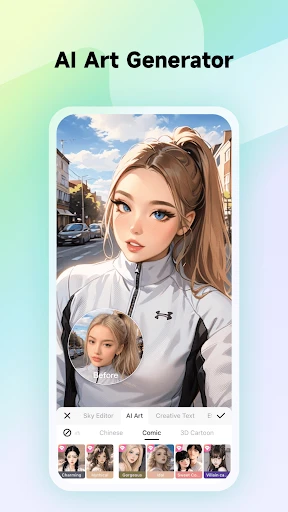
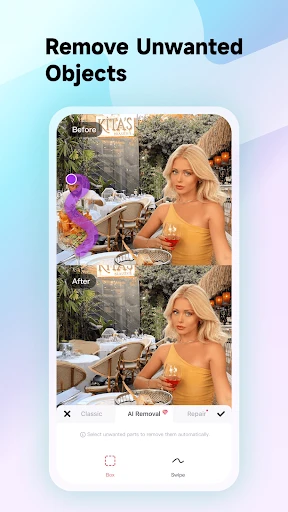
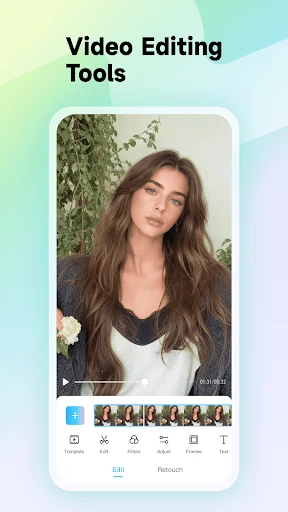
Meitu – AI-Powered Photo Editing and Beauty Enhancement App
Meitu is a comprehensive photo and video editing application developed by Meitu, Inc., designed to enhance images with advanced beauty filters, retouching tools, and AI-driven features. Originally popular for its one-click beautification effects, the app has evolved into a versatile creative suite offering makeup simulation, background removal, artistic filters, and short video editing. Available on both Google Play and the Apple App Store, Meitu serves millions of users globally who seek effortless, high-quality visual content creation.
Chapter 1: Function
Meitu’s core functions revolve around intelligent image enhancement and creative editing. The app provides one-tap beauty optimization that smooths skin, adjusts facial features, and applies virtual makeup with realistic precision. Its AI-powered portrait retouching detects faces automatically and offers customizable adjustments for skin tone, eye size, jawline, and more. Additionally, Meitu includes tools for background replacement, photo mosaics, text overlays, and stylized filters ranging from vintage to anime. For video content, users can trim clips, add transitions, and apply beauty effects in real time. The app also features a collage maker, a magic brush for selective color editing, and an AI art generator that transforms photos into paintings or cartoons. All functions are designed with an intuitive interface, allowing both beginners and advanced users to produce polished results in seconds.
Chapter 2: Value
Meitu’s value proposition centers on democratizing professional-grade photo editing through accessibility, speed, and AI innovation. Unlike complex desktop software like Photoshop, Meitu eliminates the learning curve by automating common retouching tasks, enabling anyone to achieve studio-quality results from a smartphone. Its key advantage lies in the seamlessness of its beauty algorithms, which preserve natural skin texture while correcting imperfections, appealing to users who prioritize authenticity over heavy filtering. The app also offers a vast library of culturally diverse beauty standards, allowing users in different regions to customize looks that align with local aesthetics. Moreover, Meitu integrates social sharing features directly into its workflow, enabling instant posting to platforms like Instagram and TikTok without leaving the app. Regular updates introduce trending effects, such as AR masks and seasonal filters, keeping the user experience fresh. For content creators, the app provides watermark-free exports in high resolution, supporting both personal and commercial use. Its freemium model grants access to basic tools at no cost, while premium subscriptions unlock advanced AI features and ad-free editing, making high-end capabilities financially accessible. By combining utility with entertainment, Meitu transforms routine photo editing into an engaging, creative experience, fostering user loyalty through consistent value delivery.
Chapter 3: Scenarios
Meitu primarily targets young adults, especially women aged 16 to 35, who are active on social media and seek quick, visually appealing content. Everyday use cases include preparing selfies for Instagram or TikTok, where users rely on Meitu’s one-tap beauty filters to enhance skin and facial symmetry before posting. The app is also popular among travel enthusiasts, who use its background replacement and artistic filters to create polished vacation photos without professional gear. Beauty bloggers and small business owners leverage Meitu for product photography, removing cluttered backgrounds and applying consistent branding filters. Additionally, professionals like event planners use the collage maker to compile photo grids for promotional material. Meitu’s video editing tools are frequently employed by vloggers to add beauty effects during recording, saving time in post-production. Even casual users turn to Meitu for everyday tasks, such as removing red-eye from family photos or adding festive stickers to holiday pictures. The app’s AI art generator attracts artists and hobbyists exploring digital creativity without learning complex design software. Ultimately, Meitu serves anyone needing fast, reliable, and visually striking results across personal, social, and light commercial contexts.
Advantages
- ai retouching preserves skin texture without over-smoothing
- one-tap background replacement works on complex hair edges
- live portrait mode adjusts depth of field post-capture
- skin tone analysis suggests inclusive beauty adjustments
- batch processing applies edits to multiple photos at once
Disadvantages
- heavy processing drains battery quickly on older devices
- subscription required for advanced ai features after trial
- offline mode lacks cloud-synced presets and models
- facial recognition struggles with extreme angles or masks
- watermark added to free exports unless cropped manually
Frequently Asked Questions
Q: What is Meitu primarily used for?
A: Meitu is a photo and video editing app focused on beauty enhancement, retouching, and creative filters. Its core functions include skin smoothing, face reshaping, makeup application, and AI-powered style transfer. Basic editing tools like crop, brightness, and contrast adjustments are also available. It integrates social sharing features for posting directly to platforms.
Q: Is Meitu free to use or does it require payments?
A: Meitu offers a free version with basic editing tools and ads. Premium features like advanced filters, exclusive stickers, and ad-free experience require a subscription (monthly or yearly) via in-app purchase. No additional equipment is needed. Permissions for camera, photo library, and storage access are necessary for full functionality.
Q: Does Meitu work on both iOS and Android devices?
A: Yes, Meitu is available on iOS (version 11.0 or later) and Android (version 5.0 or later). It is optimized for smartphones and tablets. Compatibility may vary on older devices with limited RAM. The app targets casual users and social media enthusiasts, not professional photographers. No third-party hardware is required.
Q: How does Meitu's AI beauty feature handle different skin tones?
A: Meitu's AI beauty feature analyzes facial features and adjusts filters to detected skin tones, but results may vary across diverse ethnicities. Users can manually tweak brightness, smoothing, and color balance to customize output. The app does not guarantee perfect accuracy for all skin types. Feedback is limited to in-app rating systems.
Q: Can I use Meitu offline without internet access?
A: Offline usage is limited to basic editing tools like crop, rotate, and standard filters. AI features (e.g., face reshaping, style transfer) and sticker downloads require an internet connection. Saved projects remain accessible offline after download. No after-sales support is provided for local issues; help is available via in-app FAQ or email.
Technical Information
Recommended for You

Spin the Wheel: Random Picker+

GIF Maker Pro

TV Remote App for All TV

1 Second Everyday Video Diary

NOAA Weather Unofficial (Pro)

bet365 - Sportsbook & Casino

The NBC App - Stream TV Shows
SkyHalo Weather for Wear OS

10bii Financial Calculator

Secure VPN-Safer Internet

Workvivo

World Clock – World time clock

Remini - AI Photo Enhancer

Christmas Wallpaper

Baby Photo Editor

QuickBooks Workforce

Parcel Pending

Apartments & Rentals - Zillow

Hulu: Stream TV shows & movies

ZoomOn Home Security Camera

Headunit Reloaded Emulator HUR

Oh She Glows - Healthy Recipes

Torque Pro (OBD 2 & Car)
