USB Screen Share - Phone to TV

USB Screen Share - Phone to TV
USB screen mirroring to TV for easy sharing
Screenshots

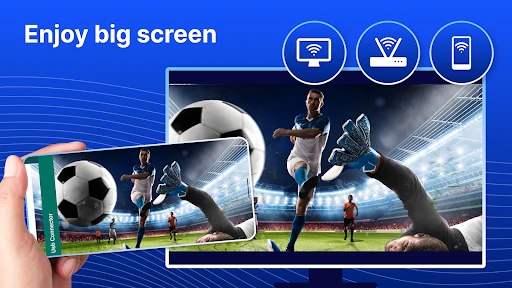
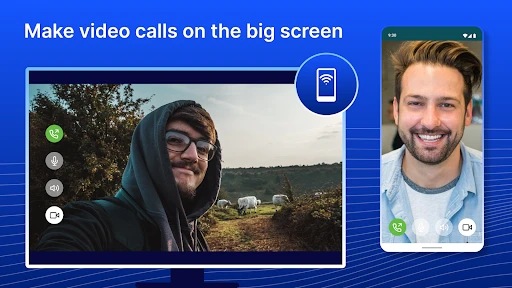

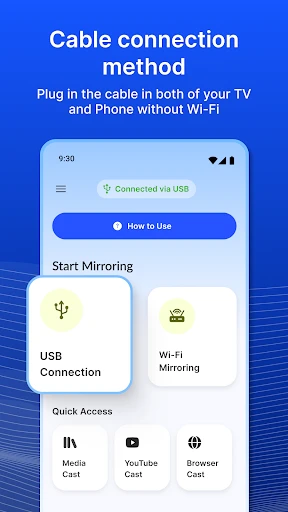
USB Screen Share - Phone to TV: Wired Screen Mirroring App Overview
USB Screen Share - Phone to TV is a utility application designed to mirror the screen of an Android smartphone or tablet directly to a larger display, such as a television or monitor, using a physical USB cable connection. Unlike wireless casting solutions that rely on Wi-Fi networks, this app prioritizes a stable, low-latency connection by transmitting video and audio data through a wired interface. It supports standard MHL, DisplayLink, and other USB video adapters, enabling users to view mobile content on screens without native casting features. The app is particularly useful in environments where Wi-Fi is unavailable, unreliable, or congested, offering a plug-and-play experience with minimal setup. Its interface is streamlined for quick connection, allowing users to select their adapter and start mirroring instantly. The app also supports landscape and portrait orientation adjustment and includes basic display settings to optimize resolution and frame rate for the connected monitor.
Chapter 1: Function
The core function of USB Screen Share - Phone to TV is to establish a direct screen mirroring connection between an Android device and an external display via USB. It detects compatible USB video adapters, such as DisplayLink docks or MHL cables, and initiates a real-time video stream that replicates the phone's interface on the TV or monitor. The app handles resolution scaling to match the external display's native capabilities, supports audio passthrough through the USB connection or via the phone's headphone jack, and offers orientation locking to prevent accidental rotation. It includes a simple on-screen control panel for starting and stopping the mirroring session, adjusting brightness and volume levels for the external output, and switching between extended and mirrored display modes when supported by the adapter. Additionally, the app provides a diagnostic tool that verifies adapter compatibility and USB data transfer speed, ensuring the user's hardware meets the minimum requirements for smooth performance.
Chapter 2: Value
The primary value proposition of USB Screen Share - Phone to TV lies in its ability to deliver a stable, high-quality screen mirroring experience in environments where wireless solutions fail. By relying on a physical USB cable, the app eliminates common issues such as Wi-Fi interference, bandwidth contention, signal drops, and latency spikes that plague wireless casting protocols. This makes it an ideal solution for professional presentations, where consistent frame rates and instant response times are critical for showing slides or demos without stuttering. For home users, it provides a reliable way to stream video content from streaming apps or local media files to a television without buffering, even in areas with weak Wi-Fi coverage. The app also offers a security advantage: since no network transmission occurs, sensitive data such as business documents, banking apps, or personal photos remain physically isolated from potential wireless eavesdropping. Its compatibility with a wide range of USB video adapters, including inexpensive third-party dongles, makes it cost-effective compared to purchasing a dedicated smart TV or streaming stick. Furthermore, the app's low resource consumption means it works efficiently on older Android devices, extending their utility as media sources. The plug-and-play nature reduces setup time to seconds, requiring no password entry, network configuration, or QR code scanning, which adds convenience for users who need quick and temporary screen sharing.
Chapter 3: Scenarios
The primary target user groups for USB Screen Share - Phone to TV include business professionals who frequently present from their phones in meeting rooms without smart displays or reliable Wi-Fi. For example, a sales representative can connect their Android phone to a conference room monitor via a USB-C to HDMI adapter and immediately display pitch decks or product videos without relying on hotel Wi-Fi networks. Another major use case is for educators and trainers who need to mirror teaching materials from their phone to a classroom projector or large monitor, especially in older educational facilities with limited IT infrastructure. Home users also benefit, particularly those using media streaming services on their phones who want to watch content on a larger screen in a living room where the TV lacks built-in casting support but has a USB-display-capable port. Travelers staying in hotels with older TVs that only have HDMI inputs can use the app with a portable USB video adapter to enjoy their own movie library. Additionally, IT administrators and developers use the app for debugging and testing mobile apps on external monitors, as the wired connection ensures pixel-perfect reproduction and minimal input lag for user interface testing.
Advantages
- one-tap mirroring from phone to TV without cables
- supports both iOS and Android for cross-device casting
- low latency for real-time video playback and gaming
- works offline via USB tethering
- no Wi-Fi needed
- auto-detects connected TV without manual setup
Disadvantages
- requires USB debugging enabled on Android devices
- limited to single screen output
- no multi-display support
- no audio pass-through on some third-party TV models
- cable length restricts physical mobility during use
- no wireless casting option for non-USB TV models
Frequently Asked Questions
Q: What is USB Screen Share and how does it work?
A: USB Screen Share is a utility app that lets you mirror your phone screen to a TV or monitor via a USB cable connection. It bypasses Wi-Fi for lower latency and stable transmission, supporting real-time display of games, videos, and presentations. No internet or wireless network is required for the core mirroring function.
Q: Is USB Screen Share free to use or does it require purchases?
A: The app offers a free basic version with limited mirroring time and standard resolution. Full unlimited use, higher resolution support, and removal of ads require a one-time in-app purchase. No additional equipment or subscription fees are needed beyond the compatible USB cable.
Q: Which devices and systems are compatible with USB Screen Share?
A: USB Screen Share works on Android 8.0 and above smartphones with USB OTG support. The receiving device must be a TV or monitor with a USB input port that supports video capture, typically via an external USB capture card. iOS devices and older Android versions are not currently supported.
Q: Does the app require any special cable or adapter to function?
A: Yes, a standard USB-C to USB-A cable is required for connecting your phone to the TV or monitor. However, most modern TVs do not accept direct USB video input, so an external USB video capture card (sold separately) is commonly needed to translate the signal for the display. The app itself handles the software encoding and transmission.
Q: How can I fix connection issues or lag during screen mirroring?
A: Ensure your USB cable supports data transfer (not just charging) and is firmly connected. Try a different USB port on the TV or capture card. Restart both devices and the app. For lag, reduce the mirroring resolution in the app settings. Check that your phone's USB mode is set to 'File Transfer' or 'MTP'. No technical support is provided by the developer for hardware compatibility issues.
Technical Information
Recommended for You

Car Launcher

Tattoo Simulator Tattoo Maker

YoLink

PrinterShare Premium Key

Stickman: draw animation maker

Fever: Events & Tickets
The NBC App - Stream TV Shows

Hipcamp: Camping, RVs & Cabins

Bojangles

All Document Reader & Editor

Scooter's Coffee

Beats

The Voice Official App on NBC

Lowe's

طاقچه؛ کتاب الکترونیکی و صوتی

minimalist phone: Launcher

Umax - Become Hot

Fresha for business

Kids360: Parental Control App

Scoopz: Real Life, Real Video

Mathway: Scan & Solve Problems

Wallpaper Engine

Antivirus: Virus Cleaner, Junk
