MMGuardian Parental Control

MMGuardian Parental Control
Parental control for keeping kids safe online
Screenshots


MMGuardian Parental Control Comprehensive Protection for Your Childs Digital Life
MMGuardian Parental Control is a powerful mobile application designed to help parents monitor, manage, and safeguard their childrens smartphone usage. It offers a suite of tools to track calls, texts, social media activity, and location, while providing features to limit screen time, block inappropriate content, and detect cyberbullying. The app operates on both Android and iOS platforms, giving families a unified solution to digital parenting challenges. With its focus on real-time alerts and detailed reporting, MMGuardian aims to balance child independence with parental oversight, ensuring a safer online environment without invasive overreach.
Chapter 1: Function
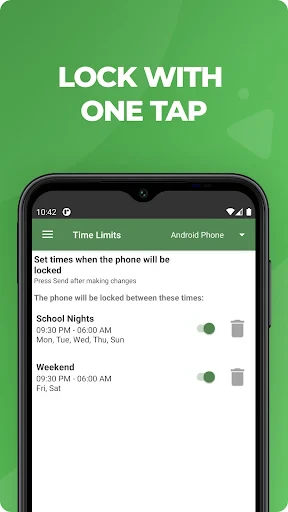
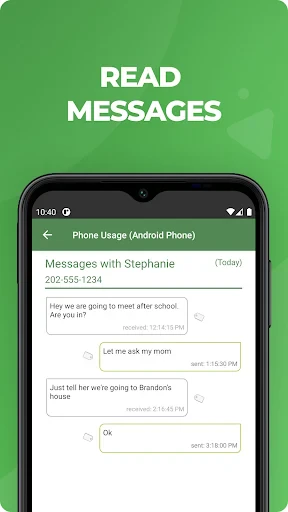
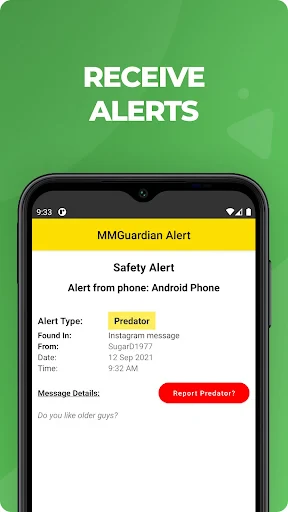
The core functions of MMGuardian include call and text monitoring, allowing parents to view contact lists, message content, and block specific numbers or unknown callers. Its social media monitoring feature scans popular platforms like WhatsApp, Instagram, and TikTok for signs of cyberbullying, explicit language, or predatory behavior, sending alerts when risks are detected. The apps screen time management enables parents to set daily usage limits, schedule phone lock periods for homework or bedtime, and pause internet connectivity remotely. Location tracking provides real-time GPS data and geofencing alerts when a child enters or leaves designated areas such as school or home. Additionally, MMGuardian includes a web filter that blocks adult content and restricts browsing to approved sites, alongside a proprietary alert system for detecting when a child sends or receives sexting-related language, facial recognition in photos, or self-harm indicators. All data is presented in an intuitive dashboard with weekly activity summaries.
Chapter 2: Value
MMGuardian delivers significant value by addressing modern parental anxieties rooted in the prevalence of cyber risks, screen addiction, and unsupervised digital interactions. Its primary advantage lies in its proactive threat detection, which uses machine learning to identify subtle language patterns associated with bullying, depression, or grooming, empowering parents to intervene early before issues escalate. Unlike basic screen time apps, MMGuardian provides granular monitoring of actual content, not just usage duration, offering transparency into a childs digital world without violating privacy excessively. For parents of teenagers, the app bridges the gap between trust and safety, as its non-stealth mode alerts the child that monitoring is active, promoting honest conversations about online behavior. Another key advantage is its cross-platform compatibility, ensuring seamless oversight regardless of the devices operating system. The geofencing feature reduces worry during commutes, while the panic button option lets children send emergency alerts to parents with a tap. By combining automation human interpretation via its alert system, MMGuardian saves parents hours of manual check-ins. Its reporting tools also support co-parenting arrangements, allowing multiple guardians to view data collaboratively. For high-risk situations, such as children with special needs or exposure to online predators, the app acts as a digital safety net that adapts to evolving threats, making it an investment in long-term wellbeing rather than just a control tool.
Chapter 3: Scenarios
MMGuardian is primarily designed for parents of children aged 8 to 17 years, specifically those concerned about screen overuse, cyberbullying, or early exposure to mature content. It is ideal for families where both parents work and cannot constantly supervise phone activities, or for younger children receiving their first smartphone who need structured boundaries. Everyday use cases include setting a two-hour game limit after school to ensure homework completion, blocking all apps during dinner to encourage family interaction, and receiving an automatic alert if the child searches for self-harm related topics. For teenagers, scenarios involve monitoring late-night texting habits that could impact sleep, filtering inappropriate web content during research, and using geofencing to verify their arrival at extracurricular activities. The app also suits divorced or separated parents by allowing shared access to location and alert histories. Additionally, MMGuardian helps parents of children with learning disabilities or anxiety by providing predictable schedules via the phone lock feature, reducing distractions. For school-related use, it can limit social media during exam periods or block gaming during class hours when children use personal devices off campus. It further serves as a tool for grandparents or guardians entrusted with temporary child care, enabling them to enforce consistent rules remotely.
Advantages
- monitors SMS and call logs with timestamp accuracy
- geofencing alerts trigger on entry and exit boundaries
- blocks explicit content via real-time web filtering
- tracks social media apps like Snapchat and WhatsApp
- stealth mode hides app icon from child’s device
Disadvantages
- requires USB debugging setup on Samsung devices
- VPN conflicts with school-managed network connections
- no cross-platform support for iOS parental controls
- location accuracy degrades in rural areas without Wi-Fi
- subscription auto-renews without grace period reminder
Frequently Asked Questions
Q: What does MMGuardian Parental Control do?
A: MMGuardian monitors text messages, calls, and social media on your child's Android or iOS device. It provides alerts for bullying, sexting, or suspicious contacts. Core functions include location tracking, app blocking, screen time limits, and web filtering. It aims to help parents oversee digital safety without reading all messages manually.
Q: Is a subscription required for all features?
A: Yes, MMGuardian requires a paid subscription for full functionality. A free trial is available for a limited period. Without a subscription, only basic setup and limited monitoring work. In-app purchases unlock advanced features like social media monitoring and detailed reports. No additional hardware is needed beyond the device.
Q: Does MMGuardian work on both Android and iOS?
A: It supports Android phones and tablets running OS 5.0 or later. For iOS, it works on iPhones and iPads with iOS 12 or newer, but with fewer features due to Apple restrictions. It does not support Windows, Mac, or other operating systems. Parent devices use a separate app to view reports from any platform.
Q: How does MMGuardian monitor social media apps?
A: On Android, it can read messages from WhatsApp, Facebook Messenger, Instagram, and others by capturing screen content or notification logs. On iOS, it only detects app usage time and blocking status due to privacy limitations. It cannot read encrypted content on either platform.
Q: Can MMGuardian track the child's location in real time?
A: Yes, it provides real-time GPS location tracking with location history for the last 30 days. Geofencing alerts send notifications when the child enters or leaves predefined areas. Location updates depend on the child device having an active internet connection or mobile data. Accuracy varies with network conditions.
Technical Information
Recommended for You

Call Blocker - Block Numbers

Hot Topic: Pop Culture Fashion

ColorSnap® Match

Breaking News - Live Headlines

Handy Art Reference Tool
![[KNA008] COMBINE](https://apk.ericdress.com/wp-content/uploads/2026/07/image731308511660044049.webp)
[KNA008] COMBINE

Retouch Remove Objects Editor

AlfaOBD

New Era Cap

JoyPlan - Home design 3D

Dictionary - Merriam-Webster

Offline Music Mp3 Player- Muso
Center Control - Stable & Easy

Music Maker JAM: Beatmaker app

Fomz

Plenty of Fish Dating App

Pregnancy Test App Quiz

Battery Charging Animation App

Greeting Card Design

Chatbot AI - Search Assistant
Dream 132 bronze watch face

Find a Grave

Layla