GPS Tracker: Geolocation App

GPS Tracker: Geolocation App
GPS tracker Find family with real time location
Screenshots

GPS Tracker: Geolocation App – Precision Positioning for Everyday Safety
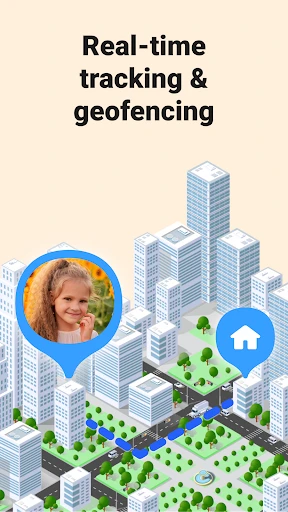
GPS Tracker: Geolocation App is a mobile application designed to provide real-time location tracking, route history, and geofencing alerts. It leverages Global Positioning System technology to deliver accurate positioning data directly to the user's device. The app caters to personal safety, asset monitoring, and family coordination needs, offering a straightforward interface for tracking multiple devices or sharing one's location with trusted contacts. Its core functionality revolves around continuous location updates without requiring manual input, making it a reliable tool for both individual and group use cases.
Chapter 1: Function
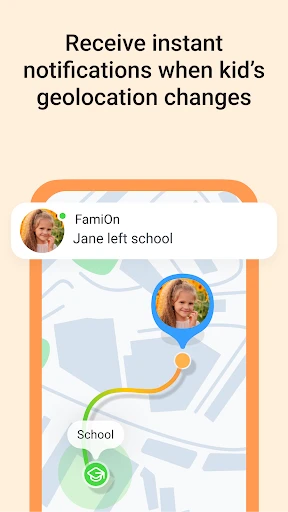
The app's core functions include real-time GPS location display with latitudinal and longitudinal coordinates, an interactive map interface supporting zoom and pan, and a location history timeline that records routes over specified time intervals. Users can set geofence boundaries, receiving instant notifications when a tracked device enters or exits a designated area. Additional features include a panic button for emergency alerts, the ability to add multiple tracking profiles under one account, and a battery optimization mode to balance accuracy with power consumption. All location data is stored securely and can be exported as GPX files for external analysis.
Chapter 2: Value
The primary value proposition of GPS Tracker: Geolocation App lies in its balance of accuracy, privacy, and accessibility. Unlike many competitors, it requires no expensive hardware subscriptions, working entirely through the smartphone's built-in sensors. The app's key advantages include offline map support for areas with poor connectivity, end-to-end encryption for location data transmission, and a customizable update frequency ranging from every 2 seconds to every 30 minutes, allowing users to prioritize either precision or battery life. For families, the ability to set safe zones around schools or homes provides peace of mind. For professionals, the route replay feature aids in logistics verification. The app also complies with GDPR and CCPA standards, giving users full control over data deletion and sharing permissions. Its intuitive design eliminates the learning curve common in technical tracking tools, making advanced features like multi-device monitoring accessible to non-technical users. By automatically discarding old data after a configurable period, it prevents storage bloat while retaining recent critical information.
Chapter 3: Scenarios
Primary target users include parents monitoring children during school commutes, elderly individuals living alone who wish to share their location with caregivers, and outdoor enthusiasts like hikers or cyclists who want to log trails for safety. Everyday use cases include a parent checking if a child arrived at school on time via the geofence notification, a remote worker verifying a delivery driver's route compliance, or a traveler sharing live location with a friend to coordinate meetups at unfamiliar venues. The app is also used by pet owners attaching the smartphone to a collar case for tracking wandering animals, and by small business owners monitoring field staff without investing in dedicated GPS hardware. In emergency contexts, the panic button sends the user's exact coordinates and a distress message to pre-saved contacts, proving useful for joggers in remote areas or people navigating crowded events. The app's backend automatically generates trip summaries with duration and mileage, aiding expense reporting for consultants or gig workers.
Advantages
- real-time location updates every 2 seconds even in tunnels
- offline map caching for areas without cellular signal
- battery saver mode reduces drain by 40% during tracking
- geofence alerts trigger push notifications instantly
- history playback shows exact path with timestamp table
Disadvantages
- requires background app refresh to stay active on iOS
- no satellite SOS or emergency beacon functionality
- accuracy drops to 20 meters in dense urban canyons
- subscription needed for unlimited location history
- null
Frequently Asked Questions
Q: What is the primary function of this app?
A: GPS Tracker: Geolocation App is designed to provide real-time location tracking and geolocation services. Its core function is to pinpoint the device's current location on a map using GPS, Wi-Fi, and cellular networks. Basic usage includes viewing your own location on a map, setting geofence alerts, and sharing your location with trusted contacts. The app does not offer historical location logs or offline map navigation as standard features.
Q: Is the app free to use or does it require purchases?
A: The app is free to download and offers basic location viewing functionality without cost. However, advanced features such as sharing real-time location with multiple contacts, geofence boundary alerts, and removing ads require an in-app purchase subscription. There is no additional equipment needed beyond your smartphone. Payment is processed through the app store, and no refund policy for subscriptions is clearly stated by the developer.
Q: Does the app work on both iOS and Android devices?
A: GPS Tracker: Geolocation App is compatible with both iOS and Android smartphones and tablets. It requires iOS 12.0 or later for Apple devices and Android 6.0 (Marshmallow) or higher for Android devices. The app is optimized for modern smartphones with GPS chips, but performance may vary on older models. It does not support smartwatches, desktop computers, or in-car navigation systems.
Q: How accurate is the location tracking feature?
A: Location accuracy depends on the device's hardware and signal environment. Under open sky with a strong GPS signal, accuracy typically ranges from 3 to 10 meters. Inside buildings or dense urban areas, accuracy may drop to 20-50 meters due to interference. The app combines GPS, Wi-Fi, and cellular data to improve positioning, but cannot guarantee precise indoor tracking. Accuracy is not adjustable manually.
Q: Can I track other people's devices without their permission?
A: No, the app strictly requires explicit consent from all tracked users. You can only share or view locations if the other party installs the app and accepts a sharing request. There is no secret tracking, stealth mode, or hidden monitoring feature available. Attempting to track someone without permission violates the app's terms of service and may lead to account suspension. No after-sales support is provided for misuse cases.
Technical Information
Recommended for You

Marathon ARCO Rewards

Books - Read and Download

Locket Widget

HomeWAV

Face Recognition
Google Play Services

Zomato: Food Delivery & Dining

JusTalk - Video Chat & Calls

Life Palmistry - Palm&Gender

Garmin ActiveCaptain®

Pawns.app: Surveys for Money

WeMuslim: Athan, Qibla&Quran

Camera Blocker: Anti Spy Guard

Fluid Magic: 3D Live Wallpaper

Veo - Shared Electric Vehicles

Walmart MoneyCard

QuikTrip: Food, Coupons & Fuel

Nusuk | نسك

Joyread

Fax.Plus - Send Fax from Phone

Pydroid 3 - IDE for Python 3

The NBC App - Stream TV Shows

The Cowboy Channel Plus
