Guitar Tuner Simple Pro

Guitar Tuner Simple Pro
Precise tuning tool for musicians seeking quick accurate pitch
Screenshots
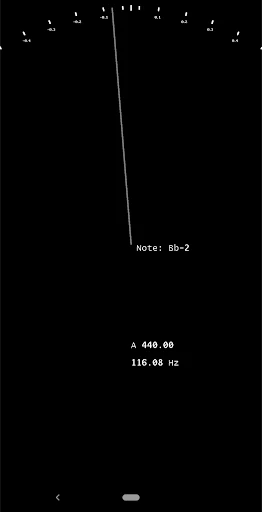
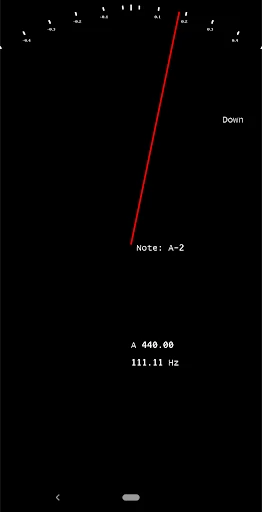
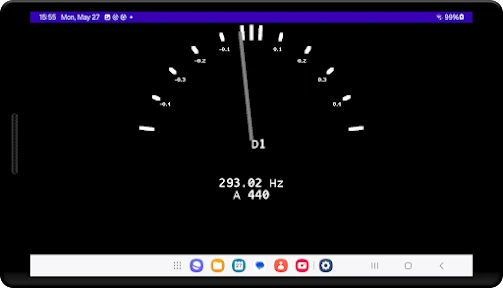
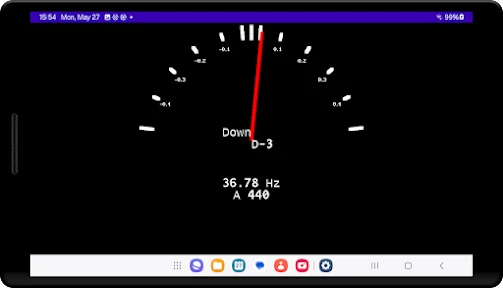

Guitar Tuner Simple Pro: Precision Tuning at Your Fingertips
Guitar Tuner Simple Pro is a dedicated mobile application designed to help guitarists of all skill levels achieve accurate and reliable instrument tuning quickly. The app leverages the device's built-in microphone to detect the pitch of each string, providing real-time visual feedback and guidance. Its minimalist interface removes unnecessary complexity, focusing solely on the core task of tuning. The app supports standard tuning as well as alternative tunings, making it versatile for various playing styles. With no ads, offline functionality, and a straightforward design, Guitar Tuner Simple Pro offers a seamless, professional-grade tuning experience directly from your smartphone.
Chapter 1: Function
Guitar Tuner Simple Pro delivers a streamlined, high-precision tuning mechanism. The core function is automatic pitch detection: upon opening the app, it immediately accesses the phone microphone and listens for the sound of a played string. The app then displays the detected note and indicates whether it is sharp, flat, or in tune using an intuitive visual meter. Users can select from standard tuning EADGBE or switch to common alternatives like Drop D, Open G, or DADGAD with a single tap. The app also includes a chromatic mode for custom tunings. For noisy environments, a manual calibration option improves accuracy. The interface shows the target string number and name, making it easy for beginners to follow. The entire process happens in seconds, with no account creation, ads, or unnecessary permissions required.
Chapter 2: Value
The primary value proposition of Guitar Tuner Simple Pro lies in its combination of accuracy, simplicity, and reliability. Unlike generic tuner apps cluttered with extra features or disruptive advertisements, this app is purpose-built for one task and executes it exceptionally well. Professional-grade accuracy ensures that each string is tuned to the correct frequency, which is critical for sound quality and playability. The offline capability means users can tune anywhere, from a quiet practice room to a noisy backstage area, without needing an internet connection. The intuitive visual interface eliminates the learning curve often associated with more complex audio tools. For beginners, it removes the intimidation of tuning by ear; for experienced players, it provides a fast and reliable reference. The app respects user privacy, requires no sign-up, and does not collect personal data. Its minimalistic design also conserves battery life. Overall, Guitar Tuner Simple Pro saves time, reduces frustration, and helps maintain instrument health by promoting regular, accurate tuning.
Chapter 3: Scenarios
Guitar Tuner Simple Pro is designed for a broad range of users, including beginners who are learning their first chords, intermediate players preparing for practice sessions, and seasoned performers who need quick tuning between songs. Primary use cases include: home practice, where the app ensures the instrument sounds correct before learning new techniques; at a music school, where students can tune quietly without disturbing others; during jam sessions with friends, allowing quick adjustments on the fly; and before live performances, where speed and reliability are essential. It is also ideal for traveling musicians who cannot carry a physical tuner. The app is equally useful for acoustic and electric guitars, as it works with any sound source the microphone can capture. Additionally, it serves as a backup tool for professional guitarists who already own expensive pedal tuners but want a convenient mobile option. Parents supervising children learning guitar will also find the simple interface easy to explain and use.
Advantages
- one-tap chromatic tuning with mic noise filtering
- supports standard
- drop
- and open tunings for versatility
- audible reference tone for ear training while tuning
- works offline without internet after initial download
- low latency detection on both guitar and bass strings
Disadvantages
- no manual fine-tuning adjustment for non-standard pitches
- microphone calibration drifts in noisy rehearsal environments
- limited to string instruments
- no support for ukulele or violin
- interface lacks visual feedback for strummed chord detection
- free version shows full-screen ads after each tuning session
Frequently Asked Questions
Q: What does Guitar Tuner Simple Pro do?
A: Guitar Tuner Simple Pro is a precision tuning app for acoustic and electric guitars. It uses the device microphone to detect pitch and displays real-time note frequency. No additional cables or equipment are required. The app supports standard tuning (EADGBE) and alternative tunings like Drop D or Open G. It is designed for quick, one-tap tuning with visual feedback.
Q: Is Guitar Tuner Simple Pro free to use?
A: The app offers a free version with basic tuning features and ad support. A one-time in-app purchase unlocks the Pro version, removing ads and adding advanced features such as chromatic tuning, frequency fine-tuning, and A4 reference adjustment. There is no subscription model. All features are accessible offline after initial download.
Q: Does the app work on all guitar types and iOS devices?
A: Guitar Tuner Simple Pro works on acoustic, electric, and classical guitars. It requires iOS 12.0 or later and is compatible with iPhone, iPad, and iPod Touch. The app does not require external hardware. For electric guitars, plugging into an audio interface is optional but not necessary because the microphone can pick up amplified sound.
Q: How accurate is the tuning in noisy environments?
A: The app has a tuning accuracy of ±0.1 semitone. In noisy environments, accuracy may decrease due to microphone interference. For best results, use the app in a quiet room or attach a clip-on microphone. The Pro version includes a noise filter to improve performance. The app does not support vibration-based sensors.
Q: Can I contact support after purchasing the Pro version?
A: Yes, the developer provides email support for Pro users. Refunds for the in-app purchase are handled through Apple’s App Store policies; the developer cannot issue direct refunds. There is no live chat or phone support. Common issues such as microphone permission errors or tuning lag are addressed in the in-app help section.
Technical Information
Recommended for You

Face Recognition

Photobooth mini FULL
Ranking Filter Funny Challenge

Mobile Passport Control

Klook: Travel, Hotels, Leisure

GitHub

Instant Cash Advance Loan App

Varo Bank: Online Banking

MERO - Programări Online

Kraken: Buy Stocks & Crypto

DamonSX2 Pro - PS2 Emulator

Pixlr AI Photo Editor

Smule: Karaoke, Sing & Record

Bonjour RATP

Credit Sesame: Grow your score

Addons for Minecraft Mods

myColorado

Broken Screen 4K Funny Pranks

DRIVE Electric for Tesla

WolframAlpha Classic

Parental Control App Blocker

Chat Master: Prank Story

TMOLector: Manga and Stories