DJ Mixer - DJ Music Remix

DJ Mixer - DJ Music Remix
DJ Mixer app for music lovers creating pro remixes easily
Screenshots
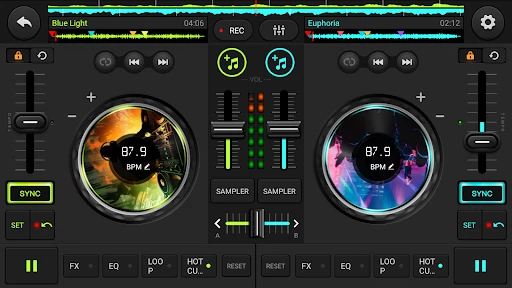
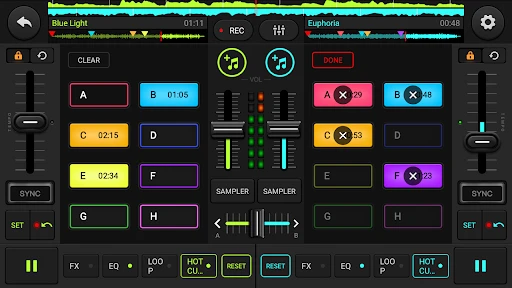
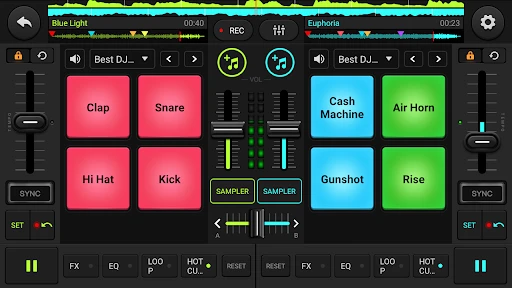
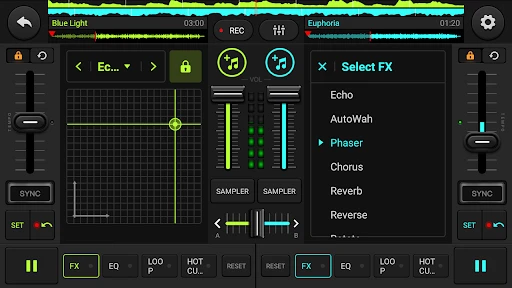
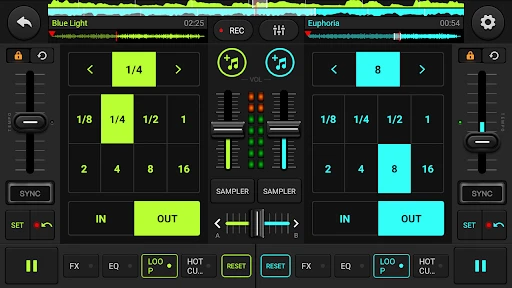
DJ Mixer - DJ Music Remix: Your Portable Mixing Studio
DJ Mixer - DJ Music Remix is a mobile application designed to transform any smartphone or tablet into a fully functional DJ console. It provides users with professional-grade tools for mixing, blending, and remixing their personal music library in real time. The app focuses on accessibility, ensuring that both beginners and experienced DJs can create seamless transitions, apply effects, and produce custom tracks without requiring expensive hardware or extensive technical knowledge. Its intuitive interface mimics the layout of physical DJ decks, complete with virtual turntables, crossfaders, and cue points, making it ideal for live practice, casual parties, or creative music exploration.
Chapter 1: Function
The app delivers a comprehensive set of core mixing functions. Users can load tracks directly from their device’s music library and control two active decks simultaneously. Key features include manual beat matching via adjustable tempo sliders, synchronized auto-mix for smooth transitions, and a high-precision waveform display for visual cueing. The mixing console offers a three-band equalizer for adjusting bass, mid, and treble frequencies, along with a crossfader for blending between channels. Additionally, the app includes a range of real-time audio effects such as echo, flanger, reverb, and filter sweeps, which can be applied to individual decks or the master output. Cue point and loop functionality allow users to mark specific sections of a song and repeat them, enabling creative remixing. A built-in recorder captures live mixes for later playback or sharing.
Chapter 2: Value
The primary value proposition of DJ Mixer - DJ Music Remix lies in its ability to democratize DJing by removing the financial and skill barriers associated with traditional equipment. For aspiring DJs, the app provides a low-cost, risk-free environment to learn beatmatching, phrasing, and effect application, reducing the need for expensive controllers or software licenses. Its intuitive drag-and-drop interface and auto-sync feature significantly shorten the learning curve, allowing users to create professional-sounding mixes within minutes. For experienced users, the app offers portability and convenience, enabling spontaneous mixing sessions without bulky gear. The recording feature adds practical value by allowing users to archive performances, share mixes on social media, or create podcasts directly from their phone. Furthermore, the app works offline with locally stored music, avoiding streaming latency or internet dependency. Regular updates introduce new effects and improvements, ensuring long-term usability. By combining power with simplicity, the app serves as both a creative outlet and a practical tool for music enthusiasts at any skill level.
Chapter 3: Scenarios
The app targets a broad audience ranging from hobbyist music lovers to semi-professional performers. Primary user groups include bedroom DJs who want to practice mixing at home without investing in professional hardware, party hosts seeking to control music playback and transitions at social gatherings, and content creators requiring quick remixes for videos or live streams. Everyday use cases include crafting seamless playlists for car rides or workouts by manually blending tracks, creating custom mashups by overlaying vocals from one song onto the instrumental of another, and recording practice sessions to evaluate progress. Additionally, the app is frequently used by students in music production or audio engineering courses as a hands-on supplement to theoretical learning. Mobile DJs performing at small events, such as house parties or school dances, leverage the app’s portability and reliable performance to manage entire sets without secondary equipment.
Advantages
- instant bpm matching for seamless track transitions
- built-in audio recorder captures live mixes without external tools
- waveform visualization aids precise cue point placement
- supports mp3
- wav
- aac
- and flac for flexible imports
- touch-sensitive crossfader allows dynamic volume sweeps
Disadvantages
- free version limits export length to 3 minutes per mix
- no midi controller support restricts hardware integration
- manual beatgrid adjustment required for non-electronic tracks
- high latency on bluetooth headphones disrupts live monitoring
- no key detection feature for harmonic mixing
Frequently Asked Questions
Q: What is DJ Mixer - DJ Music Remix?
A: DJ Mixer - DJ Music Remix is a mobile app in the music production category that lets users mix, remix, and edit songs in real time. Core features include dual turntables, crossfader, beat sync, loop, and sampler pads. It supports multi-track audio processing and volume/effect controls for live or recorded mixing. Basic usage requires no external equipment; all functions are operated via touchscreen. The app has no in-app purchases for initial use, but offers optional premium packs for extra sound effects and loops.
Q: Is DJ Mixer compatible with all smartphones or tablets?
A: The app runs on iOS 12.0 or later for iPhone/iPad and Android 8.0 or higher for phones and tablets. It uses the device's internal audio and touch controls, so no additional hardware is needed. Compatibility varies by device RAM and processor speed; older models may experience latency when applying multiple effects simultaneously. Always check your device model against the minimum requirements on the app store page before downloading.
Q: Does the app require an internet connection to function?
A: No, internet connection is not required for core mixing and playback functions. All local audio files stored on the device can be loaded and mixed offline. However, features like downloading online sample libraries, accessing premium sound packs, or syncing to cloud storage need an active Wi-Fi or mobile data connection. Offline use does not restrict any basic mixing capabilities.
Q: How can I export or save my final mix in DJ Mixer?
A: To export, tap the record button to capture your live mix, then stop and select 'Save Mix'. The app outputs as MP3 or WAV format at 192 kbps or higher, stored directly in the app's library or your device's music folder. You can share via email, social media, or transfer to a computer via USB. Free version limits export length to 5 minutes; full export requires premium upgrade.
Q: Is there customer support available for in-app purchase issues or bugs?
A: Yes, support is provided through the app's 'Help & Feedback' menu and the developer's official website. Common inquiries include refund requests for failed purchases, audio latency problems on specific devices, and crash reporting. Response time is typically within 48 hours. No phone support; all communication is via email or in-app ticket system. Note that unauthorized third-party plugins are not covered by support.
Technical Information
Recommended for You

Proxy Browser

MSNBC: Watch Live & Analysis

FIFA Official App

Nebula: Horoscope & Astrology

АЗС Татнефть

PowerDirector - Video Editor

D-ID: AI Video Generator

BimmerCode for BMW and MINI
Weather Live: Weather Forecast

Falou - Fast language learning

Smart & Final

ArriveCAN
Easy Piano Keyboard - Piano88

Handshake Jobs & New Careers

Church Center App

Spirit Fanfiction and Stories

DNA Launcher

Plant Parent: Plant Care Guide

Kismet - Tarot, Astrology

CaptionCall

JoiParty - Chat room

Wasatch Backcountry Skiing Map

AI Chat App - AI Chatbot