Ringtones for Android™

Ringtones for Android™
Find unique ringtones and personalize your Android phone easily.
Screenshots
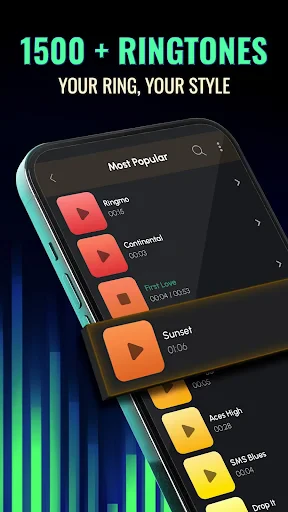

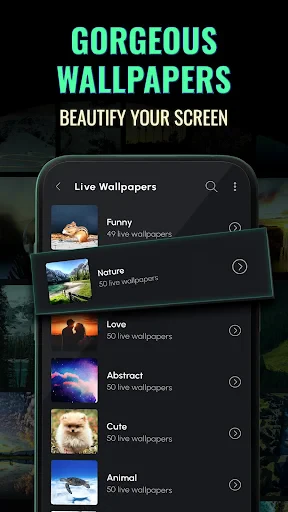


Ringtones for Android: Extensive Sound Customization
Ringtones for Android is a dedicated mobile application designed to provide Android users with a vast library of high-quality ringtones, notification sounds, and alarm tones. It serves as a one-stop solution for personalizing device audio, offering thousands of categorized sounds that can be previewed and set directly from the app. The application focuses on simplicity and accessibility, ensuring that users can easily browse, search, and apply their preferred tones without navigating complex system settings. By aggregating a diverse collection of genres including classic melodies, nature sounds, pop hits, and humorous clips, the app aims to cater to varied tastes and preferences, making it a practical tool for everyday device customization.
Chapter 1: Function
The core functionality of Ringtones for Android revolves around a massive, continuously updated sound library. Users can browse categories such as Trending, New, Classics, Nature, and Movies to discover new tones. The app includes a built-in preview player that allows instant listening before setting any sound. Key operational features include a one-tap set button that assigns a chosen tone to incoming calls, messages, or alarms. Additional functions include a search bar for finding specific sounds by keyword, a favorites system for saving preferred tones, and a history log that tracks recently used sounds. The app also integrates a simple option to set a specific song as a contact-specific ringtone. All operations are performed within the application interface, eliminating the need for manual file management or external music players.
Chapter 2: Value
The primary value proposition of Ringtones for Android lies in its unparalleled convenience and breadth of content. Users gain instant access to thousands of professionally curated sounds without the need for manual downloads from websites or risky file transfers. This eliminates the common frustration of searching multiple sources for a suitable tone. The app offers a significant time-saving advantage, as users can preview, select, and apply a ringtone in under ten seconds. A key advantage is the quality control of its library, reducing the likelihood of low-bitrate or distorted audio that plagues user-uploaded collections. Furthermore, the app respects device storage by not requiring downloads for previewing, only saving the final chosen file. For users with technical limitations, the app automates the system-level configuration process, ensuring compatibility across various Android versions and manufacturer skins. The two-tap workflow from selection to activation represents a massive reduction in friction compared to traditional methods involving file managers and settings menus. This ease of use combined with vast choice delivers a superior user experience for personalization.
Chapter 3: Scenarios
The primary target user groups for Ringtones for Android include casual smartphone users seeking quick personalization, professionals who desire distinct notification tones for work versus personal life, and individuals who frequently change their device audio based on mood or season. Everyday use cases encompass setting a custom ringtone for a specific contact, such as assigning a unique sound for a family member to differentiate calls. Users commonly rely on the app to replace system defaults with more pleasant or distinctive alarm tones for morning waking. Another frequent scenario involves configuring notification sounds for messaging apps like WhatsApp or Telegram, where a user might select a subtle chime for work emails and a more playful tone for personal chats during leisure hours. The app is also used during events or holidays, where users quickly find seasonal sounds like Halloween or Christmas ringtones. For people who attend meetings, the app provides quick access to silent or vibrating tones. Finally, new Android users or those upgrading devices often use this app as their first step to make the phone feel personalized and less generic immediately after setup.
Advantages
- one-tap set any audio file as ringtone
- works offline with no internet required
- supports mp3
- wav
- aac
- and more formats
- intuitive crop tool for precise trimming
- no account signup or tracking permissions
Disadvantages
- lacks built-in sound library or presets
- no batch processing for multiple files
- limited to local files on device storage
- can't preview ringtones in-app before saving
- no cloud backup or sync feature
Frequently Asked Questions
Q: What is Ringtones for Android and how does it work?
A: Ringtones for Android is a mobile app that provides a vast library of ringtones, notification sounds, and alarm tones for Android devices. It allows users to browse, preview, and download sounds directly to their phone, with options to set them as default ringtones or assign them to specific contacts. The core function is to offer a simple, one-tap setup for customizing device audio.
Q: Is the app free to use or does it require in-app purchases?
A: The app is free to download and use, offering a large selection of ringtones without upfront cost. However, it includes optional in-app purchases for premium ringtones, ad removal, or additional sound packs. Users can access many basic features and sounds without spending money, but full access requires purchases. No additional equipment is needed beyond a compatible Android device.
Q: Does the app work on all Android devices and system versions?
A: Ringtones for Android is compatible with Android devices running OS version 5.0 (Lollipop) and higher. It works on most smartphones and tablets from brands like Samsung, Google, Xiaomi, and OnePlus. The app is optimized for both phone and tablet interfaces, but performance may vary on older devices. It requires storage space for downloaded sounds and permissions to write to device storage for setting ringtones.
Q: How can I set a downloaded ringtone for a specific contact?
A: To assign a ringtone to a specific contact, first download the sound from the app. Then, open your phone's Contacts app, select the desired contact, tap the 'Ringtone' option, and choose the downloaded file from your device's storage. The app does not directly set contact-specific ringtones; it only provides the sound files. This process is standard and does not require any additional permissions beyond storage access.
Q: Can I use downloaded ringtones as alarm sounds or notifications?
A:
Technical Information
Recommended for You

Headunit Reloaded Emulator HUR

Spellai - AI Art Maker

My Aurora Forecast Pro

Jewelry Women Jewellery Photo

Document Reader & Viewer

Vaporwave PRO Wallpapers

Booktime

Shazam: Find Music & Concerts

BimmerCode for BMW and MINI

Keys simulator and cars sounds

Fishing Spots: Maps & Forecast

NewsBreak Lite

Learn more about your future

Easy Metronome

Yandex Go: Taxi Food Delivery

My SafeLink
Microsoft Excel: Spreadsheets

Chatspin Random Video Chat Duo

Golden Corral

Pillo: Angry Pill Reminder Box

AR Drawing: Sketch, Art, Paint

Cryptoguru: Trading Simulator

Airalo: eSIM Travel & Internet