My Invisalign - Official App

My Invisalign - Official App
My Invisalign App Track Progress Smile Journey
Screenshots

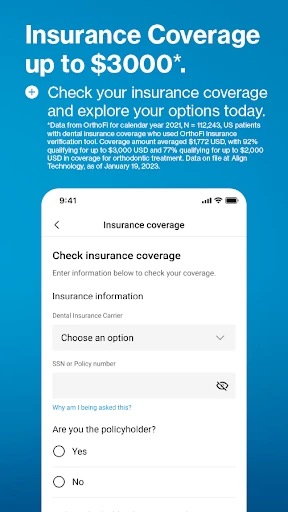


My Invisalign - Official App: Your Personalized Alignment Journey Companion
My Invisalign is the official mobile application designed to support patients throughout their Invisalign treatment. Developed by Align Technology, the app serves as a digital hub that bridges the gap between orthodontic visits. It provides a centralized platform for tracking treatment progress, managing appointment schedules, and accessing personalized care instructions directly from a user’s smartphone. The app leverages the power of interactive 3D visualization, allowing users to view a virtual simulation of their expected teeth movement plan. It also offers daily reminders to ensure compliance with aligner wear time, which is critical for achieving optimal results. By digitizing the patient experience, My Invisalign aims to make the orthodontic journey more transparent, engaging, and convenient, reducing anxiety and enhancing communication between the patient and their dental professional.
Chapter 1: Function
The core function of My Invisalign revolves around treatment monitoring and compliance. First, it provides a 3D Treatment Timeline that displays a step-by-step visual forecast of teeth movement across each aligner stage, enabling users to see their anticipated final smile from the start. Second, the app features an Aligner Check-in tool that allows users to upload photos of their teeth at specific stages. These images are then reviewable by their orthodontist or dentist remotely, facilitating virtual check-ins and reducing the need for frequent in-office visits. Third, it includes a Wear Time Tracker that logs daily aligner usage; the app sends push notifications to remind users when to put aligners back in after meals or cleaning. Fourth, it offers a comprehensive Care Guide with instructions for cleaning aligners, handling attachments, and managing discomfort. Finally, the app integrates a Direct Messaging function for secure communication with the treatment provider, enabling quick questions about pain, fit issues, or lost aligners without having to call the office.
Chapter 2: Value
My Invisalign delivers significant value by transforming a traditionally passive treatment into an active, data-driven experience. Its primary advantage is enhancing treatment compliance. Research shows that patients who wear aligners for the prescribed 20-22 hours per day achieve faster and more predictable results. By providing real-time wear tracking and personalized reminders, the app effectively turns adherence into a measurable habit, reducing the risk of treatment delays or failed corrections. A second key advantage is the reduction of in-office visits. The in-app photo upload and remote check-in feature allows clinicians to monitor progress weekly or bi-weekly instead of monthly, saving patients travel time and adjusting costs. For orthodontists, this streamlines workflow and improves patient retention. Third, the app improves patient education and confidence. The 3D visualizations demystify the process, helping users understand exactly what each stage accomplishes, which reduces anxiety about the final outcome. Fourth, the app fosters a sense of ownership and engagement. Users can track their own timeline, celebrate milestones like “Finish Stage 10 of 30,” and feel more in control. Finally, My Invisalign provides a seamless emergency response system. If an aligner breaks or is lost, users can immediately message their provider through the app to order a replacement, minimizing downtime. These advantages collectively increase the likelihood of a successful, timely, and satisfying orthodontic outcome.
Chapter 3: Scenarios
My Invisalign is primarily designed for two user groups: current Invisalign patients and their treating orthodontists or dentists. For adult patients aged 18-45, who are often busy professionals or students with demanding schedules, the app is indispensable. A common everyday scenario involves a professional who wears aligners for 22 hours daily. They use the app to set a timer when they remove aligners for lunch, receiving a reminder 15 minutes later. After lunch, they use the app’s image guide to clean the aligners properly before reinserting. In the evening, they snap a photo of their teeth for the weekly remote check-in, which their doctor reviews within the app. Another scenario is for teenagers undergoing treatment. Parents use the app’s parental control features to monitor their child’s wear time compliance and receive alerts if the child forgets to reinsert aligners after breakfast or sleepovers. For orthodontic clinics, the app streamlines administrative workflows. A receptionist or assistant can log into the provider dashboard to view which patients have uploaded images, prioritize those with issues, and send automated reminders for upcoming aligner changes. This reduces phone calls and manual charting. Overall, the app serves everyone in a holistic treatment ecosystem: the patient for daily guidance, the parent for oversight, and the clinician for efficient remote management.
Advantages
- tracks real-time wear time via Bluetooth to the aligner case
- shows countdown-to-change schedule with customizable reminders
- syncs treatment progress photos directly to your orthodontist
- provides chew count feedback to improve aligner seating
- offers in-app virtual check-in to reduce office visits
Disadvantages
- requires smartphone proximity to Bluetooth case for accurate logging
- no direct battery level indicator for the connected case
- limited functionality if orthodontist does not enable data sharing
- photo upload quality depends heavily on phone camera and lighting
- cannot manually override missed wear time if app loses sync
Frequently Asked Questions
Q: What is My Invisalign and what does it do?
A: My Invisalign is the official app for Invisalign patients. It provides a treatment tracker showing progress against the plan, a daily wear timer to log aligner usage, and a photo tool to document smile changes. It also offers appointment reminders and direct access to your orthodontist’s instructions. The app requires no additional equipment—only your smartphone and a Bluetooth connection is optional for the timer feature.
Q: Is My Invisalign free to use or does it require in-app purchases?
A: My Invisalign is completely free to download and use. There are no in-app purchases or subscription fees. The app works as a companion tool for active Invisalign patients, provided you have a valid treatment plan assigned by your orthodontist. No extra payment is needed to access any core features such as the wear timer, progress photos, or treatment milestones.
Q: Does My Invisalign work on both iPhone and Android devices?
A: Yes, My Invisalign is available for both iOS and Android devices. It supports iPhones running iOS 14.0 or later and Android devices running OS 8.0 or later. The app is designed for patients currently undergoing Invisalign treatment. It does not function for those without an active treatment plan. Certain features, like the Bluetooth wear timer, may require specific hardware support on older devices.
Q: How does the wear timer in My Invisalign track my aligner usage?
A: The wear timer uses your smartphone’s motion sensors and optionally a Bluetooth-connected SmartTrack device (if provided by your orthodontist) to detect when you are wearing your aligners. It logs total wear time daily and sends reminders if you remove them too long. The timer data syncs to your orthodontist’s portal for progress review. Manual override is available if the automatic detection is inaccurate.
Q: Can I contact my orthodontist directly through the My Invisalign app?
A: Yes, the app includes a direct messaging feature that allows you to send text or photos to your orthodontist’s office. You can ask about discomfort, schedule adjustments, or report broken aligners. The orthodontist can also push updates to your treatment plan through the app. Response time varies by clinic. The app does not provide emergency medical advice—call your provider for urgent issues.
Technical Information
Recommended for You

AlfaOBD

Video to MP3 Convert

Cracker Barrel

Reverb: Buy & Sell Music Gear

HHAeXchange

CoinSnap - Coin Identifier

MyCard - Contactless Payment

Screen Cast - Mirror For TV

KineMaster - Video Editor

Tilla Premium

MyMazda

Soccer Ronaldo wallpapers CR7

iRobot Home (Classic)
1Weather Forecasts & Radar

Atlas - Rewards Credit Card

OnStar Guardian: Safety App

BBC: World News & Stories

Binance: Buy Bitcoin & Crypto

Norton Family Parental Control

Tesla Proxy Pro - Safe & Fast

PixAI: AI Anime Art Generator

MangaToon: Comic & Manga

Spam Call Blocker for Android