Diary Pro - Diary With Lock

Diary Pro - Diary With Lock
Private journal with lock for secure personal daily reflections
Screenshots

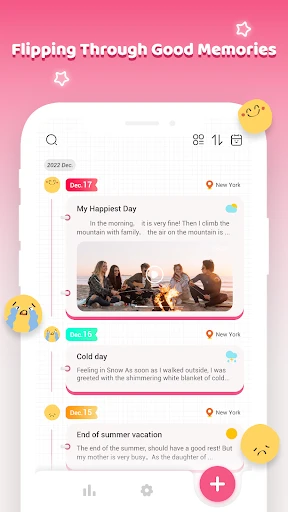


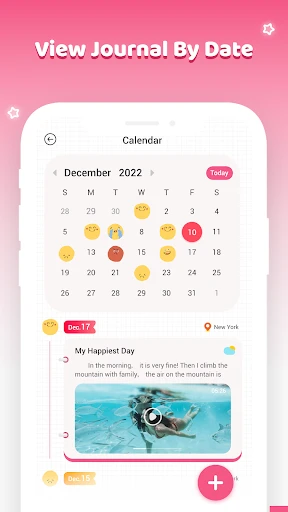
Diary Pro - Diary With Lock: Secure Personal Journaling App
Diary Pro is a privacy-focused digital journaling application designed to provide a secure and private space for users to record their daily thoughts, memories, and experiences. The app emphasizes data protection through strong encryption and a lock feature, ensuring that personal entries remain confidential. It combines the simplicity of traditional diary writing with the convenience of modern mobile technology, making it a reliable tool for personal reflection.
Chapter 1: Function
The core function of Diary Pro revolves around secure note-taking and journal management. Users can create text-based diary entries with automatic timestamps. The primary security feature is the app lock, which can be set using a PIN, pattern, or password, preventing unauthorized access even if the device is lost or shared. The app also supports cloud backup options, allowing users to save and restore their encrypted diary data across devices. Additionally, it offers search functionality, bookmarking for important entries, and customizable themes to personalize the writing interface.
Chapter 2: Value
The value proposition of Diary Pro lies in its uncompromising focus on user privacy and emotional well-being. Unlike general note-taking apps, Diary Pro provides a dedicated environment for self-expression where users can write openly without fear of their private thoughts being exposed. The integrated lock feature acts as a digital safe, fostering a sense of trust and security that encourages consistent journaling habits. Its backup system ensures that valuable personal histories are not lost, while the simple, distraction-free interface promotes mindfulness and stress relief through regular reflection. For users who value mental clarity and privacy, this app offers a controlled, safe space that no generic app can match.
Chapter 3: Scenarios
Diary Pro targets individuals of all ages who seek a private outlet for daily thoughts, including teenagers wanting to keep secrets from family, professionals managing confidential notes, or people recovering from trauma who need a therapeutic tool. Typical use cases include writing before sleep to decompress, recording significant life events such as milestones or travel experiences, and tracking personal growth or moods over time. The app is also ideal for users who share their devices frequently, as the lock ensures that personal entries remain hidden from others.
Advantages
- locks individual entries with PIN or fingerprint
- supports markdown formatting for structured journals
- offers password-protected cloud backup via iCloud
- includes passcode recovery via security question
- uses AES-256 encryption for stored diary data
Disadvantages
- no end-to-end encryption for cloud sync
- free version limited to 100 entries total
- lacks calendar heatmap view for entry tracking
- no biometric unlock on iPad
- only PIN
- import/export only plain text
- not PDF
Frequently Asked Questions
Q: What core features does Diary Pro offer for privacy?
A: Diary Pro provides password and biometric lock protection, ensuring all diary entries are encrypted locally. It supports multiple lock modes including pattern, PIN, and fingerprint. No cloud storage is used by default, keeping data solely on your device for maximum privacy control.
Q: Is Diary Pro free to use or requires in-app purchases?
A: The app is free to download with basic diary writing and locking functions. Premium features like custom themes, backup to Google Drive, and unlimited image attachments require a one-time or subscription in-app purchase. No additional hardware is needed.
Q: Which devices and systems are compatible with Diary Pro?
A: Diary Pro is designed for Android devices running version 5.0 or higher. It is also optimized for tablets. iOS, Windows, or macOS versions are not currently available. The app requires storage access for saving entries and images locally.
Q: Can I recover my diary entries if I forget the password?
A: There is no password recovery option due to end-to-end local encryption. If you forget your password, all entries will be permanently inaccessible. The app strongly recommends setting a security question or linking a backup email during setup for potential account-based recovery in future updates.
Q: Does Diary Pro limit the number of entries or attachments?
A: The free version allows unlimited text entries but limits image attachments to 5 per entry. Free users can store up to 50 images total. Premium subscribers have no limits on entries or attachments. No data sync across devices is included in the free tier.
Technical Information
Recommended for You

Genral Tv | Video Player

McDonald's Offers and Delivery

My BMW

PixelLab - Text on pictures

Tagged - Meet, Chat & Dating

Beauty Make Up Photo Editor

MediBang Paint:Draw Art, Comic

Earth Map Satellite

Homestyler - Home Design Game

CBS

Captions Lite

Substack

Fidelity Investments

Weather app

Screen Mirroring Pro App

Donna AI Song & Music Maker

TonalEnergy Tuner & Metronome

Mojo: Reels and Video Captions

Web Video Caster Receiver

Alarmy - Alarm Clock & Sleep

Magic Fluid: 4D Live Wallpaper

Local Weather: Live Forecast

TUDN: TU Deportes Network