eufy-original eufy Security

eufy-original eufy Security
Eufy security wireless cameras local privacy smart home
Screenshots


About eufy Security App Feature
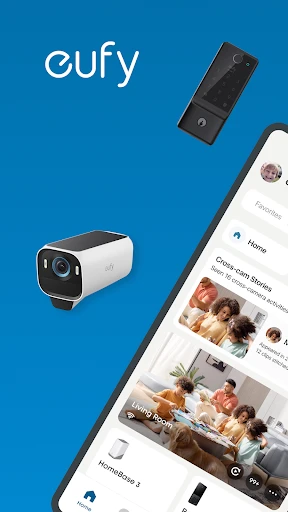
The eufy Security app is the central control interface for eufy brand home security devices, including cameras, doorbells, sensors, and alarms. It enables users to monitor their property in real time without recurring subscription fees, thanks to on-device AI processing and local storage. The app supports live viewing, motion event recording, two-way audio, and smart home integration, making it a comprehensive tool for modern home security. Its design prioritizes ease of use, privacy, and cost-effectiveness, appealing to homeowners and renters seeking reliable surveillance without ongoing costs.
Chapter 1: Function
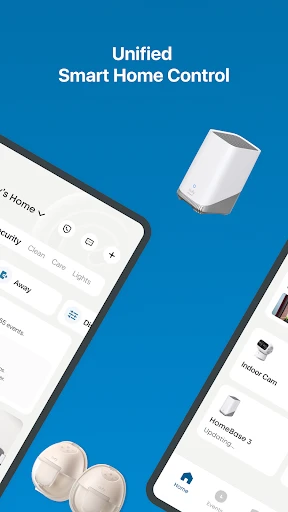
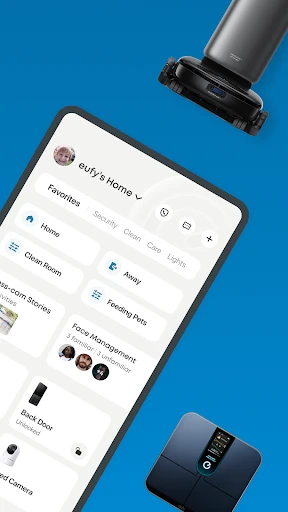
The eufy Security app serves as a unified hub for managing all compatible eufy devices. Its primary functions include live video streaming from indoor and outdoor cameras, immediate motion detection alerts delivered to the user’s phone, and two-way audio communication for visitor interaction or deterrence. Users can review recorded clips stored locally on the HomeBase or microSD cards, without cloud fees. The app also supports customizable activity zones to reduce false alerts, schedule modes like Home, Away, and Sleep, and integrate with voice assistants such as Amazon Alexa and Google Assistant for hands-free control. Device status checks, firmware updates, and system health diagnostics are available directly within the app, ensuring continuous operation.
Chapter 2: Value
The value of the eufy Security app lies in its zero-subscription model, strong privacy protections, and intelligent automation. Traditional security systems often require monthly cloud storage fees, but eufy stores all footage locally, saving users hundreds of dollars over time. On-device AI processing means video analytics for person, pet, or package detection happen locally, not on remote servers, reducing latency and eliminating reliance on internet uploads for privacy. The app’s robust encryption ensures data remains secure. Additionally, its integration with smart home ecosystems allows users to create routines; for example, an outdoor camera can trigger indoor lights when motion is detected, enhancing security and convenience. The user interface is intuitive, with push notifications that are configurable and non-intrusive. For families, the ability to add multiple user accounts with different permission levels provides flexible access control. The app’s reliability and cross-device support ensure consistent performance whether on iOS or Android, making it a trustworthy companion for both first-time and experienced security users.
Chapter 3: Scenarios
The primary target user groups are homeowners, apartment dwellers, small business owners, and parents with young children or elderly relatives living independently. Everyday use cases include: 1) A homeowner viewing their front door camera while at work to check for package deliveries or visitors, using two-way audio to instruct delivery personnel. 2) A parent monitoring a nursery via an indoor camera while in another room, receiving motion alerts when the baby stirs. 3) A small business owner checking a back entrance camera during off-hours for unusual activity. 4) An elderly person’s caregiver setting up motion sensors and cameras to detect falls or missed medication schedules, with alerts sent to family members. 5) A frequent traveler reviewing recorded clips of their empty home to ensure no break-ins occurred, with schedules set to automatically arm the system. The app also supports pet owners who use outdoor cameras to watch their pets in the yard, and apartment residents who need a portable system without permanent installation.
Advantages
- 24/7 local video storage
- no monthly fees
- AI detects humans
- pets
- and vehicles separately
- 2K resolution with HDR for clear night footage
- Weatherproof design rated IP67 for outdoor use
- Easy DIY setup via magnetic mount and app
Disadvantages
- Requires stable 2.4GHz Wi-Fi
- not 5GHz
- No cloud storage option for remote backups
- Field of view limited to 110 degrees
- Motion alerts delay up to 3 seconds
- App lacks third-party smart home integrations
Frequently Asked Questions
Q: What does eufy Security app do?
A: The eufy Security app lets you manage and monitor eufy security cameras, doorbells, and sensors. It provides live video streaming, motion alerts, two-way audio, and cloud-free local storage via HomeBase. No subscription is required for basic recording, and it supports intelligent detection like human and pet recognition for enhanced security awareness.
Q: Is the app free or does it require a subscription?
A: The eufy Security app is free to download and use. All core features, including real-time video, motion alerts, and local storage recording, do not require a subscription. Optional cloud storage plans are available for extended video history, but the app functions fully without any recurring fees, making it cost-effective compared to many competitors.
Q: Which devices and systems are compatible with eufy Security?
A: The app is compatible with iOS 12.0+ and Android 6.0+ smartphones and tablets. It works with eufy Security cameras, video doorbells, and sensors, all using 2.4GHz Wi-Fi for connection. A HomeBase hub is required for some devices to enable local storage and advanced features. No additional hardware beyond standard home Wi-Fi is needed.
Q: Can I share camera access with family members?
A: Yes, you can share camera access with up to 10 family members or guests through the app. Invite them via email, and they can view live feeds, receive notifications, and use two-way audio based on permissions you set. All shared users need their own eufy Security app account, and the primary account holder controls access rights at any time.
Q: How does local storage work without a cloud subscription?
A: Local storage is handled by the HomeBase hub, which holds a built-in hard drive (up to 16TB) or a microSD card. Recordings are saved directly to the hub and can be viewed in the app without any internet subscription. Video clips are encrypted and remain private on your device. If the HomeBase is removed, some features may stop until reconnected.
Technical Information
Recommended for You

National Car Rental

Business Insider

Outlined Watch Face

Taimi - LGBTQ+ Dating & Chat

Greeting Card Design

Security Camera App

RM Play

World App - Worldcoin Wallet

Camsea - Live Video Call

Liven: Discover yourself

MOD Bus Simulator Indonesia

Bible Homescreen - Read Now

فیلتر شکن قوی پرسرعت Homa Vpn

My Best Colors

Air Traffic - flight tracker

UDisc Disc Golf App

Perpay - Shop and Build Credit

Microsoft OneNote: Save Notes

Google Play Store

Protection 360™

Prank Call - ARMY BLINK Call

J23 - Jordan Release Dates

Al Jazeera - الجزيرة