Kangaroo: Simple Home Security

Kangaroo: Simple Home Security
Kangaroo Simple Security for New Homeowners
Screenshots
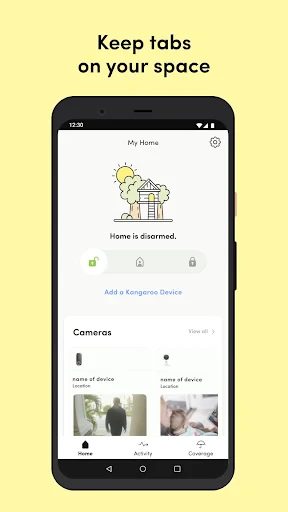
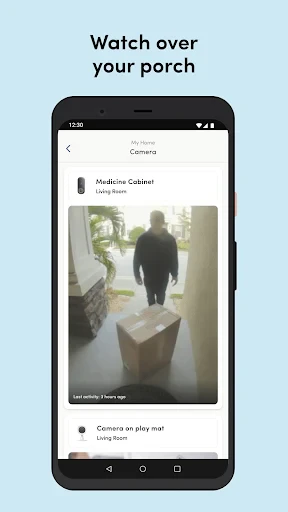
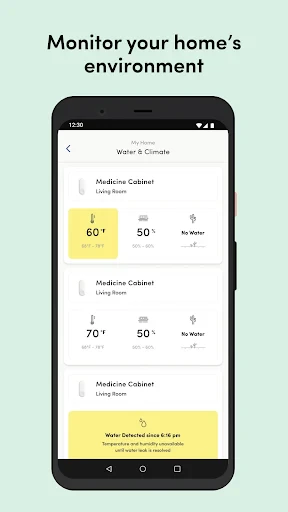


Kangaroo: Simple Home Security – Protect What Matters with Ease
Kangaroo is a user-friendly home security app designed to transform any smartphone or tablet into a complete monitoring system. It pairs with Kangaroo’s lineup of affordable, no-contract hardware—indoor and outdoor cameras, motion sensors, entry sensors, and a siren—to provide real-time alerts, live video streaming, and event recording. The app prioritizes simplicity, requiring no professional installation or long-term commitments. Users can arm or disarm the system remotely, view clips of detected motion, and customize notification preferences. With a focus on accessibility and affordability, Kangaroo aims to make home security approachable for renters, homeowners, and anyone seeking peace of mind without complex setups. Its intuitive interface ensures even non-tech-savvy users can monitor their homes within minutes. The app also supports optional cellular backup for uninterrupted connectivity and integrates with voice assistants via IFTTT for added convenience.
Chapter 1: Function
Kangaroo’s core functions revolve around straightforward monitoring and instant alerts. The app connects wirelessly to Kangaroo cameras and sensors using a base station or direct Wi-Fi. Once paired, its live view feature streams 1080p video from indoor or outdoor cameras, with night vision for low-light conditions. Motion detection triggers push notifications with short video clips stored in the app’s event log, accessible for up to 30 days with a subscription. The entry sensor alerts users when doors or windows open, while the motion sensor detects movement in specific zones. Users can arm the system in home mode (ignoring internal motion) or away mode (full coverage). The siren can be activated remotely or automatically upon breach. Optional features include two-way audio on cameras and customizable activity zones to reduce false alerts. All controls are centralized on the app’s dashboard, with a single tap to switch modes or view live feeds.
Chapter 2: Value
Kangaroo’s primary value is democratizing home security by eliminating barriers like contracts, high costs, and complex hardware. Unlike traditional systems requiring professional installation, Kangaroo’s peel-and-stick sensors and plug-in cameras set up in minutes, with no drilling or wiring needed. This makes it ideal for renters who cannot modify properties or budget-conscious users avoiding monthly fees—the base app and sensor alerts are free; subscriptions for cloud storage and advanced features cost roughly 5 to 10 per month, far below rivals. Its key advantage is flexibility: users can start with a single camera and expand gradually. The app’s simplicity also reduces anxiety, as notifications are actionable and clear. Privacy is reinforced with end-to-end encryption for video streams. Additionally, Kangaroo’s integration with IFTTT allows automation, like flashing smart lights when motion is detected. For homeowners, it offers a reliable backup to existing systems. The hardware’s battery life often exceeds 12 months, and outdoor cameras are weather-resistant, ensuring long-term value. This combination of low entry cost, ease of use, and scalable protection positions Kangaroo as a practical alternative to complex brands like Ring or SimpliSafe.
Chapter 3: Scenarios
Kangaroo primarily targets renters, apartment dwellers, and budget-minded homeowners who need simple, no-commitment security. Its primary user group includes young adults living alone, who value peace of mind but dislike long contracts; they use the entry sensor on front doors and indoor cameras to monitor deliveries or verify visitors. A second group is families with children, who place motion sensors near bedrooms or windows and rely on real-time alerts while at work—for example, knowing when kids return from school. Remote workers and small business owners use Kangaroo for dual purpose: monitoring home offices during the day and securing storefronts after hours via the outdoor camera. Seniors or individuals with mobility challenges benefit from voice control through IFTTT to arm the system without handling a phone. Everyday use cases include checking the live feed while on vacation, receiving a notification when a package arrives, or triggering the siren via app during a false alarm to deter intruders. The outdoor camera is commonly pointed at backyards to detect wildlife or unexpected movement, while the cellular backup ensures functionality during power outages. These scenarios highlight the app’s adaptability across living situations and lifestyles.
Advantages
- motion alerts sent within 2 seconds of detection
- local storage option avoids monthly cloud fees
- battery lasts 6 months on a single charge
- magnetic mount allows placement on any metal surface
- no hub required; works directly via Wi-Fi
Disadvantages
- night vision range limited to 15 feet in testing
- field of view is fixed at 130 degrees without tilt
- two-way audio has a 1-second delay on average
- no support for 5GHz Wi-Fi networks
- app requires location permission even when idle
Frequently Asked Questions
Q: What does Kangaroo do for home security?
A: Kangaroo provides simple home security through motion sensors, entry sensors, and a video doorbell. It sends real-time alerts to your phone and allows live camera viewing, two-way talk, and customizable alerts. No professional monitoring contract required, making it ideal for basic security needs.
Q: Is Kangaroo free to use or require subscriptions?
A: The app is free to download and basic features like live view and motion alerts are free. Optional cloud recording plans start at $3.99/month for 30-day video history. No long-term contracts or hidden fees, but sensors and cameras must be purchased separately.
Q: What devices and systems does Kangaroo support?
A: Kangaroo works on iOS and Android smartphones. Its hub connects via Wi-Fi and requires no landline or professional installation. Compatible with Amazon Alexa and Google Assistant for voice control. Sensors are battery-powered and designed for renters and homeowners without wiring.
Q: Can Kangaroo record video without a subscription?
A: Yes, the app allows live video streaming for free from the doorbell and camera. However, cloud video recording and saved history require a subscription. Without a plan, you receive motion-triggered still images and push alerts. No local storage option is available.
Q: How to troubleshoot Kangaroo sensor offline issues?
A: First, check sensor battery and replace if low (CR123A). Ensure the hub is within 100 feet of sensors with no thick walls. Restart the hub by unplugging for 10 seconds. If offline persists, re-pair the sensor via the app’s device settings. Contact support for hardware defects within 1-year warranty.
Technical Information
Recommended for You

Microsoft Outlook Lite: Email

Change my hair color

Penny Puss 2.0

Farmacias del Ahorro

Homes.com Real Estate Search

Niagara Launcher ‧ Home Screen

Google Play Games

Microsoft PowerPoint

Al Quran Kareem: القران الكريم

Messenger: Text Messages
VPN Proxy Speed - Super VPN

FlipArtify - 2D Draw Animation

Find my phone・Location tracker

Dollar General-Digital Coupons

Recipe Keeper

StayFree - Screen Time

Anime tv - Anime Tv Online HD

Ringtones for Android Phone

AI Video Maker - Renderforest

Holy Bible - KJV+Audio+Verse

Music ringtones for android

Lockscreen Drawing

Fanatics: Shop NFL, NBA & More
