Movies Anywhere

Movies Anywhere
Movies Anywhere connects purchases stream movies everywhere
Screenshots


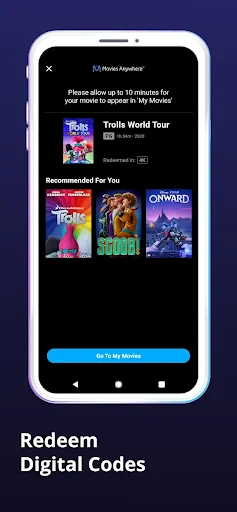

Movies Anywhere: Your Universal Digital Movie Locker
Movies Anywhere is a digital storage and syncing service that connects your existing accounts from major movie retailers and studios into a single, unified library. It allows you to stream or download purchased films across multiple platforms and devices without rebuying them. The app serves as a central hub, ensuring that when you buy a movie from one participating store, it becomes available in all other connected accounts. This eliminates fragmentation and provides a seamless viewing experience, letting you access your collection from virtually any smart device, gaming console, or streaming player at any time.
Chapter 1: Function
The core function of Movies Anywhere is to consolidate your digital movie purchases. Upon linking accounts from partners like Amazon Prime Video, Apple TV, Google Play, Vudu, and Microsoft, the app automatically scans each platform for eligible titles and aggregates them. It then syncs these titles so they appear in every connected library. Users can browse their entire collection in one place, watch playback directly within the app, or choose to view a title on any linked platform where the movie is available. The app also organizes films by series, genre, or studio, and supports creating custom playlists. Additional features include access to bonus content like deleted scenes and commentary for select titles, as well as family-friendly parental controls to manage what kids can view.
Chapter 2: Value
Movies Anywhere provides substantial value by solving the problem of platform fragmentation. The primary advantage is financial: once a user buys a digital movie from any participating retailer, they effectively own it across all connected services, eliminating the need for duplicate purchases. This is especially beneficial for households with multiple streaming devices or different family members who prefer different platforms. The app also offers convenience through centralized management; users can search, sort, and rate their entire library without switching between apps. Its cross-platform portability ensures that a movie purchased on an Android device can be watched on an Apple TV or Roku without any extra cost. Another key advantage is the integration with Movies Anywhere Screen Pass, which allows users to share selected titles with friends and family who do not own the movie, fostering social viewing. The cloud-based nature guarantees that the library is never lost, even if a user changes devices or loses access to a specific platform. For collectors, the app preserves purchase history and provides a reliable backup. Overall, it transforms digital movie ownership into a flexible, secure, and universally accessible asset, enhancing the long-term value of every purchase.
Chapter 3: Scenarios
Movies Anywhere serves a broad range of users, from casual viewers to dedicated film collectors. The primary target user groups include households with multiple streaming devices, such as families who own Rokus, Apple TVs, and game consoles, as they benefit from unified access. Another key group is cross-platform users who switch between Android phones, iPads, and Windows PCs, as the app ensures their collection travels with them. Typical use cases include a parent buying a movie for their child on Amazon Prime Video, which then automatically appears on the family’s Apple TV for weekend viewing. A college student might purchase a film on Google Play using student discounts, then watch it later on their laptop via Microsoft Movies TV. Collectors often use the app to scan for missing titles across accounts and redeem digital copies from physical disc purchases via included codes. In everyday life, a user might start a movie in the living room on a smart TV, pause it, and resume watching on a tablet in bed. The Screen Pass feature is commonly used to share a classic film with a friend who does not own digital movies, encouraging casual sharing without significant cost. Additionally, the app’s parental controls are frequently employed by parents to create a kid-safe viewing environment, choosing only approved films from the consolidated library.
Advantages
- links purchases across major digital stores automatically
- unifies Disney
- Warner
- Sony libraries into one account
- syncs watch history and progress across all linked apps
- supports 4K HDR playback wherever you buy once
- includes exclusive bonus content not on other platforms
Disadvantages
- no free tier or ad-supported streaming available
- many independent studios and smaller labels missing
- requires a linked account from participating retailers first
- limited to US users with no international support
- library access breaks if you unlink a retailer account
Frequently Asked Questions
Q: What is Movies Anywhere and how does it work?
A: Movies Anywhere is a digital movie locker app that links your accounts from major retailers like Amazon, iTunes, Vudu, and Google Play. When you purchase a movie from any connected retailer, it syncs across all linked libraries, allowing you to stream or download on different platforms without repurchasing.
Q: Is Movies Anywhere free to use?
A: Yes, downloading and using the Movies Anywhere app itself is free. However, to add movies to your library, you must purchase or redeem digital codes from supported retailers or physical discs. There are no subscription fees, but the app itself does not sell movies directly.
Q: What devices and operating systems does Movies Anywhere support?
A: Movies Anywhere supports iOS, Android, and web browsers. For streaming, it works on selected smart TVs, Roku, Apple TV, Fire TV, and Chromecast via the connected retailer apps. It does not support gaming consoles or all older TV models. Check their official website for a full device list.
Q: Can I watch movies offline with Movies Anywhere?
A: Yes, you can download movies from the Movies Anywhere app to your iOS or Android device for offline viewing. Downloaded titles remain accessible for up to 30 days after starting playback unless deleted. Offline playback is limited to the app itself and requires prior purchase.
Q: How do I troubleshoot syncing issues between retailers?
A: First, ensure all linked retail accounts (Amazon, iTunes, Vudu, Google Play) are active and correctly connected inside the Movies Anywhere app. Disconnect and reconnect each account if films don't appear. Contact Movies Anywhere support if the issue persists after 24 hours, as syncing is automatic but may have delays.
Technical Information
Recommended for You

rednote

Nail Art Design Ideas

Friend Tracker: Find Anyone

HotelTonight: Hotel Deals

InnoCaption Live Call Captions

AR Drawing Paint Sketch Trace

My AI Sweetheart

DailyBible Lite - KJV Version
Center Control - Stable & Easy

Paramount+

Domino's Pizza USA

RIZZ

AlfredCamera Home Security app
Snowflake rose gold watch face

Lively Lock Screen Wallpapers

Zello PTT Walkie Talkie

Camera iphone 15 - OS16 Camera

Hicut:Face Swap AI Video App

Hammer: Truck GPS & Maps

Police Radar - Camera Detector

Wells Fargo Mobile®

Pix Master

Traeger