Baby Shark Car Town: Kid Games

Baby Shark Car Town: Kid Games
Kids car town games for toddlers fun learning
Screenshots


Baby Shark Car Town: Kid Games Overview and Value Guide
Baby Shark Car Town: Kid Games is an interactive mobile application designed for preschool and early elementary children. It combines the popular Baby Shark characters with a vibrant, open-ended town simulation. The app focuses on introducing young users to different types of vehicles and community roles in a safe, ad-free environment. It is developed by The Pinkfong Company, known for educational children’s content.
Chapter 1: Function
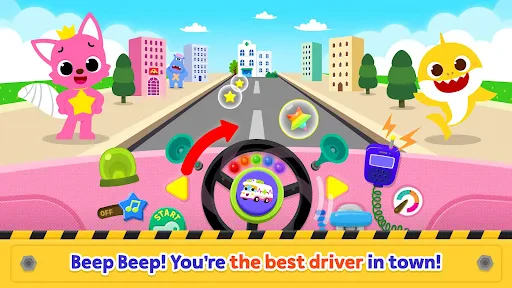
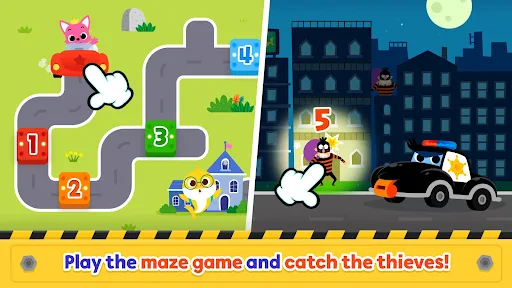
The core function of Baby Shark Car Town is to provide a free-play sandbox where children can drive a variety of vehicles, including buses, fire trucks, ice cream trucks, and taxis, through a colorful town map. Users tap and swipe to navigate their chosen vehicle along roads, interact with traffic lights, and stop at designated locations to pick up or drop off character passengers. The app also includes simple car washing and fueling mechanics to teach basic cause and effect. A secondary function is character collection, where children can unlock different Baby Shark family members as drivers. The interface is designed with large, touch-friendly buttons and minimal text, ensuring toddlers and young children can navigate independently without reading skills. All activities are self-directed, with no timers, scores, or competitive elements, emphasizing exploration over achievement.
Chapter 2: Value
Baby Shark Car Town delivers significant educational and developmental value for its target age group. Its primary value proposition lies in fostering imaginative play and role-playing, which are critical for cognitive and social development. By allowing children to act as a bus driver picking up friends or a firefighter responding to a call, the app encourages empathy and understanding of community helpers. The open-ended nature promotes decision-making skills, as children choose where to drive, which vehicle to use, and what order to complete tasks. From a motor skills perspective, the app requires precise tapping and swiping to steer the vehicle, which aids in fine motor coordination development. The repetitive patterns of traffic lights and road signs introduce early concepts of rules and safety in a non-punitive way. A major advantage is the absence of in-app advertisements and external purchase pressure, creating a completely safe digital playground for unsupervised play. The app also supports offline play after initial download, making it suitable for travel. Furthermore, the use of the globally recognized Baby Shark brand ensures high engagement, as children are already familiar with and attached to the characters. This familiarity reduces learning friction and increases sustained attention. For parents, the value is in knowing their child is spending screen time on a product that aligns with developmental milestones rather than passive consumption. The app also includes a parent gate system to prevent accidental purchases or navigation to external content, offering additional peace of mind.
Chapter 3: Scenarios
The primary target user group for Baby Shark Car Town is children aged 2 to 5 years old, particularly those who are fans of the Baby Shark franchise. In everyday use, a typical scenario involves a toddler or preschooler sitting with a parent or caregiver during a quiet time at home. The child selects a fire truck and drives it through the town to a burning building, then taps to extend the ladder and spray water. Another common scenario is a child using the app during a car ride, as the offline mode prevents data usage. The app also serves as a calming activity before naptime, as there are no loud alarms or failure states. In a sibling or playdate setting, children can take turns choosing different vehicles, negotiating over which character to use, which naturally encourages social sharing and turn-taking. For parents managing screen time, the open-ended gameplay allows them to set natural limits, such as finishing one trip around the town, rather than interrupting a timed level. The app is also used in early childhood education settings, such as preschools, where teachers incorporate it into lessons about transportation or community helpers. The simple interface allows small groups of children to gather around a tablet and discuss the actions on screen, facilitating verbal language development.
Advantages
- tap to play mini-games like car wash and fueling
- offline play available without wifi or data
- simple drag-and-drop controls for toddlers
- includes familiar baby shark characters and songs
- lightweight app under 100mb for low-end devices
Disadvantages
- limited to repetitive core loop of driving and cleaning
- no text or voice guidance for non-reading kids
- in-app purchases pop up frequently during play
- no multiplayer or parent-child cooperation mode
- vehicle customization locked behind paywall
Frequently Asked Questions
Q: What is Baby Shark Car Town: Kid Games about?
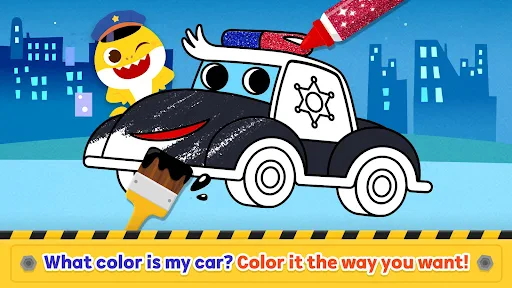
A: Baby Shark Car Town: Kid Games is an educational app for preschoolers where children drive Baby Shark-themed vehicles through interactive town scenes. It focuses on developing motor skills and creativity through simple driving missions, vehicle customization, and mini-games. No reading required; all instructions are visual and audio-based.
Q: Is the app free to download with no in-app purchases?
A: The app is free to download but includes optional in-app purchases for additional vehicle skins, town expansions, and ad removal. Core gameplay and basic vehicles are accessible without payment. No external equipment or subscriptions are required to play.
Q: What devices and systems does Baby Shark Car Town support?
A: The app supports iOS 11.0 or later on iPhone and iPad, and Android 5.0 or later on phones and tablets. It is optimized for touchscreens and runs on most modern devices. Not compatible with PC, macOS, or Kindle Fire without Google Play support.
Q: How does the car steering and driving work for young children?
A: Driving uses simple tap-and-drag controls—children tap to accelerate and swipe to steer. The app automatically brakes to prevent crashes. There is no tilt or complex joystick, making it easy for ages 2-5. Destinations are clearly marked with glowing arrows.
Q: Can my child play offline without Wi-Fi or cellular data?
A: Yes, all core gameplay modes and town scenes can be played offline. Only in-app purchase transactions and ad displays require an internet connection. Once downloaded, no active Wi-Fi or data is needed for the child to drive and explore.
Technical Information
Recommended for You

Roku Smart Home

Strobe

ONE@Work (formerly Even)

Cold Stone®

GeoZilla - Family GPS Locator

Toca Hair Salon 3

Samsung SmartTag

Yahoo Sports: Scores & News

Today's Hit Music Ringtones

MM-Calendar

Booktime

Wingstop

Carrier Services

Rewarded Play: Earn Gift Cards

YouTube Studio

Policia de Niños Llamada Falsa

NYT Cooking: Recipes & Tips

AI Dress up-Try Clothes Design

Moonstories
GPS Map Driving Directions

Dovly: Grow your Credit Score

Spring - Video Editor & Maker

Messages: Text SMS