PlantNet Plant Identification

PlantNet Plant Identification
PlantNet identifies plants via photo, connecting nature lovers to biodiversity knowledge
Screenshots
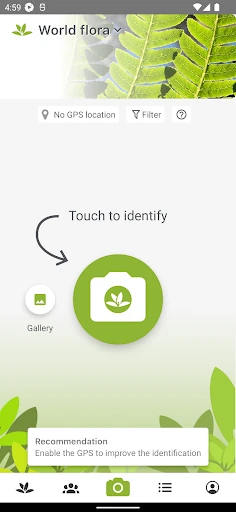
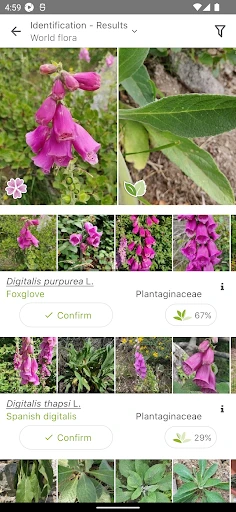


PlantNet Plant Identification – Discover and Identify Plants with Ease
PlantNet Plant Identification is a mobile application designed to help users identify plants through image recognition technology. Developed by a consortium of French research organizations, it leverages a vast botanical database and user-contributed observations to provide accurate plant identification. The app serves as a tool for botanists, gardeners, students, and nature enthusiasts to learn about plant species, document biodiversity, and contribute to citizen science projects.
Chapter 1: Function
The core function of PlantNet is plant identification through photo analysis. Users take a photograph of a plant part, such as a leaf, flower, fruit, or bark, and the app compares the image against its extensive reference library. The app uses deep learning algorithms to match visual features and returns likely species with associated photographs and descriptive information. It supports identification of wild plants, cultivated species, and some urban flora. Additionally, the app allows users to browse identified species by geographic location, view community contributions, and submit their own observations to improve the database. The identification process is offline-capable for basic searches, requiring internet access only for full database queries and updates.
Chapter 2: Value
PlantNet offers significant value by democratizing botanical knowledge and fostering environmental awareness. Its primary advantage is accessibility: any user with a smartphone can instantly identify unknown plants without specialized training. This empowers educators to integrate field biology into curricula, enables gardeners to manage invasive species, and assists researchers in monitoring biodiversity changes. The app is free from advertisements and does not collect personal data for commercial use, aligning with its nonprofit scientific mission. Another key advantage is its collaborative nature; every identification contributes to a growing global dataset used by scientists to track plant distribution and phenology. Unlike generic image search tools, PlantNet focuses exclusively on botanical accuracy, reducing misidentification risks. The app also provides a learning platform through its 'explore' feature, allowing users to discover plants in their region and understand ecological relationships. While not a replacement for expert field guides, it serves as a practical first step for species recognition, saving time and encouraging outdoor exploration. Its continuous updates reflect new scientific discoveries and user feedback, ensuring relevance across changing ecosystems.
Chapter 3: Scenarios
PlantNet is designed for a diverse audience ranging from casual hikers to professional ecologists. Primary target user groups include nature enthusiasts who encounter unknown plants during outdoor activities and wish to learn more about them. Gardeners and landscapers use the app to identify weeds, ornamentals, or potentially toxic species in their gardens. Students and teachers in biology or environmental science classes rely on PlantNet for fieldwork and species documentation projects. Researchers and citizen scientists contribute observations to track plant migration patterns or invasive species spread. Everyday use cases occur during walks in parks, botanical gardens, or forest trails, where users snap photos of flowers or leaves for immediate identification. The app is also valuable for urban planning departments and conservation groups conducting flora surveys. Additionally, travelers use it to identify local vegetation in unfamiliar regions, enhancing their travel experience with botanical insights. The offline mode supports use in remote areas without cellular coverage, making it suitable for expeditions and wilderness trips.
Advantages
- identifies plants from photos without internet
- uses collaborative data from global botanists
- compares multiple plant parts for accuracy
- covers over 20
- 000 species worldwide
- supports offline mode for remote fieldwork
Disadvantages
- requires clear
- well-lit photos for reliable results
- struggles with rare or hybrid plant varieties
- no built-in plant care or watering reminders
- database heavily biased toward European flora
- app size is large due to offline data pack
Frequently Asked Questions
Q: What does PlantNet do with my photos?
A: PlantNet uses your uploaded plant photos solely for species identification via visual recognition. Images may be added to its collaborative database to train algorithms and improve accuracy. No personal data or location is shared without consent, and you can delete contributions anytime through account settings.
Q: Is PlantNet free to use or are there paid features?
A: PlantNet is entirely free with no in-app purchases. All identification functions, species databases, and community features are accessible without payment. No subscription is required, though an internet connection is needed for image analysis and database queries.
Q: What devices and operating systems does PlantNet support?
A: PlantNet works on iOS 12.0+ and Android 5.0+ devices. It requires a camera for photo capture and internet access for identification. No additional hardware like external sensors is needed. Offline mode is not available as analysis relies on cloud comparison.
Q: Can PlantNet identify every plant species accurately?
A: PlantNet identifies over 20,000 species but accuracy depends on photo quality, plant part (flower, leaf, fruit), and database coverage. Common temperate species have high accuracy, while rare or tropical plants may show partial matches. The app clearly indicates confidence levels and suggests corrections.
Q: How do I handle failed or incorrect identifications?
A: If identification fails, improve lighting and focus, capture multiple plant parts (leaf, flower, stem), and avoid blurred backgrounds. Incorrect results can be manually corrected by selecting the right species from a list. User feedback helps update the database, but no customer support is provided for individual identification disputes.
Technical Information
Recommended for You

Invitation Maker

King James Bible - Verse+Audio

Miles - Video chat online

Gametime - Last Minute Tickets

FiMe: Find Phone By Clap Hand

myAir™ by Resmed

ClevCalc - Calculator

Fax.Plus - Send Fax from Phone

LogicLike: ABC & Math for kids

IPTV Player: Watch Live TV

Color Analysis - Dressika

DaTuner: Tuner & Metronome

SkyLock - Lock Screen

What The Forecast

Clap to Find My Phone, Whistle

Postmates - Food Delivery

Dofu - NFL Live Streaming

12 Steps AA Companion

Macy's: Online Shopping & Save

Navionics® Boating

Wave VPN

Pixl - Face Retouch & Blemish

AI Phone: Phone Call Translate