Orbot: Tor for Android

Orbot: Tor for Android
Tor VPN for Android secure private browsing and censorship bypass
Screenshots

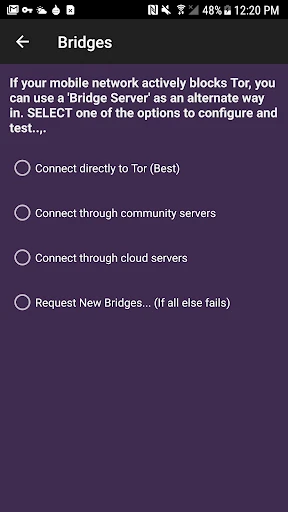
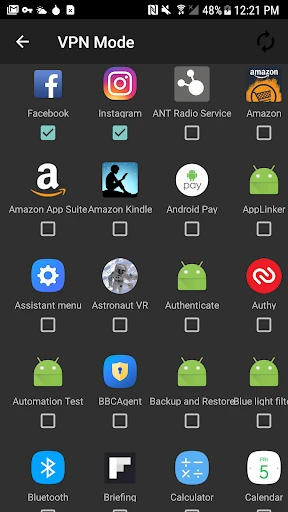


Orbot: Tor for Android – Privacy and Anonymity on Mobile
Orbot is a free proxy app that empowers other apps to use the internet more securely. By routing traffic through the Tor network, Orbot encrypts data and hides the user’s IP address, providing a layer of anonymity. It acts as a tunnel that protects communications from surveillance and tracking, making it a vital tool for privacy-conscious users on Android devices.
Chapter 1: Function
Orbot’s core function is to route all compatible app traffic through the Tor network. It integrates with the system to allow selected applications to connect via Tor, encrypting data multiple times and bouncing it through a distributed network of relays. Users can control which apps use the proxy via a simple per-app configuration list. Orbot also includes a built-in VPN mode for broader device-wide protection, though this requires root access or Android 5+ with a VPN API. It supports bridges for circumventing censorship in restrictive regions. The app updates Tor circuits automatically, ensuring each connection appears from a different IP, and offers a clear status indicator showing whether the connection is active or offline.
Chapter 2: Value
Orbot delivers significant value by providing robust privacy protection on mobile, a platform often overlooked for anonymity tools. Its primary advantage is decentralizing trust: it does not rely on a single VPN provider or centralized server, but instead uses thousands of volunteer-run relays. This architecture makes it resistant to data logging or court orders targeting a single entity. For journalists, activists, or ordinary users concerned about ISP tracking, Orbot prevents metadata collection and content monitoring. It also enables access to .onion sites, opening the dark web’s secure services on mobile. A key differentiator is its cost: it is free and open-source, with no premium tiers or data limits. Unlike commercial VPNs, Orbot does not log user activity or require an account. Its per-app filtering allows users to balance privacy with speed, routing only sensitive apps like browsers or messengers through Tor while keeping high-bandwidth apps on a direct connection. The bridge support is vital for users in countries with heavy internet censorship, as it obfuscates Tor traffic as regular HTTPS traffic, bypassing firewalls.
Chapter 3: Scenarios
Orbot primarily serves privacy advocates, journalists, activists, and individuals living under repressive regimes. A common use case is a journalist in a restricted country who needs to communicate with sources via encrypted messaging without exposing their location or identity. They configure Orbot to route only their secure messaging app while keeping map navigation on a normal connection to avoid drawing suspicion. Another scenario involves a privacy-conscious traveler using public Wi-Fi at airports or cafes. With Orbot active, their browsing history and login credentials remain hidden from network eavesdroppers. Students or researchers bypassing institutional firewalls to access scholarly content also benefit, routing their browser through Orbot to avoid content blocks. Additionally, ordinary Android users who wish to prevent their mobile carrier from tracking their website visits can enable Orbot for their default browser, ensuring no permanent identifying IP address is linked to their activity. The app is also used by developers testing Tor compatibility for their own applications.
Advantages
- routes all traffic through Tor for privacy
- works without root on most Android devices
- lets you per-app toggle Tor use individually
- built-in bridge support to bypass censorship
- open-source with frequent security updates
Disadvantages
- slows down browsing due to Tor relay latency
- some apps may crash without VPN mode fix
- setup requires understanding proxy or VPN config
- limited to TCP traffic; UDP apps fail directly
- no built-in kill switch for accidental leaks
Frequently Asked Questions
Q: What is Orbot and what does it do?
A: Orbot is a free proxy app for Android that enables other apps to use the Tor network for anonymized internet access. It encrypts traffic and routes it through a global overlay network of relays to hide your IP address and location. Core features include per-app VPN mode, bridge relays for censorship circumvention, and support for SOCKS5/HTTP proxies. It does not anonymize all device traffic by default; only apps configured to use its proxy benefit.
Q: Is Orbot completely free or does it require in-app purchases?
A: Orbot is entirely free to download and use with no in-app purchases or subscription fees. It operates as an open-source project maintained by The Tor Project. No additional equipment is required, though using bridges (e.g., obfs4) may need configuration. No paid tiers or premium features exist; all functionality is available at no cost.
Q: Which Android devices and system versions are supported?
A: Orbot supports Android devices running Android 4.1 (API 16) or higher, covering most modern smartphones and tablets. It is available via Google Play, F-Droid, and direct APK downloads. No iOS version is officially provided. ARM, x86, and x86_64 architectures are supported. Root access is not required but can enable transparent proxying for all apps.
Q: Does Orbot anonymize all apps on my phone automatically?
A: No, Orbot does not anonymize all apps by default. It functions as a proxy service; individual apps must be configured to route through Orbot via VPN mode (Android VPN API) or proxy settings. In VPN mode, you can select which apps use Tor. Without per-app configuration, traffic from other apps bypasses Tor entirely. Full-device anonymity requires careful manual setup.
Q: How can I fix connection issues or blocked Tor access?
A: If Orbot fails to connect, first check your internet connection. For censored networks, enable bridges in Orbot settings: go to 'Bridges' and select obfs4, meek, or Snowflake. Alternatively, request a custom bridge via torproject.org. Disable VPN conflicts (e.g., other VPN apps). No official customer support exists; help is available through Tor Project forums, documentation, and community channels.
Technical Information
Recommended for You

Telemundo 47: Noticias de NY

GoFundMe

Glassdoor | Jobs & Community

Job Search by ZipRecruiter

Fly Browser-Search & Private

AirTalk Wireless

شرطة الأطفال - مكالمة وهمية

NumberBox: Caller ID

Beauty Plus Princess Camera

FPL

AutoZone Auto Parts & Repair

Blood Pressure Diary

myVCA

Zip News: Latest & Alerts

Google Tasks

Dictionary.com: English Words

Magic Cross Stitch: Pixel Art

My Kitchen: 3D Planner

MSC for Me

Universal TV Remote Control

Night Camera Mode: Video Photo

Crosshair & Nickname Generator

iMotoneige