Invoice Maker - Invoice Fly

Invoice Maker - Invoice Fly
Invoice Fly creates sends invoices for small business owners
Screenshots


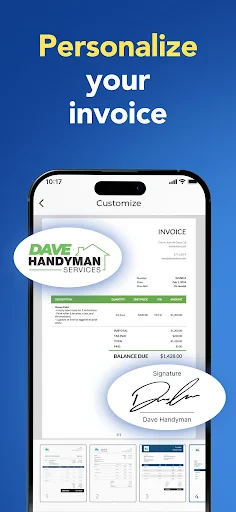
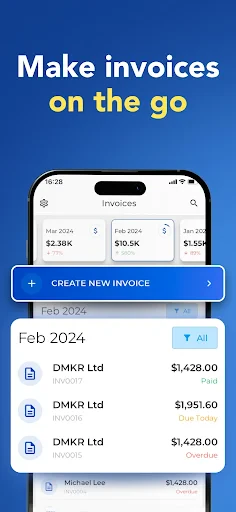

Invoice Maker - Invoice Fly: Streamlined Invoicing for Professionals
Invoice Maker - Invoice Fly is a mobile-first application designed to simplify the creation, management, and tracking of invoices, estimates, and receipts for freelancers, small business owners, and independent contractors. The app provides a comprehensive toolkit that transforms a smartphone or tablet into a portable billing office. Users can generate professional-looking invoices from customizable templates, which support the addition of company logos, itemized line items, tax rates, and discount calculations. The application also facilitates expense tracking, payment recording, and customer management, allowing users to maintain a centralized ledger of all financial transactions. A key feature is its ability to convert estimates into invoices with a single tap, streamlining the workflow from proposal to payment. With support for multiple currencies and languages, Invoice Fly caters to a global user base. The app emphasizes offline functionality, meaning users can create and send invoices without a constant internet connection, with data syncing automatically once connectivity is restored. This ensures uninterrupted business operations for professionals who work in varied environments, from remote locations to traditional offices. By integrating essential accounting functions into an intuitive interface, Invoice Fly aims to reduce administrative overhead and help users get paid faster.
Chapter 1: Function
Invoice Maker - Invoice Fly operates as an all-in-one billing and expense management solution. Its core functions include invoice generation from a library of professionally designed templates, which users can personalize with their brand colors, logo, and business details. The app supports the creation of recurring invoices for retainer-based clients, automating repeated billing cycles to save time. Users can add line items with descriptions, quantities, unit prices, and applicable taxes, with the system automatically calculating totals, subtotals, and any applied discounts. Beyond invoicing, the app includes an expense tracking module where users log business costs by photographing receipts, categorizing expenditures, and tagging them to specific clients or projects for seamless cost allocation. The customer management feature stores client contact information, invoice history, and payment statuses, enabling quick follow-ups on overdue accounts. Payment processing is integrated through secure gateways, allowing clients to pay directly from the invoice via credit card or bank transfer. Invoice Fly also generates financial reports, such as profit and loss summaries and outstanding receivables, giving users clear visibility into their cash flow. Data security is managed through PIN lock and cloud backup options, ensuring sensitive financial information remains protected and recoverable.
Chapter 2: Value
The primary value of Invoice Maker - Invoice Fly lies in its ability to dramatically reduce the time and complexity associated with billing for small-scale operators. For freelancers and micro-business owners who lack dedicated accounting departments, the app replaces manual invoice generation, spreadsheet tracking, and paper receipts with an automated, error-resistant digital workflow. This efficiency gain directly translates into faster payment cycles; by sending professional, accurate invoices immediately after a job is completed, users can shorten the average time to receive payment, improving liquidity. The app's value proposition is further reinforced by its cost-effectiveness, offering a robust feature set at a fraction of the price of desktop accounting software or outsourced bookkeeping services. The offline capability is a distinct advantage for users in industries like trade services, event planning, or consulting, where internet access may be unreliable on-site. This feature ensures that an electrician, for example, can generate an invoice for a completed repair without needing to return to a home office, capturing revenue opportunities instantly. Additionally, the integrated expense tracking helps users maximize tax deductions by ensuring no business cost is overlooked. The centralized customer database enables better relationship management, as users can instantly access a client's full billing history, payment preferences, and outstanding balances. This fosters trust and professionalism, which are crucial for client retention. By providing clear financial reports, the app empowers users to make informed business decisions, such as identifying their most profitable clients or services, and adjusting pricing strategies accordingly. Ultimately, Invoice Fly delivers measurable time and cost savings, reduces administrative stress, and contributes to a healthier cash flow, making it an indispensable tool for anyone managing their own billing.
Chapter 3: Scenarios
The primary target user groups for Invoice Maker - Invoice Fly are freelancers, independent contractors, and sole proprietors across various service-based industries. Common users include freelance graphic designers, web developers, writers, and consultants who manage multiple clients with different billing structures, from fixed-price projects to hourly engagements. The app also serves tradespeople, such as electricians, plumbers, mechanics, and home renovators, who often need to create invoices on-site at a customer's location, directly after completing a service. Everyday use cases include a photographer who sends a polished invoice to a wedding client the day after an event, including a detailed breakdown of services and usage rights. A freelance marketing consultant might use the app to set up recurring monthly invoices for retainer clients, automatically sending them each billing cycle. A handyman who visits multiple homes in a day can use the app to generate a receipt for a small repair, log the expense for the parts purchased, and track which customers have paid or are still outstanding. Another typical scenario involves a freelance event planner who creates an initial estimate for a client, then converts it into an invoice once the contract is signed, and later uses the expense module to log deposits paid to venues and vendors. The app’s multi-currency function is particularly useful for digital nomads or remote consultants working with international clients, allowing them to invoice in the client’s local currency while viewing their own income in a preferred base currency. By catering to these diverse, real-world scenarios, Invoice Fly addresses the specific pain points of professionals who need a reliable, portable, and efficient invoicing tool that adapts to their dynamic work environments.
Advantages
- scans receipts with OCR to auto-fill invoice fields
- exports PDF invoices directly to email or cloud storage
- supports multi-currency and tax rate customization per client
- offline mode for creating invoices without internet connection
- integrates with QuickBooks for automatic expense syncing
Disadvantages
- free version limits invoice count to 10 per month
- OCR accuracy drops with handwritten or low-light receipts
- no built-in inventory tracking for product-based businesses
- subscription required to remove watermark on PDF exports
- customer support response time often exceeds 24 hours
Frequently Asked Questions
Q: What does Invoice Maker do exactly?
A: Invoice Maker - Invoice Fly is a mobile app for creating, managing, and sending professional invoices, estimates, and receipts. It offers customizable templates, automatic tax calculation, payment tracking, and PDF export. The app supports multiple currencies and languages, and allows adding your logo and business details. No accounting or design skills are required.
Q: Is the app free or does it require purchases?
A: The app is free to download with basic invoice creation features. For unlimited invoices, custom templates, advanced reports, and cloud backup, you need to purchase the premium subscription or one-time in-app purchase. There is no mandatory hardware or additional equipment needed beyond your smartphone or tablet.
Q: Which devices and systems support this app?
A: Invoice Maker - Invoice Fly is available for iOS (iPhone/iPad) and Android smartphones and tablets. It requires iOS 12.0 or later or Android 5.0 and up. The app is optimized for both phone and tablet screens. No desktop version is currently offered. Users need internet access for cloud sync and email sending.
Q: Can I send invoices directly to clients from the app?
A: Yes, you can send invoices directly via email or share them as PDF attachments through messaging apps. The app also supports generating a shareable link for your invoice. However, physical printing or mailing is not handled. Payment links for online payment (e.g., PayPal, Stripe) require manual setup in the premium version.
Q: How do I recover my data if I uninstall the app?
A: Data recovery depends on backup settings. If you have enabled cloud backup via the app's premium subscription, your invoices are stored on our servers and can be restored after reinstallation. Free users risk data loss, as local storage is wiped upon uninstall. Export your invoices as PDF or CSV files regularly to keep a copy. There is no official desktop sync tool.
Technical Information
Recommended for You

PiyoLog: Newborn Baby Tracker

Baby Photo Editor

Splice - Video Editor & Maker

Status Saver - Video Saver

Ballozi VERO Hybrid Analog

My Tide Times - Tables & Chart

Break Speed

Cruise Norwegian – NCL

Face Recognition

Dairy Queen® Food & Treats

Busuu: Learn & Speak Languages

IPTV Pro

Heart Camera

Fawesome - Movies & TV Shows

YouCam Video Editor & Retouch

Videa: AI Video Maker, Effects

Haircare app for women

TV Cast for Chromecast

Ringtones & Wallpapers - Mob24

Love's Connect

Video Downloader HD - Vidow

Captions Lite

iVerify Basic
