Homebase: Employee Scheduling

Homebase: Employee Scheduling
Homebase schedules teams boosts productivity for small businesses
Screenshots
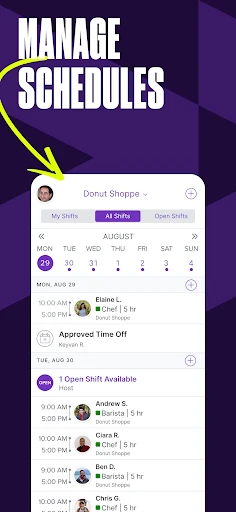
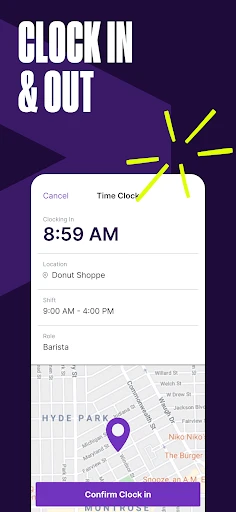

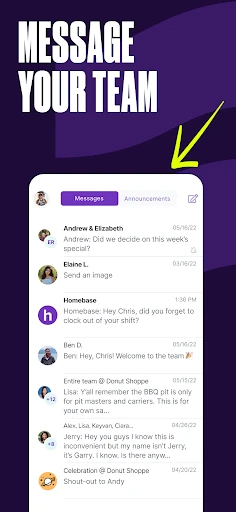
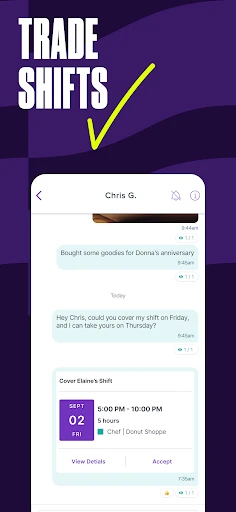
Homebase: Employee Scheduling - Simplify Workforce Management
Homebase is a comprehensive employee scheduling and workforce management app designed for small to mid-sized businesses. It streamlines shift creation, time tracking, team communication, and payroll integration, helping managers save time and reduce administrative errors while giving employees more control over their schedules.
Chapter 1: Function
Homebase’s core functions center on intuitive shift scheduling, real-time time clock capabilities, and seamless team messaging. Managers can drag and drop shifts, set recurring patterns, and publish schedules instantly. Employees can request swaps, pick up open shifts, and clock in/out via the app or a physical kiosk. The app also tracks hours against budgets, sends automated break reminders, and integrates with major payroll providers for direct data export. These features eliminate manual spreadsheets and reduce scheduling conflicts, ensuring labor costs are controlled and compliance with local labor laws is maintained.
Chapter 2: Value
Homebase delivers significant value by automating repetitive administrative tasks that traditionally consume hours of a manager’s week. Its intelligent scheduling engine prevents overtime by flagging schedule conflicts and calculating projected labor costs in real-time. For employees, the mobile-first interface fosters engagement through instant shift notifications, easy availability updates, and fair shift distribution. The app’s centralized dashboard provides actionable insights on labor percentage, turnover rates, and peak staffing needs, enabling data-driven decisions. Additionally, the built-in compliance tools help businesses avoid costly fines related to meal breaks and rest periods. For multi-location operations, Homebase offers unified oversight, allowing owners to compare performance across sites. The free tier’s generous feature set makes it accessible for startups and small chains, while paid plans unlock advanced analytics and custom reporting. This combination of efficiency gains, cost control, and workforce satisfaction creates a strong return on investment for any business with hourly employees.
Chapter 3: Scenarios
Homebase primarily serves industries like retail, hospitality, healthcare, and service-based businesses that rely on hourly and shift workers. Typical target users include restaurant owners managing front-of-house and kitchen staff, retail store managers handling part-time associates, and small clinic administrators coordinating nurses and front desk personnel. Everyday use cases include creating weekly schedules for 10-50 employees, handling last-minute call-outs by broadcasting open shifts to the team, or running a payroll report in seconds at month-end. The app is equally valuable for franchise owners overseeing multiple locations, as they can audit schedules across stores from a single login. It also supports seasonal businesses needing to quickly scale staffing up or down during peak periods. By replacing paper timecards and text chains, Homebase becomes the central hub for daily operations in dynamic, fast-paced work environments.
Advantages
- shifts auto-publish based on employee availability and store traffic
- drag-and-drop schedule builder with instant conflict detection
- integrated time clock syncs with POS for accurate payroll
- mobile alerts for shift swaps reduce no-shows by 40%
- offline mode allows schedule edits without internet connection
Disadvantages
- advanced shift forecasting requires 30 days of historical sales data
- free tier limits to 10 employees and 1 location
- no native integration for restaurant-specific tip pooling
- crew messaging lacks read receipts and file sharing
- opening/closing task templates not customizable per role
Frequently Asked Questions
Q: What does Homebase do for employee scheduling?
A: Homebase is a workforce management app that enables businesses to create, share, and manage employee schedules. It offers drag-and-drop shift building, shift swapping, and automatic conflict detection. The app also integrates time tracking and communication tools, making it a central hub for hourly employee management without needing additional software.
Q: Is Homebase free to use or requires in-app purchases?
A: Homebase offers a free tier with basic scheduling, time clock, and messaging features for a single location. Paid plans start at $20 per month per location, unlocking advanced features like labor cost forecasting, hiring tools, and multi-location management. No additional equipment is required, but the mobile app requires an internet connection.
Q: Which devices and systems does Homebase support?
A: Homebase supports iOS, Android, and web browsers. The mobile app requires iOS 14.0 or later and Android 8.0 or later. It is designed for small to medium-sized businesses in industries like restaurants, retail, and services. No specific hardware is needed, but a compatible device is necessary for full functionality.
Q: Does Homebase limit the number of employees or schedules?
A: Yes, free plan limits to one location and up to 20 employees. Paid plans scale to unlimited employees and multiple locations. Schedule creation is unlimited within plan limits, but features like automated scheduling and shift templates may be restricted on lower tiers. Check current pricing for exact caps.
Q: How can I resolve schedule syncing errors in Homebase?
A: Most syncing errors are caused by outdated app versions or poor internet connection. Ensure both manager and employee apps are updated via official stores. Log out and log back in if shifts appear duplicated. For persistent issues, contact Homebase support through the app’s help center; they typically respond within 24 hours.
Technical Information
Recommended for You

ICS Mobile

ValeroPay+

Wireless Display

Flash Color Call

Whitetail Deer Calls Pro

Pregnancy App & Baby Tracker

Pocket Toons

Photo Video Maker Music Song

Wedding Invitation Card Maker

Best Western To Go

A Better Routeplanner (ABRP)

Screen Mirroring Pro for Roku

Starlink
1800 Contacts - Lens Store

리디 - 웹툰, 만화, 웹소설, 전자책 모두 여기에!

Whistle Express Car Wash

Zaxbys

Easy Quran Mp3 Audio Offline

JoiParty - Chat room

Flex - Rent On Your Schedule

POLITICO

PictureThis - Plant Identifier

PDF Reader and Photo to PDF