Smartsheet: Projects & Teams

Smartsheet: Projects & Teams
Smart sheets for teams projects and work management
Screenshots


Smartsheet: Projects & Teams - Comprehensive Work Management Platform
Smartsheet is a dynamic work management and collaboration platform designed to bridge the gap between traditional spreadsheets and modern project management software. It empowers teams to plan, track, automate, and report on work with a familiar spreadsheet interface, but with the power of advanced automation, real-time collaboration, and robust integrations. The app is available on Google Play and the Apple App Store, offering mobile access to manage tasks, projects, and processes from anywhere.
Chapter 1: Function
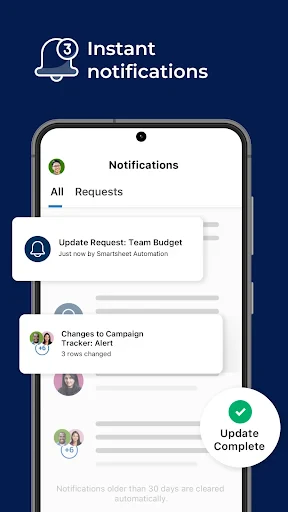
Smartsheet’s core functions revolve around flexible work execution. The app provides a spreadsheet-style grid view for task management, allowing users to create and assign tasks, set dependencies, and manage timelines. It includes Gantt, calendar, card (Kanban), and grid views to visualize work. Users can set up automated workflows for notifications, approval requests, and status updates. Real-time collaboration enables comments, file attachments, and updates visible to all team members. The mobile app offers offline access to recent projects, push notifications for task assignments and changes, and quick markdown tools to update task status. Smartsheet also supports formulas for calculations, conditional formatting, and reporting dashboards to track project health, resource utilization, and progress against deadlines.
Chapter 2: Value
Smartsheet delivers significant value by combining the familiarity of spreadsheets with enterprise-grade project management capabilities. Its key advantage is reducing the learning curve, as most users already understand spreadsheet logic, minimizing training time. The platform provides a single source of truth, eliminating siloed data across emails, documents, and separate tools. Automation features drastically reduce manual data entry and repetitive status updates, saving teams substantial time and reducing human error. Smartsheet scales from simple to-do lists to complex cross-departmental portfolios, supporting organizations of all sizes. The mobile app extends productivity beyond the office, enabling teams to update tasks, approve requests, and view dashboards on the go. Its deep integration ecosystem connects with Salesforce, Microsoft Teams, Jira, Google Workspace, and over 200 other tools, ensuring workflows are seamless. The platform’s audit trail and permission controls support compliance and security needs, making it suitable for regulated industries. For project managers, Smartsheet provides real-time visibility without requiring dedicated PMO software, while team members gain clarity on priorities and deadlines. The net result is improved accountability, faster decision-making, and higher project success rates.
Chapter 3: Scenarios
Smartsheet serves a wide range of target user groups. Primary users include project managers, operations teams, marketing departments, IT professionals, and small business owners who need to coordinate multiple tasks and resources. Everyday use cases include managing marketing campaign launches, where teams track deliverables, deadlines, and approvals across designers, writers, and stakeholders. IT teams use Smartsheet to manage software development sprints, support ticket tracking, and change management processes. In human resources, it supports employee onboarding checklists, performance review cycles, and recruitment pipelines. Operations professionals rely on it for inventory tracking, process documentation, and vendor management. The app is also widely adopted in education for academic project planning, in construction for task tracking and site inspections, and in healthcare for patient follow-up schedules and compliance audits. The mobile app is particularly valuable for field workers who need to update task status from job sites, approve expense reports during travel, or review project dashboards while commuting.
Advantages
- real-time gantt chart updates sync across all team members
- automated workflow triggers from cell changes or dates
- grid-to-card view switching for task-level focus
- formula-driven rollup rows for budget and resource tracking
- offline mobile access with auto-sync on reconnection
Disadvantages
- steep learning curve for non-spreadsheet users
- limited native automation vs dedicated project tools
- mobile app lags on large sheets with many nested rows
- no native time tracking without third-party integration
- conditional formatting rules reset after sheet copy operations
Frequently Asked Questions
Q: What is Smartsheet and what does it do?
A: Smartsheet is a cloud-based work management and collaboration platform. It combines the familiar spreadsheet interface with project management features like Gantt charts, automations, and reporting. Users can track tasks, manage timelines, share files, and automate workflows across teams, making it suitable for project coordination and operational planning.
Q: Is Smartsheet free to use or does it require payment?
A: Smartsheet offers a free trial for new users, but continued use requires a paid subscription. Plans include Individual, Business, and Enterprise tiers, each with different limits on sheets, collaborators, and automation features. No additional hardware is needed, but a stable internet connection and a compatible device are required.
Q: Which devices and systems support Smartsheet?
A: Smartsheet is available on iOS and Android mobile devices via dedicated apps, and on desktop via any modern web browser (Chrome, Firefox, Safari, Edge). It supports Windows, macOS, and Linux platforms. Offline editing is limited; most features require an active internet connection. No specific age group restriction is stated.
Q: Can Smartsheet replace Excel for complex data formulas?
A: Smartsheet supports many common spreadsheet formulas, but it is not a full Excel replacement. Advanced functions like pivot tables, macros, or complex array formulas are not supported. It is optimized for collaborative project tracking rather than heavy data analysis. For advanced calculations, data export to Excel is recommended.
Q: How can I get support or report a problem with Smartsheet?
A: Smartsheet provides in-app help articles, a community forum, and email-based support for all paid plans. Higher-tier plans include live phone and chat support. There is no physical after-sales repair service as it is purely software. Users can also submit bug reports through the official Smartsheet support portal.
Technical Information
Recommended for You

Bible App for Kids

Bitmoji

AI Baby Generator

Clime: NOAA Weather Radar Live

Clock Launcher: Set Alarms

Galaxy SmartTag

Public – Stocks and Options

OBD JScan

Messenger: Text Messages, SMS

Muscle Trigger Point Anatomy

iSharing: GPS Location Tracker

Nova Launcher Prime

Booksy for Customers

SMS Backup & Restore Pro

GetYourGuide: Travel & Tickets

NuFACE

Musicify-Offline MP3 Player

B612 AI Photo&Video Editor

Manobook - Los Besos de Jacob

Buffalo Wild Wings Ordering

Wells Fargo Mobile®

BIGVU Teleprompter & Captions

Sofascore: Live Sports Scores