DaVinci - AI Image Generator

DaVinci - AI Image Generator
AI art maker for creators to generate stunning images fast
Screenshots
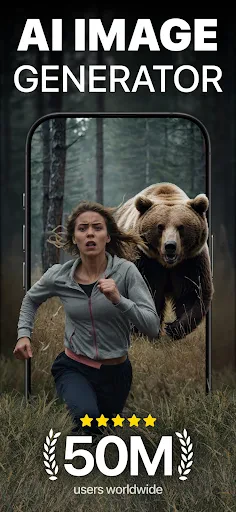
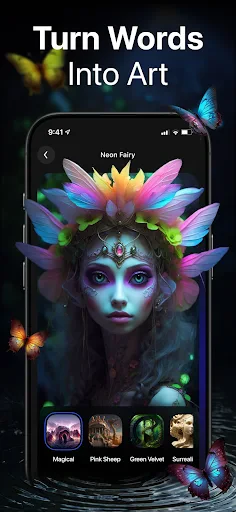
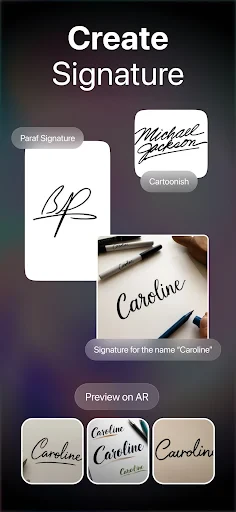


DaVinci - AI Image Generator: Unleash Your Creative Vision through Artificial Intelligence
DaVinci - AI Image Generator is a cutting-edge mobile application that harnesses the power of artificial intelligence to transform text descriptions into stunning, high-quality visual artworks. Designed for both professional creators and casual enthusiasts, the app leverages advanced deep learning models to interpret user prompts and generate detailed images ranging from photorealistic portraits and landscapes to abstract art and fantasy illustrations. Its intuitive interface eliminates the technical barriers of traditional graphic design, allowing anyone to produce unique visuals in seconds. The app continuously updates its AI engine to support various artistic styles and resolutions, making it a versatile tool for personal expression, content creation, and commercial projects.
Chapter 1: Function
DaVinci - AI Image Generator provides a suite of core functions centered on text-to-image generation, style customization, and iterative refinement. Users begin by inputting a descriptive prompt, which the AI analyzes to construct a coherent image. The app offers an extensive library of preset styles, including oil painting, watercolor, cyberpunk, anime, and 3D rendering, enabling users to instantly alter the aesthetic direction of their output. A key function is the parameter adjustment panel, where users can control aspect ratio, image resolution, and creative freedom level to fine-tune results. Additionally, the app includes an inpainting feature that allows users to select specific areas of a generated image and modify them with new prompts, facilitating detailed edits without starting from scratch. Batch generation saves time by producing multiple variations of a single prompt, while the history log preserves all creations for future access and sharing. These functions collectively streamline the creative process, making advanced AI image synthesis accessible and responsive to user intent.
Chapter 2: Value
The value proposition of DaVinci - AI Image Generator lies in its ability to democratize visual creativity, reduce production time, and offer unparalleled flexibility in artistic exploration. For professionals such as graphic designers, marketers, and content creators, the app serves as a rapid prototyping tool that cuts down the hours typically spent on manual sketching or stock image searching. It enables the generation of custom illustrations, social media visuals, and concept art from a single sentence, dramatically accelerating project timelines. For hobbyists and non-designers, the app removes the learning curve associated with complex software like Photoshop or Blender. Users with no formal training can produce professional-grade images that capture their imagination, fostering a sense of creative achievement and self-expression. The AI’s iterative refinement capability adds further value: users can evolve a basic idea through successive generations, exploring variations in color, composition, and mood until the perfect output emerges. Furthermore, the commercial licensing of generated images is straightforward, allowing businesses to use the artwork for merchandise, advertising, or digital products without copyright concerns. By merging speed, accessibility, and quality, DaVinci empowers users to turn fleeting ideas into tangible assets, ultimately saving money on outsourcing and expanding the boundaries of individual creativity.
Chapter 3: Scenarios
DaVinci - AI Image Generator targets a diverse range of user groups, including digital artists seeking inspiration, small business owners needing on-demand graphics, educators creating visual aids, and hobbyists exploring AI art. Everyday use cases are varied: a content creator might generate unique thumbnails for a YouTube video by describing a futuristic cityscape in a neon-noir style, fine-tuning the result to match their channel’s branding. An e-commerce entrepreneur could produce mockups for product packaging, such as a minimalist botanical pattern for a skincare line, without hiring a designer. In educational settings, a teacher might visualize historical events or scientific concepts, like rendering a 3D diagram of a cell structure from a prompt. Social media managers often use the app for quick, eye-catching posts; for example, generating an inspirational quote background with a soft watercolor aesthetic. Personal use scenarios include creating custom avatars for gaming profiles or designing birthday cards with fantasy elements. The app also supports collaborative workflows, where a team leader rapidly generates multiple visual concepts during a brainstorming session to align on creative direction. These scenarios highlight the app’s adaptability across professional, commercial, and recreational contexts, making it a practical companion for anyone who needs instant, AI-powered visual solutions.
Advantages
- generates photorealistic images from basic text prompts
- supports inpainting for selective image region edits
- runs locally on-device without internet after model download
- offers fine-grained style controls like lighting and texture sliders
- exports at 4K resolution for professional print use
Disadvantages
- large model file requires over 8GB free storage
- generation speed slows significantly on older GPU hardware
- lacks built-in community gallery for style inspiration
- free tier limits output to 5 images per day
- no native layer-based editing for composite work
Frequently Asked Questions
Q: What is DaVinci AI Image Generator used for?
A: DaVinci is an AI-powered app that generates images from text prompts. It uses advanced diffusion models to create high-resolution artwork, photos, and illustrations. No design skills are required; users simply describe an image idea, and the app produces multiple variations. Technical features include style transfer and real-time editing.
Q: Is DaVinci free to use or does it require payment?
A: DaVinci offers a free tier with limited daily generations and basic resolution. For unlimited high-resolution outputs, priority processing, and commercial use rights, a subscription is required. Subscriptions are available monthly or yearly. No additional equipment or hardware is needed beyond a smartphone or tablet.
Q: Which devices and systems support DaVinci?
A: DaVinci runs on iOS 15.0 or later and Android 10.0 or higher. It is optimized for modern smartphones and tablets with at least 4GB RAM. The app requires an internet connection for AI processing. It does not support desktop or web versions currently. Language support includes English and 10 other major languages.
Q: How accurate are the images generated by DaVinci?
A: Image accuracy depends on prompt clarity and complexity. DaVinci excels at abstract, artistic, and photorealistic styles but may misinterpret nuanced or very specific requests. Faces and text within images can sometimes appear distorted. For best results, use detailed prompts and specify style, lighting, and composition. The app provides editable draft outputs.
Q: Can I use DaVinci images for commercial projects?
A: Yes, with a paid subscription, you retain full commercial rights to generated images. Free-tier images are for personal use only and may include a watermark. The app does not currently offer copyright registration. Ensure your prompts do not infringe on third-party trademarks or copyrighted characters, as the app restricts such generation.
Technical Information
Recommended for You

iQIYI - Drama, Anime, Show
Poster Maker - Flyer Maker

Chatbot AI - Search Assistant

DriveTime Used Cars for Sale

Pregnancy and Due Date Tracker

Living Worlds – Mark Ferrari

ecobee

Anime tv - Watch Anime Online
NGL: ask me anything

Sololearn: Learn to code

Aeromexico

FaxCover Pro Create Cover Page

Adobe Capture: Illustrator,Ps

Samsung Music

Wanderlog - Trip Planner App

Huckleberry: Baby & Child

Paint

Project Gutenberg Ebooks

Hiatus: Bill and Money Manager

Face Swap Magic: AI Avatars

Coinbase Wallet: NFTs & Crypto

FiMe: Find Phone By Clap Hand
Dual Camera Sides