Concepts: Sketch, Note, Draw

Concepts: Sketch, Note, Draw
Design sketch note tool for creative thinkers
Screenshots
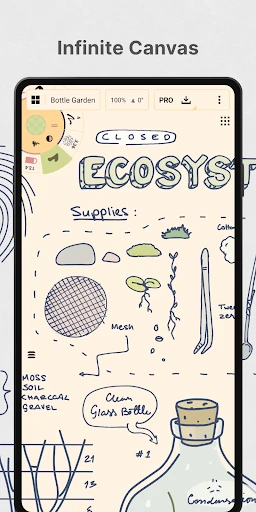


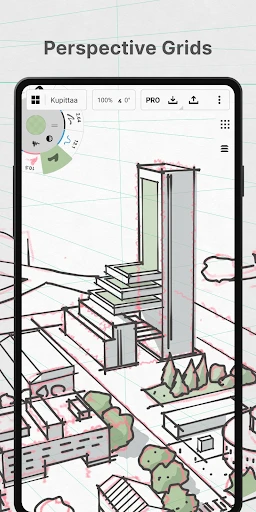
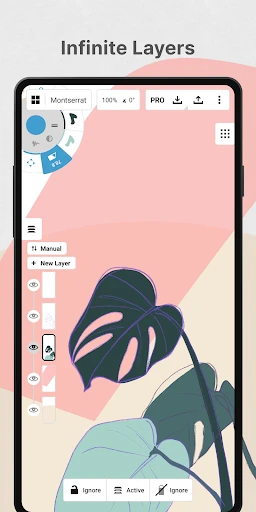
Concepts: Sketch, Note, Draw – Infinite Canvas for Creative Thinking
Concepts is a flexible, vector-based sketching and note-taking app designed for an infinite canvas. It empowers users to sketch ideas, take handwritten notes, and create detailed drawings without the constraints of page limits or pixel grids. Unlike traditional drawing apps, Concepts uses a vector engine that allows every stroke, shape, and text block to be edited, resized, or moved at any time. Its core philosophy is to provide a freeform environment where thoughts can flow naturally from rough sketches to polished diagrams. The app supports layers, precision guides, and an extensive library of customizable tools including pens, pencils, markers, and shapes. It is available on both Android and iOS, synchronizing work across devices via cloud storage. Concepts is particularly suited for designers, architects, students, and anyone who needs a versatile digital workspace for visual thinking and planning.
Chapter 1: Function
Concepts offers a comprehensive set of core functions centered around its infinite canvas and vector-based architecture. Users can draw freehand with a variety of pressure-sensitive brushes, including fountain pens, calligraphy nibs, and airbrushes, each adjustable for size, opacity, and smoothing. The app includes a rich shape library with geometric figures, arrows, and flowchart elements that snap to alignment guides for precision. Text can be added as movable, resizable notes with multiple fonts and colors. A powerful layer system allows users to organize complex drawings, lock elements, or hide them for focused editing. The vector engine means every stroke remains editable: you can adjust the curve, color, or thickness after drawing. Additionally, Concepts supports import of images and PDFs as background layers, and export in multiple formats including PNG, PDF, SVG, and DXF for use in other software. The app also features an infinite undo/redo history and a COPIC color library for consistent color selection.
Chapter 2: Value
The primary value proposition of Concepts lies in its unique combination of infinite canvas flexibility and vector-based editability, which together liberate users from the constraints of traditional paper or raster-based tools. Unlike paper, where a mistake requires erasing or starting over, Concepts allows every element to be refined indefinitely: a sketch can evolve into a detailed blueprint without losing the original intent. For professionals, this means faster iteration – an architect can rough out a floor plan, then adjust dimensions and add annotations without redrawing. The vector engine ensures outputs are resolution-independent, making drawings suitable for both screen display and large-format printing. Another key advantage is its cross-platform synchronization; a user can start a concept on an iPad and refine it on a Windows laptop with consistent tool settings. The infinite canvas eliminates page breaks and margins, ideal for mind mapping, user journey flows, or brainstorming sessions that branch in unexpected directions. Compared to competitors like Procreate or Adobe Fresco, Concepts offers superior organizational features with its layer system and precision guides, while maintaining a lower learning curve for note-takers and planners. Its COPIC color integration and customizable color palettes also appeal to illustrators seeking professional-grade color management. For students, Concepts replaces multiple notebooks – they can combine lecture notes with diagrams in a single, searchable file. Ultimately, the app delivers significant time savings and creative freedom, justifying its value as a long-term investment for visual thinkers.
Chapter 3: Scenarios
Concepts serves a diverse range of users across multiple everyday scenarios. The primary target users include designers and architects who need to iterate on sketches quickly – for example, an interior designer uses Concepts to draft room layouts on site, adjusting furniture dimensions and color schemes in real time while consulting with clients. Product designers rely on it to create detailed product sketches with accurate proportions using the grid and snap tools, then export as SVG for engineering software. A second major group is students and educators: a biology student takes handwritten lecture notes and supplements them with labeled diagrams of cells, while a teacher creates interactive lesson plans with layered visuals that can be shown step by step. Thinkers and planners use Concepts for mind mapping and project planning – a startup founder maps out a business model canvas, adding sticky-note-style text boxes and connecting them with arrows on the infinite canvas. Artists and hobbyists also benefit: a digital artist uses the COPIC color palette for character design, while a travel enthusiast sketches landmarks from reference photos. In professional meetings, a team uses Concepts on a shared device to brainstorm workflows, then saves the canvas for later refinement. The app is equally useful for organizing personal projects, such as creating a mood board for a home renovation or drafting a calligraphy practice sheet. Its adaptability makes it a daily tool for anyone who thinks visually, from casual note-takers to technical illustrators.
Advantages
- vector-based infinite canvas with precision zoom
- customizable pressure-sensitive brush engine for natural strokes
- non-destructive layering with adjustable opacity and blend modes
- imports DXF
- SVG
- and standard image formats for reference
- handles high-res exports up to 16K without quality loss
Disadvantages
- steep learning curve for non-artists due to tool density
- subscription model for advanced brushes and export options
- no native cloud sync between devices without manual export
- heavy lag on complex layers with older hardware
- limited text and shape tools compared to vector apps like Illustrator
Frequently Asked Questions
Q: What concepts app exactly does?
A: Concepts is a vector-based sketching, note-taking, and drawing app designed for creative professionals and hobbyists. It offers an infinite canvas, customizable brushes, and layers for creating precise illustrations, mind maps, or design concepts. Core features include a flexible color wheel, pressure-sensitive stylus support, and export in multiple formats like PNG, SVG, or PSD.
Q: Is the app free or does it require purchases?
A: The app is free to download with basic tools and limited layers. Unlocking the full toolkit, additional brushes, export options, and cloud storage requires a subscription (Concepts Pro) or in-app purchases. No equipment beyond your device is needed. A free trial for Pro features may be available.
Q: Can I use concepts on both iOS and Android?
A: Yes, Concepts works on iOS (iPhone and iPad) and Android tablets and phones. It also supports Windows devices via Microsoft Store. An Apple Pencil, Samsung S Pen, or any active stylus enhances precision, but finger drawing works. Internet is required only for cloud sync or downloads.
Q: How does vector drawing differ from raster here?
A: Unlike raster apps, Concepts uses vector strokes that remain editable indefinitely. You can resize, reshape, or recolor any stroke without losing quality. Lines are resolution-independent, so zooming in never causes pixelation. This makes it ideal for scalable design, architecture, or UI sketches.
Q: What common issues do new users face?
A: New users often struggle with the infinite canvas navigation, as there is no boundary. Zoom and pan gestures differ from standard apps. Layer management can also be confusing initially. The app offers in-app tutorials and a help center. No after-sales maintenance beyond standard app updates is available.
Technical Information
Recommended for You

Amazon Kindle

Empower Personal Dashboard™

ComiQuest - Comic Reader

SunPass

ERG for Android

Monster Smart Lighting

Badi – Rooms & Flats for rent

Holafly eSIM Prepaid Card

AstroLink Proxy

Paychex Flex

AXS Tickets

Torque Pro (OBD 2 & Car)
![[KNA003] SHADOW](https://apk.ericdress.com/wp-content/uploads/2026/07/image16116066015620127422.webp)
[KNA003] SHADOW

YouMail: Block Spam on Android

Budget Car Rental

Emoji Maker: DIY Emoji Merge

Mileage Tracker by Everlance

Portable WiFi - Mobile Hotspot

Picify: AI Art Editor

G2A

GIO: AI Headshot Generator

Viewpoints

TracFone My Account