AR Drawing Sketch Paint
AR Drawing Sketch Paint
AR Drawing Sketch Paint: Trace art easily for all skill levels
Screenshots
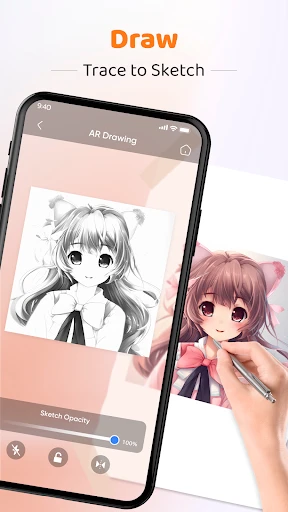
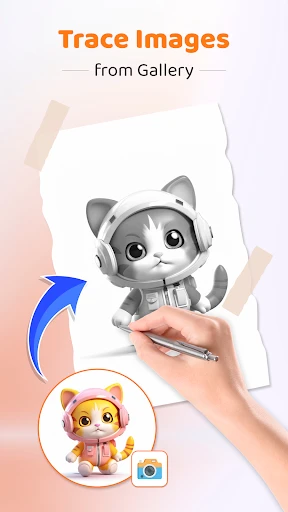
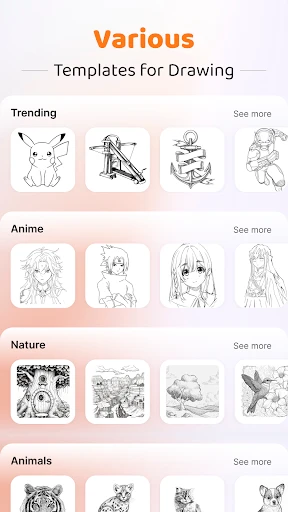
AR Drawing Sketch Paint: Transforming Creativity with Augmented Reality
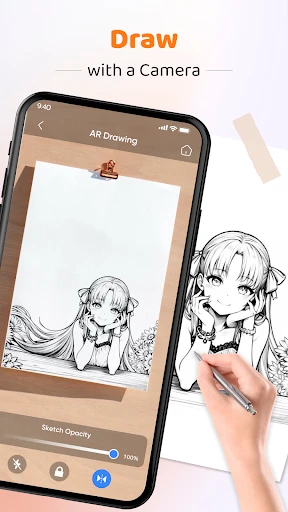
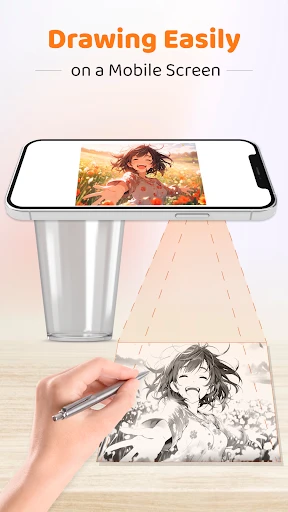
AR Drawing Sketch Paint is a mobile application that leverages augmented reality technology to assist users in creating accurate drawings, sketches, and paintings. By overlaying a virtual image onto a real-world surface through the device camera, the app acts as a digital tracing tool. It is designed for both beginners and experienced artists who seek to improve their proportions, perspective, and overall draftsmanship. The app supports a wide range of images from the user's gallery or built-in library, and it provides adjustable transparency, grid overlays, and projection lock features. Its primary purpose is to lower the barrier to entry for drawing, making the process more accessible and less intimidating while still offering utility for advanced users who want to speed up their workflow.
Chapter 1: Function
The core functions of AR Drawing Sketch Paint revolve around its augmented reality tracing system. Users first select an image from their device gallery or the app's curated collection. Once chosen, the app projects the image onto any flat surface visible through the camera viewfinder. The user can then place a piece of paper or canvas directly on that surface, and the virtual image becomes visible as a semi-transparent guide. The app offers adjustable opacity settings to control the visibility of the projected lines, allowing for both detailed tracing and loose sketching. A grid overlay function divides the projection into smaller sections, which aids in replicating complex compositions by breaking them down into manageable parts. Additionally, the projection lock feature ensures that the image remains stationary even if the device moves slightly, maintaining alignment with the paper. Users can also zoom in and out of the projected image to focus on specific areas, and the app supports adjusting the brightness of the projection to suit different lighting conditions. These functions collectively enable accurate line work and proportion copying without the need for traditional physical tracing methods.
Chapter 2: Value
The value proposition of AR Drawing Sketch Paint lies in its ability to democratize the skill of drawing. For complete beginners who often struggle with translating a three-dimensional subject onto a two-dimensional surface, the app provides a structured and forgiving starting point. It removes the frustration of incorrect proportions and misaligned features, allowing new artists to focus on the physical act of drawing and building muscle memory. The app also serves as a powerful learning tool: by tracing over projected images, users subconsciously absorb principles of composition, shading, and contour. Over time, this practice can transition into freehand drawing skills. For experienced artists and professionals, the app offers efficiency. It eliminates the need for lightboxes or manual grid transfers, saving significant time during the initial layout phase of a project. This is particularly valuable for portrait artists, muralists, and illustrators who work under tight deadlines. The app is also highly portable; it requires no bulky equipment other than a smartphone or tablet. Furthermore, its non-destructive workflow allows users to experiment with different compositions and sketch multiple versions of the same subject quickly. By bridging the gap between digital reference materials and traditional physical media, AR Drawing Sketch Paint adds substantial value to any artist's toolkit, enhancing both learning speed and professional productivity.
Chapter 3: Scenarios
AR Drawing Sketch Paint is primarily targeted at hobbyist artists and aspiring beginners who want to learn how to draw but feel intimidated by the challenge. For example, a teenager interested in anime characters can use the app to trace reference images, gradually building the confidence to draw without assistance. Another primary user group consists of art students and teachers. Students can use the app for practice and study, while instructors might incorporate it into lessons to demonstrate how shape and proportion work in real-world applications. The app is also useful for DIY enthusiasts and home decorators who want to create custom wall art. A user can project a chosen design onto a wall and then paint it directly, achieving professional-looking results without stencils. Additionally, tattoo artists frequently use such apps to transfer design ideas onto a client's skin for preview and precise placement before inking. In professional settings, muralists working on large-scale projects can use the app to project full-size reference images onto walls, ensuring accurate scaling. Finally, parents and children can use the app as a fun family activity, projecting simple cartoon images onto paper for collaborative coloring and drawing sessions. This broad range of scenarios, from casual learning to professional execution, demonstrates the app's versatility across different skill levels and creative contexts.
Advantages
- turns any photo into a line-art tracing template instantly
- adjustable opacity and thickness for precise AR overlay matching
- works offline with no post-processing cloud delay
- supports multi-layer canvas for complex sketch compositions
- auto-calibrates camera perspective using smartphone gyroscope
Disadvantages
- requires good lighting for AR tracking to stay stable
- only exports in PNG format
- no vector or PSD option
- no manual perspective adjustment if gyroscope drifts
- limited free layer count without subscription
- lacks community gallery for sharing traced artworks
Frequently Asked Questions
Q: What is the core function of AR Drawing Sketch Paint?
A: AR Drawing Sketch Paint uses augmented reality to project an image onto a surface through your device camera, allowing you to trace and sketch realistic drawings. It includes a built-in library of templates, adjustable opacity layers, and a flashlight mode for low-light tracing. No additional equipment is required beyond your smartphone or tablet camera.
Q: Is AR Drawing Sketch Paint free to use or does it require purchases?
A: The app is free to download with access to basic templates and tracing tools. Premium features like high-resolution export, advanced filters, ad-free experience, and extra template packs require a one-time in-app purchase or subscription. No additional hardware or accessories are needed to use the free version.
Q: Does AR Drawing Sketch Paint work on all devices and systems?
A: The app requires iOS 13.0+ or Android 8.0+ with at least 2GB RAM and a rear camera with autofocus. It is optimized for tablets but works on most modern smartphones. Older devices with poor camera resolution or outdated operating systems may experience lag or inaccurate projection alignment.
Q: How does the AR projection handle movement or uneven surfaces?
A: The projection locks to the selected surface using anchor points, but sudden device movement may cause temporary misalignment. It works best on flat, non-reflective surfaces with good lighting. Uneven or textured surfaces can distort the projected image, so a smooth desk or paper is recommended for consistent tracing accuracy.
Q: Can I save or export my drawings made with AR Drawing Sketch Paint?
A: Yes, completed sketches can be saved as PNG or JPEG to your device gallery or exported directly to social media. Free users get standard resolution exports, while premium users can save at 4K resolution. The app does not support vector file formats or cloud backup for drawings. For lossless sharing, premium export is recommended.
Technical Information
Recommended for You

iSyncr: iTunes to Android

GoPass ®

Thumbnail Maker - Channel art

EasyPark - Parking made easy

NumberBox: Caller ID

BabyTV - Kids Videos & Songs

Total Mp3, offline music play
Meta AI

FotMob - Soccer Live Scores

Pi Video Player - Media Player

Offline Music Mp3 Player- Muso

Daily News: Local & Alerts

Wedding Invitation Card Maker

ThemeMax: Widgets & Wallpapers

Hi Weather Launcher-Live Radar
ParentSquare
AI Photo Editor: Face Beauty

Sun Position, Sunrise/set PRO

MyHeritage: Family Tree & DNA

Moises: The Musician's AI App

MacroPoint for Truckers

Xplora
3D Parallax Wallpaper