Sketchbook

Sketchbook
Design tool for artists to sketch draw and paint freely
Screenshots


Sketchbook: Digital Art Creation Tool
Sketchbook is a professional-grade digital drawing application designed for artists, illustrators, and designers. It offers a highly responsive drawing engine, a vast collection of customizable brushes, and an intuitive user interface that mimics traditional sketching tools. The app supports high-resolution canvases, layer management, and smooth zooming and rotation, making it a reliable choice for both quick sketches and detailed artwork. Available on mobile and desktop platforms, it emphasizes a natural drawing experience with minimal lag, enabling users to focus on creativity without technical distractions.
Chapter 1: Function
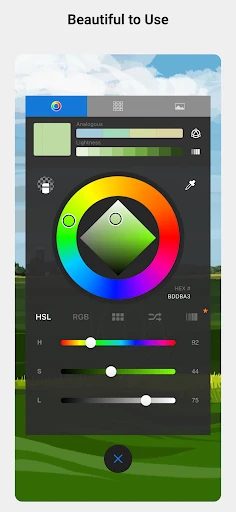
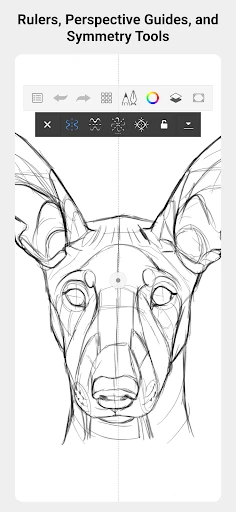
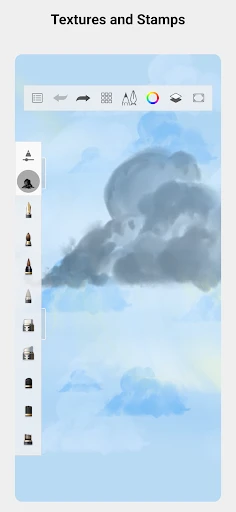
Sketchbook’s core functionality centers on its realistic drawing engine and extensive brush customization. It provides over 190 preset brushes, including pencils, markers, airbrushes, and textures, each adjustable for size, opacity, flow, and pressure sensitivity. The app supports unlimited layers with blending modes, allowing complex compositions and non-destructive editing. Key tools include a predictive stroke stabilizer for smooth lines, a perspective guide for accurate geometry, and a color wheel with harmony rules. Additionally, it offers a symmetrical drawing mode, flip canvas, and a Copic color library for precise color matching. These features are optimized for both stylus and finger input, ensuring fluid performance even on lower-end devices.
Chapter 2: Value
The primary value of Sketchbook lies in its ability to bridge the gap between digital and traditional drawing. Unlike many complex design suites, it prioritizes simplicity and speed, reducing the learning curve for beginners while still offering depth for professionals. Its stroke engine replicates real media behavior, such as pencil grain and brush bleed, giving users a tactile feel that enhances creative expression. The app operates without intrusive ads or watermarking, which is critical for artists who need clean exports for portfolios or commercial use. Another key advantage is offline functionality; all features are accessible without an internet connection, making it ideal for on-the-go sketching. Furthermore, its cross-platform syncing via cloud services ensures seamless workflow continuity between mobile and desktop devices. The regular updates and community-driven brush packs extend its utility, while the lack of subscription fees for basic features makes it cost-effective compared to competitors like Procreate or Adobe Fresco. For educators and students, the app includes specialized tools for teaching perspective and anatomy, adding educational value. Overall, Sketchbook empowers users to iterate quickly, experiment fearlessly, and produce high-quality art without hardware limitations or financial barriers.
Chapter 3: Scenarios
Sketchbook serves a diverse range of users, from hobbyists to industry professionals. Primary target groups include graphic designers creating concept art or storyboards, illustrators working on comics or children’s books, and architects sketching building layouts. It is also widely used in education, where art teachers assign digital drawing exercises, and students practice shading or color theory. Everyday use cases involve rapid prototyping: designers can rough out UI layouts, fashion designers draft clothing patterns, or tattoo artists design custom stencils. The app is equally popular among outdoor enthusiasts who sketch landscapes on tablets, and animation students who use its onion skinning feature for frame-by-frame studies. Freelancers benefit from its ability to produce print-ready files, while hobbyists enjoy using it for digital coloring books or portrait studies. Its lightweight installation and low memory footprint make it suitable for quick brainstorming sessions during meetings or commutes. Additionally, the app supports sharing directly to social media or cloud storage, streamlining workflows for content creators who need to post work-in-progress updates.
Advantages
- non-destructive layers allow unlimited undo without flattening
- pressure sensitivity support across 200+ brushes for natural strokes
- vector-style stabilizer extends to freehand drawing on mobile
- garage-band-style fullscreen canvas with zero UI occlusion
- exports layered PSD to desktop apps while preserving blend modes
Disadvantages
- no built-in shape tools or text typing on current version
- brush engine lacks jitter and scatter for organic textures
- glitchy palm rejection persists on small-screened devices
- animation timeline only supports 3 layers without paid unlock
- no cloud sync or auto-save between phone and tablet sessions
Frequently Asked Questions
Q: What core functions does Sketchbook offer for digital drawing?
A: Sketchbook provides a complete set of professional drawing tools including customizable brushes, layers with blending modes, symmetry tools, and a perspective guide. It supports high-resolution canvases up to 100 megapixels and pressure sensitivity for stylus devices. The app focuses on sketching and painting without vector editing or animation features.
Q: Is Sketchbook free to use or does it require in-app purchases?
A: Sketchbook is completely free to download and use on both iOS and Android devices. All core drawing tools, brushes, and layers are included without any in-app purchases or subscription fees. There is no premium version or locked content. The desktop version for Windows and macOS also remains free with the same full feature set.
Q: Does Sketchbook work on iPad and support Apple Pencil?
A: Yes, Sketchbook fully supports iPad devices with Apple Pencil, including pressure sensitivity and tilt recognition. The app is optimized for iPadOS and works on all iPad models running iOS 14.0 or later. It also supports Android tablets with active styluses like S Pen. No additional hardware or permissions are required beyond standard storage access.
Q: Can I export my artwork in high resolution for printing?
A: Yes, Sketchbook allows exporting artworks in multiple formats including PNG, JPG, BMP, TIFF, and PSD. You can export at the original canvas resolution up to 100 megapixels, suitable for large format printing. Layers are flattened on export unless you save as PSD. The app also supports direct sharing to social media and cloud storage services.
Q: How do I recover unsaved work if the app crashes unexpectedly?
A: Sketchbook does not include an auto-save or crash recovery feature. It is recommended to regularly save your work manually using the save icon or by pressing Ctrl+S (desktop). The app will prompt to save before closing, but any changes made after the last manual save will be lost if the app terminates abnormally. No cloud backup is provided without manual export.
Technical Information
Recommended for You

Microsoft Bing Search

DJ Music mixer - DJ Mix Studio

Regal: Tickets and Showtimes

Prepware Powerplant

My Invisalign - Official App

LifeLock Identity by Norton

Job Search by ZipRecruiter

MapQuest: Get Directions

discovery+ | Stream TV Shows

Thumbnail Maker - Channel art

CarLink: MirrorLink & Car Play

Yandex Weather & Rain Radar

Game Booster Fire GFX- Fix Lag

Falou - Fast language learning

CloudEye 365

CareCredit Mobile

Preply: Language Learning App

Atlas - Rewards Credit Card

My Secret Diary with Lock

Security Camera Mod Minecraft

Strobe

Flavortown

Beauty Camera: Selfie Editor